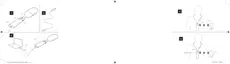
DESCRIPTION OF DEVICE - see illustration 1
1.1 Streaming button
1.2 Power button
1.3 LED
1.4 Microphone and LED
1.5 Charging port
1.6 Clip
Intended use
The COM-DEX Remote Mic device is a microphone with an integrated ra-
dio intended for transmitting sound to a COM-DEX connected to the user’s
hearing aid(s). The aim is to improve the hearing aid user’s ability to hear
speech in difficult listening situations. For optimal connectivity the device
and the COM-DEX must be within sight of each other.
NOTE
Your Remote Mic is only intended to be used with a COM-DEX (with firm-
ware V1.3 or later).
Accessories - see illustration 2
USB cable
4











 To Next Page