USING YOUR DEVICE
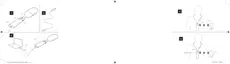
Charging your device - see illustration 3
Connect the USB cable to your device and the power supply. It takes ap-
proximately 3 hours to charge your device.
NOTE
Before you can use the device, you must disconnect the USB cable.
Battery life: 8 hours streaming.
Turning the device on and off
To turn on your device:
● Press the power button and keep it pressed for 3 seconds.
To turn off your device:
● Press the power button and keep it pressed for 3 seconds.
The device turns off automatically if it has not been streaming sound for
more than 30 minutes.
NOTE
To achieve the best sound possible, always turn your COM-DEX Remote Mic
off when not in use.
5











 To Next Page