6.3 WORKS WITH GOOGLE VOICE ASSISTANT
Let’s assume you’ve already set up your Google Home and WiiM Pro separately. Now, you
must link them together in the Google Home app for Android or iOS:
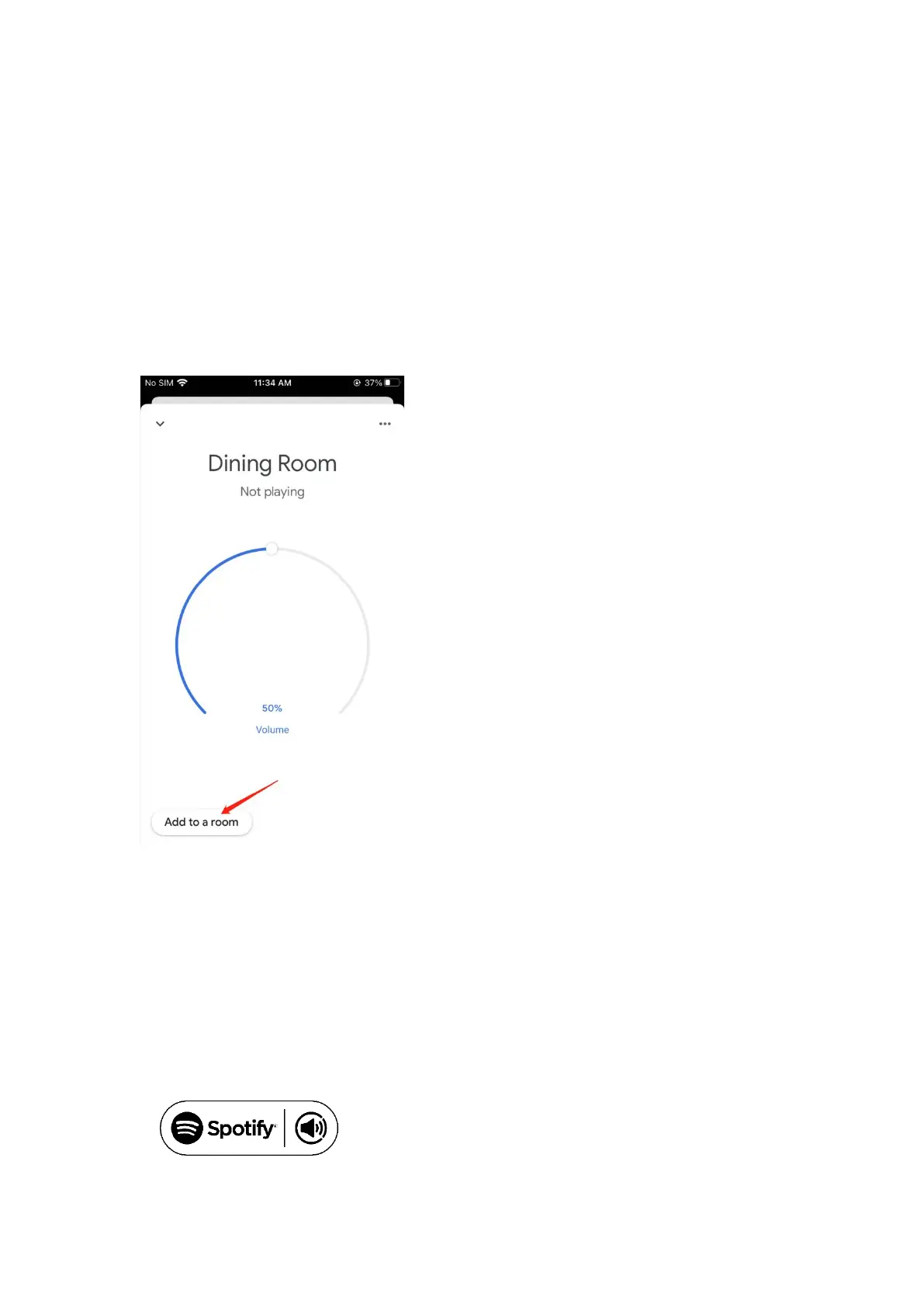
• Open the Google Home app, you will find the WiiM Pro that you have enabled as
Chromecast audio device under “Local devices”
• Tap the name of the WiiM Pro and enter the device control UI
• Tap the “Add to a room” button under the volume circle to add WiiM Pro into one
room
• You can use voice to control the WiiM Pro with your Google Home or Android
devices
7 CONTROL VIA YOUR FAVORITE APP
7.1 SPOTIFY CONNECT
Spotify Connect is a way of playing Spotify through your wireless compatible device over
Wi-Fi. That means you can play your favorite tunes anywhere in the house, all without the
need for any convoluted Bluetooth pairing between devices every time you want to listen
to music.
Use your phone, tablet, or computer as a remote
control for Spotify. Go to spotify.com/connect to
learn how.


 To Next Page