page 8
TRIGGER:
PIR MODE: Takes a photo or video only when
the PIR sensor is triggered.
FLEXTIME (Time Lapse): Takes time lapse
images at set intervals during the key
movement periods of the day, depending on
your Flextime settings.
BOTH: Both PIR and Flextime are active.
This setting allows you to choose the mode in
which the camera will be capturing images.
Location
1.
To change Location, enter MENU
and press the UP,DN,L or R
buttons to navigate to the LOCA-
TION icon and press OK.
2.
Press the UP or DN navigation
button to go up or down in
sequence. Press L or R to move to
the next digit.
3.
When the Location is set, press
OK to save and press OK again to
go back to the MENU.
UP
OK
BACK
ACTIVE TIME
LOCATION TRIGGER
DELAY
PIR SENSITIVITY
FLEXTIME
+
™
+
DATE & TIME
30
PLAY BACK
IMAGE TYPE
VIEW ASSIST
LOCATION
UP
OK
L
R
DN
BACK
LOCATION
_ _ ______
A B
UP
OK
BACK
LOCATION
____ ____
A B C D
Image Type:Still
1.
To change Image Type, enter
MENU and press the UP,DN,L or R
buttons to navigate to the Image
Type icon and press OK.
2.
Press the L, R button to select STILL
and press OK. Then select the Resolu-
tion and press OK. Select the
Exposure and press OK. Then select
the aspect and press OK.
3.
When the Image Type is set, press
OK to save and press OK again to
go back to the MENU.
UP
OK
L
R
DN
BACK
ACTIVE TIME
LOCATION TRIGGER
DELAY
PIR SENSITIVITY
FLEXTIME
+
™
+
DATE & TIME
30
PLAY BACK
IMAGE TYPE
VIEW ASSIST
IMAGE TYPE
UP
OK
L
R
DN
BACK
STILL VIDEO
HI MED LOW
REGULAR WIDE ANGLE
RESOLUTION
HI MED LOW EXP CONTROL
IMAGE TYPE
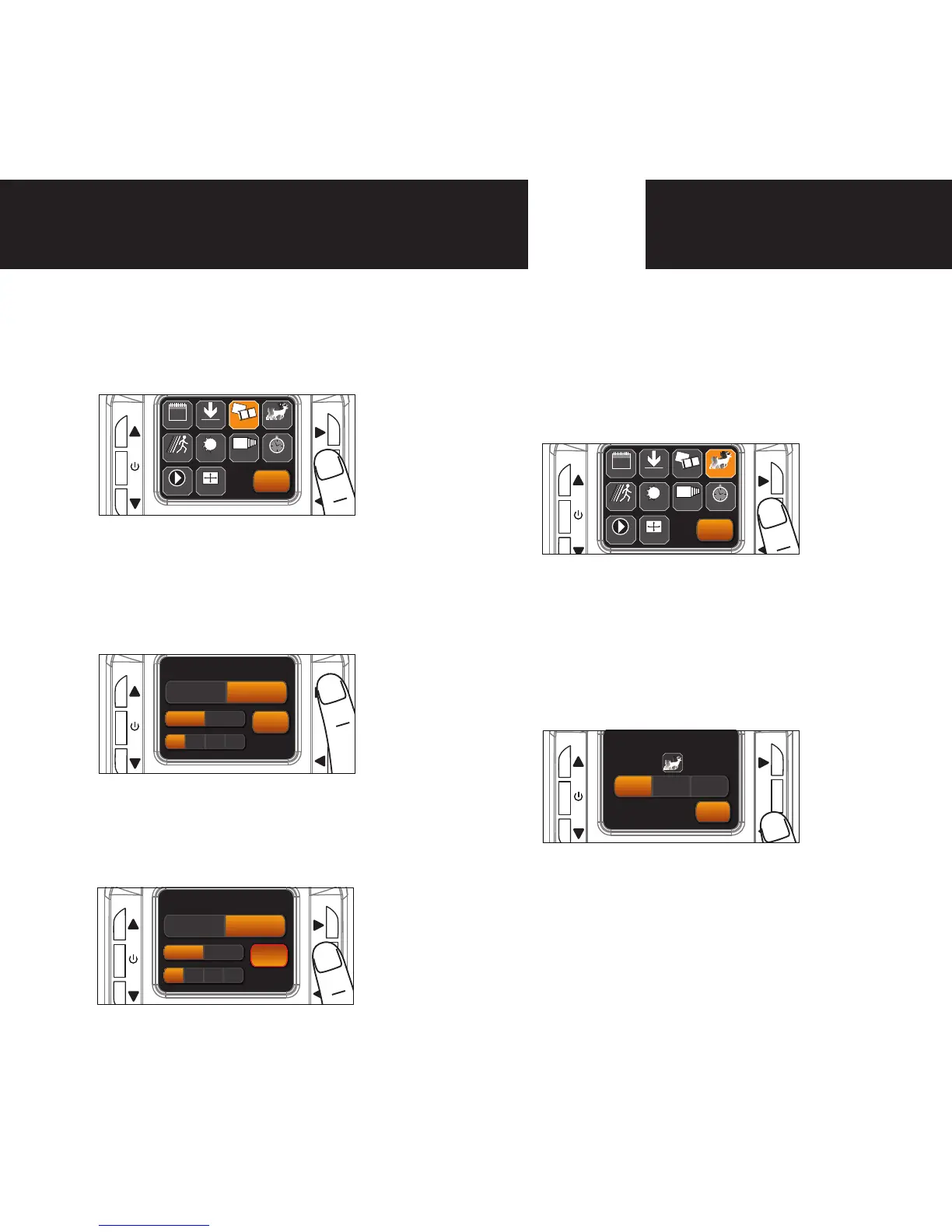
1.
To change Trigger, enter MENU
and press the UP,DN,L or R
buttons to navigate to the Trigger
icon and press OK.
2.
Press the L, R button to select
Trigger Mode. Then select the OK
to save. If PIR is selected press OK
again to go back to the MENU. If
FlexTime or Both is selected you
will be redirected to the Flextime
Menu (see page 11).
Image Type:Video
1.
To change Image Type, enter
MENU and press the UP,DN,L or R
buttons to navigate to the Image
Type icon and press OK.
2.
Press the L, R button to select
VIDEO and press OK. Then select
the Resolution and press OK. Then
select the length and press OK.
3.
When the Image Type is set, press
OK to save and press OK again to
go back to the MENU.
UP
OK
L
R
DN
BACK
ACTIVE TIME
LOCATION TRIGGER
DELAY
PIR SENSITIVITY
FLEXTIME
+
™
+
DATE & TIME
30
PLAY BACK
IMAGE TYPE
VIEW ASSIST
IMAGE TYPE
UP
OK
L
R
DN
BACK
STILL VIDEO
HD
WVGA
15s 30s 1m 2m
VIDEO LENGTH
IMAGE TYPE
UP
OK
L
R
DN
BACK
STILL VIDEO
HD
REGULAR
15s 30s 1m 2m
VIDEO LENGTH
IMAGE TYPE
UP
OK
BACK
ACTIVE TIME
LOCATION TRIGGER
DELAY
PIR SENSITIVITY
FLEXTIME
+
™
+
DATE & TIME
30
PLAY BACK
IMAGE TYPE
VIEW ASSIST
TRIGGER
UP
OK
L
R
DN
BACK
PIR
FlexTime
BOTH
TRIGGER
Save the location of the area the camera was
installed. This is for your reference and is
optional. If you do not wish to name your
location skip to the next step.
UP
OK
L
R
DN
BACK
STILL VIDEO
HI MED LOW
REGULAR WIDE ANGLE
RESOLUTION
HI MED LOW EXP CONTROL
IMAGE TYPE


 To Next Page