®
22
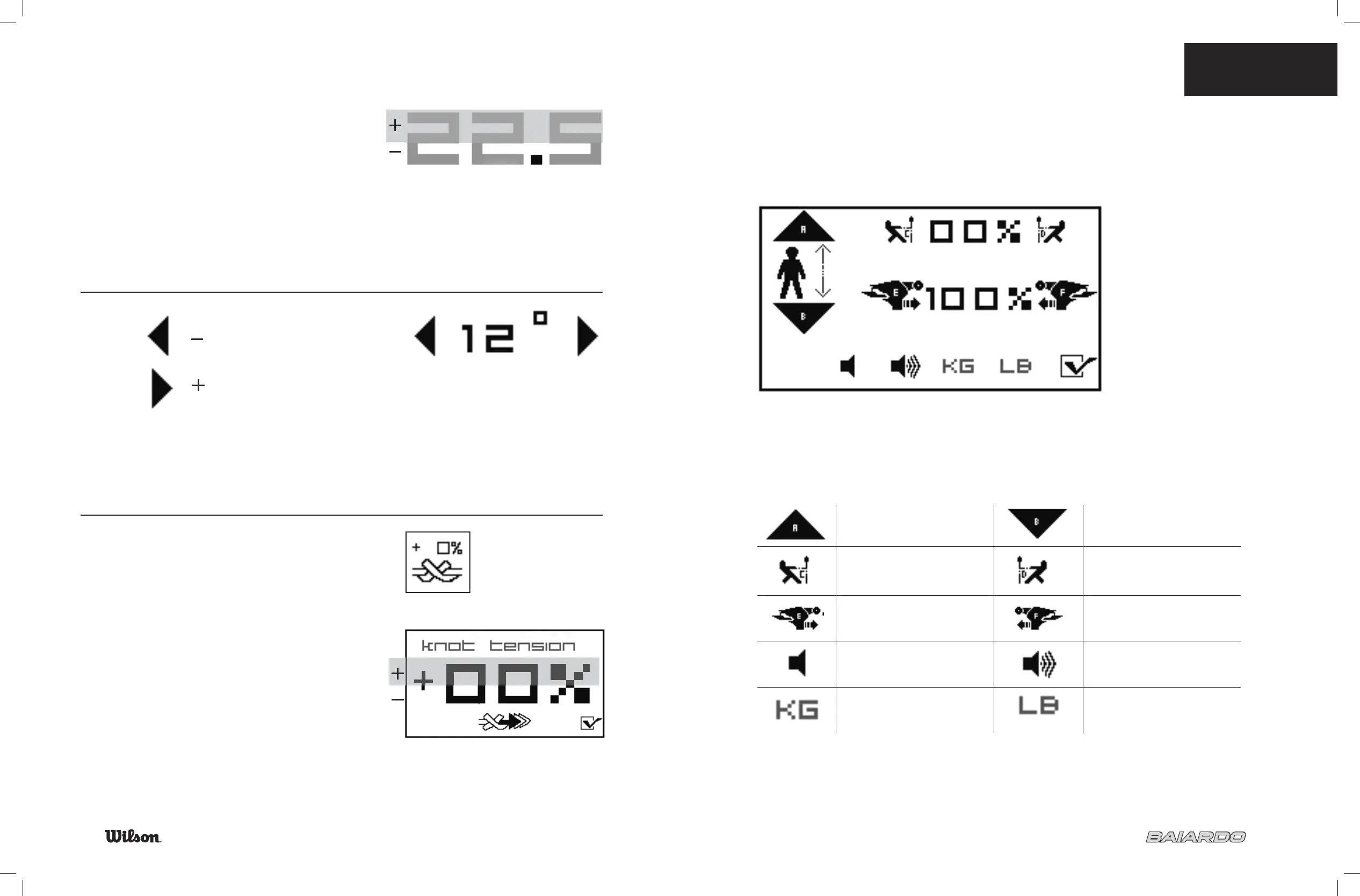
TENSION DISPLAY
Touch the top of the number to increase the tension.
Touch the bottom of the number to decrease the tension.
Scroll through numbers rapidly by leaving fi nger in place.
TILT
KNOT TENSIONING
To set tension hold down icon.
Touch top of number to increase. Touch bottom of number
to decrease.
When ready to pull last string touch icon.
The machine will increase tension set amount for ONE pull.
Touch here to decrease machine tilt
Touch here to increase machine tilt
7.4 TRADITIONAL
STRINGING MODE
23
TOOLS
Once you make all your selections, press the check mark to save.
No settings are remembered as in B.E.S.T.™ system.
Increase machine height Decrease machine height
Decrease pre-stretch Increase pre-stretch
Decrease puller speed Increase puller speed
Sound off Sound on
Kilograms Pounds


 To Next Page