Insert batteries before use.
● Open the camera and remove the battery cover. Insert 1.5V AA batteries of 4 or 8 pcs while preventing
some of the anti-access battery polarity.
● Make sure all batteries are in the same battery case when using only 4 pcs. Otherwise the device will
not work and can be damaged.
● When the camera is powered by the AC adapter (Not in the package), you can find the rubber seal at
the bottom of the camera and remove it. Connect one end to the camera with an AC adapter and plug the
other into the power. In this situation, the batteries do not supply power.
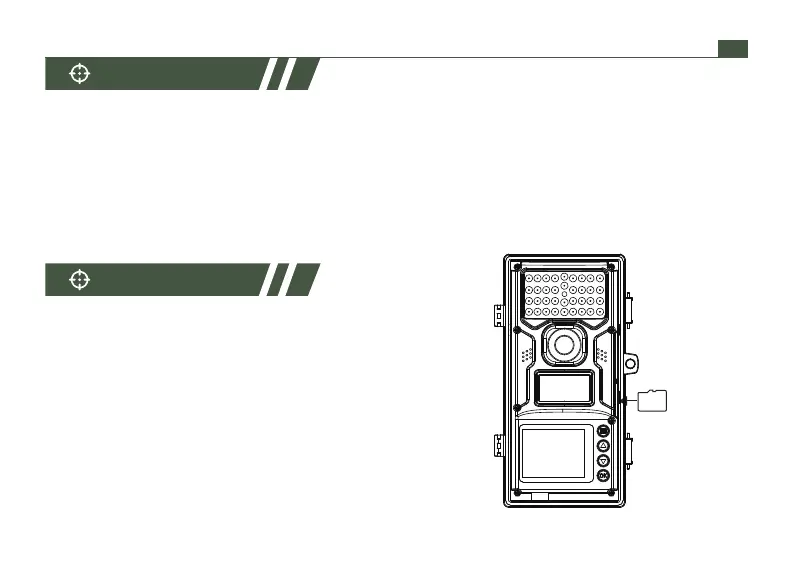
● The camera cannot save data without memory
card because of no built-in memory. So you need
to insert a Micro SD/ TF card firstly. Before shot,
format the memory card. It will improve shutter
speed and battery life.
● It supports 32GB Micro SD / TF memory card in
maximum.
● Do not push the memory card forcibly.
Insert it like the picture shown.
Power Supply
Memory Card
01 02 03 04 05 06 07 08 09 10 11 12 13 14
15 16 17 18 19 20 21 22 23 24 25 26 27 28
29 30 31 32 33 34 35 36 37 38 39 40 41 42
43 44 45 46 47 48 49 50 51 52 53 54 55 56
57 58 59 60 61 62 63 64 65 66 67 68 69 70
EN
support@wimius.com


 To Next Page