05
Pedals
1. Locate the right-side/ left side pedal, which is marked "R," "L," should have an "R" "L"
sticker attached.
2. Thread the right pedal onto the right crank gently by hand, turning clockwise. Then tighten
pedal by allen wrench.
3. Thread the left pedal onto the left crank gently by hand, turning counter-clockwise.Then
tighten pedal by allen wrench.
4. Check the chain alignment. Rotate the right pedal and crank toward the back of the bike
as though pedaling backward. Watch the chain and ensure the chain runs through the
drivetrain (the rear cog, chain tensioner, and around the front chainring) smoothly.
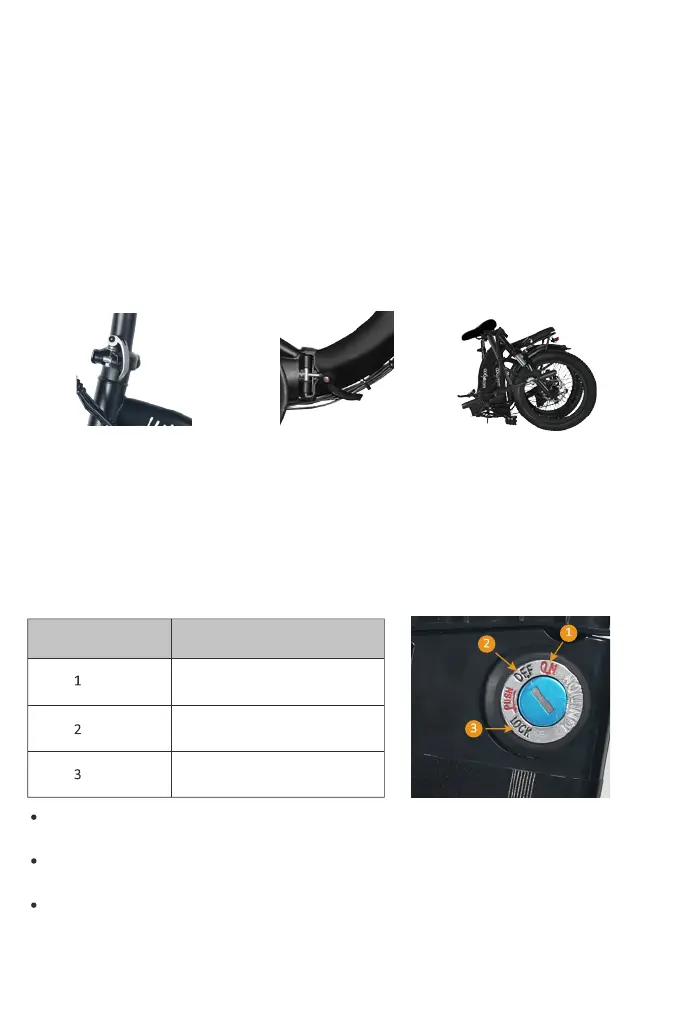
1. Open the vertical folding
clasp to fold the handle part.
3. Done, to make it smaller,
you can remove the saddle.
2. Open the middle folding
clasp to fold the bike.
Folding
Battery Key Positions
Familiarize yourself with the key port and key positions before riding the bike.The photo
below shows the key port aligned in key position 1, in line with the ON icon. In key position
1, the battery is in the "on" position, with the battery locked to the frame, and the key can't
be removed.
Anytime the battery is in key position 1, (on, locked to the frame) the display power button
will turn the bike on and off, but the battery cannot be removed.
lf the battery is in key position 2,(off, locked to the frame) no buttons or controls can be
activated, the bike will remain off, and the battery cannot be removed.
Anytime the battery is in key position 3, (off, unlocked from the frame) the battery must be
removed from the bike before moving or riding the bike.The key can be removed from
battery.
Key Position/lcon Directions
ON, Locked to Frame
OFF, Locked to Frame
OFF, Unlocked from Frame
(for battery removal)



 To Next Page