English
6
C555
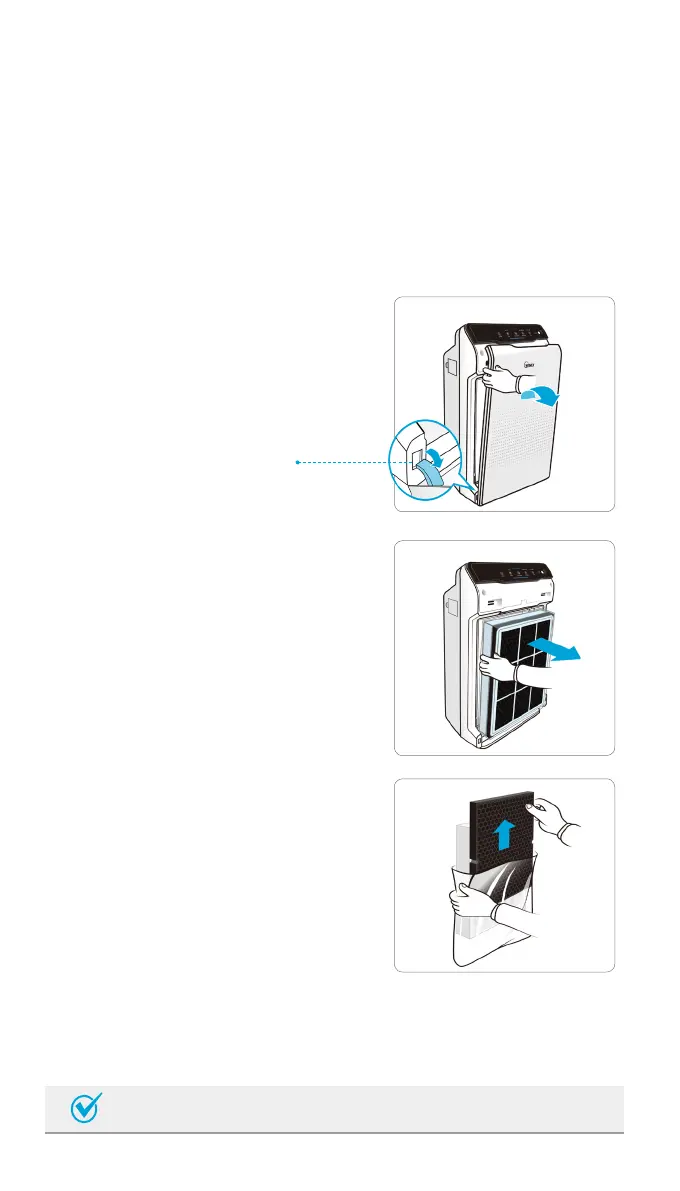
INSTALLING FILTERS
This product comes with all the required filters. The protective plastic
wrap must be removed from the filters before use
※ Operating the unit without removing the plastic wrap may result in
product failure.
※ Unplug and make sure the unit is turned off before installing filters.
③ Remove filters from protective plastic
wrap.
•Operating the unit without removing filters
from plastic wrap may cause abnormal
noise, deformation, or fire as a result of
overheating.
② Remove the filters from the unit, they
are protected inside a plastic wrap
① Remove the front panel by grasping
its upper edge and gently pulling
forward.
Latch
•Refer to pages 13 - 15 for details on how to replace filters.
Note


 To Next Page