14
English HR900
FILTER CARE
2. Removing Filters
Ensure the unit is turned off and unplugged before removing filters.
•
The unit will automatically power off when front panel is opened.
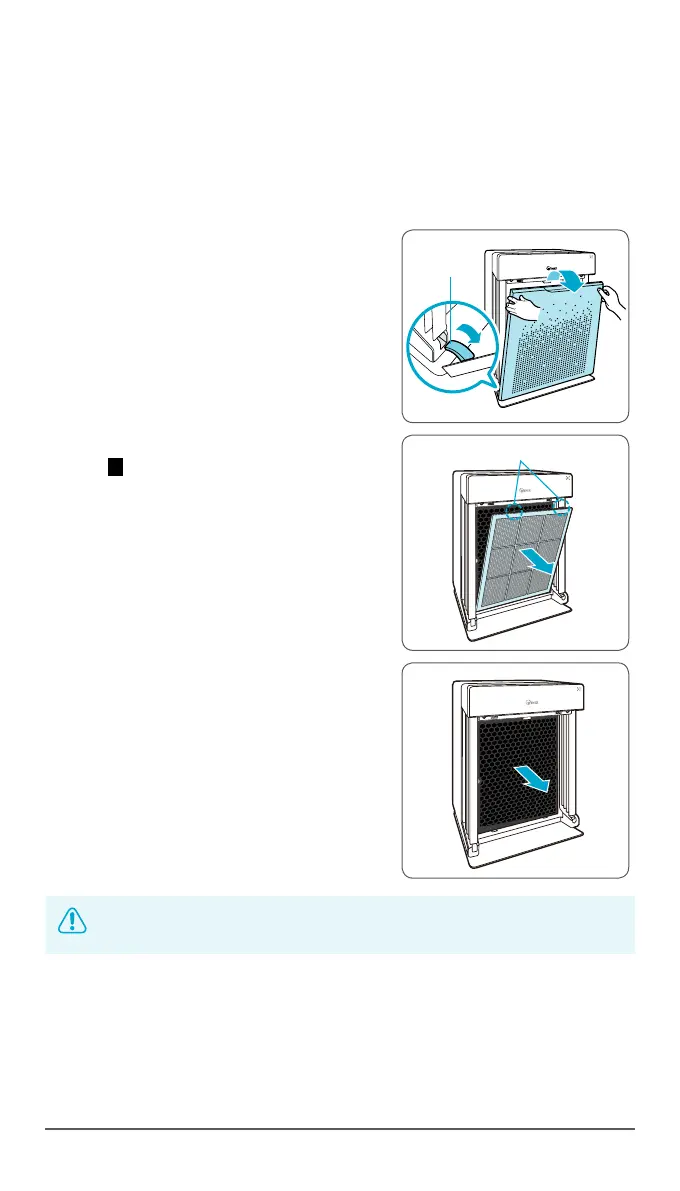
1
Remove the front panel by grasping its
upper edge and gently pulling towards
yourself.
•
To remove the front panel, the latch at
the lower edge of the panel must be
released from its position.
2
Press the tabs on the top edge to remove
the 2 Pre-filter.
3
First remove the AOC™ Carbon filter.
4
Then remove the True HEPA filter by pulling
on the tag at the top of the filter.
NOTICE
•
For optimal performance, only genuine Winix filters should
be used with this unit.



 To Next Page