17
English HR900
CLEANING THE DUST SENSOR
Cleaning the Dust Sensor
For optimal performance of the Dust Sensor, which detects airborne dust and ultrafine
particles, clean it every two months. Clean it more frequently when the unit is running
in a place with high dust levels.
1
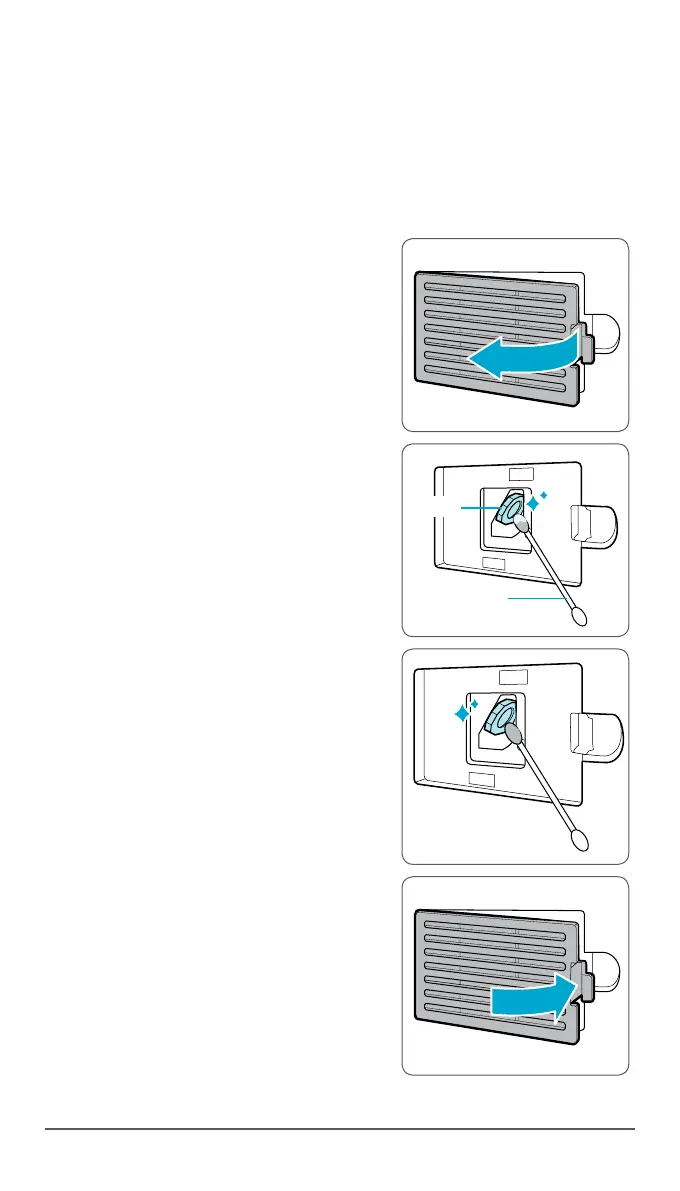
Open the Dust Sensor cover.
2
Use a damp cotton swab to wipe the lens
and intake area of the Dust Sensor.
•
To clean the sensor area, use only water.
Do not use volatile substances such as
alcohol or acetone.
3
Wipe away any remaining moisture with a
dry cotton swab.
4
Close the Dust Sensor cover.
•
The Dust Sensor cover may be cleaned
using a vacuum cleaner.



 To Next Page