04
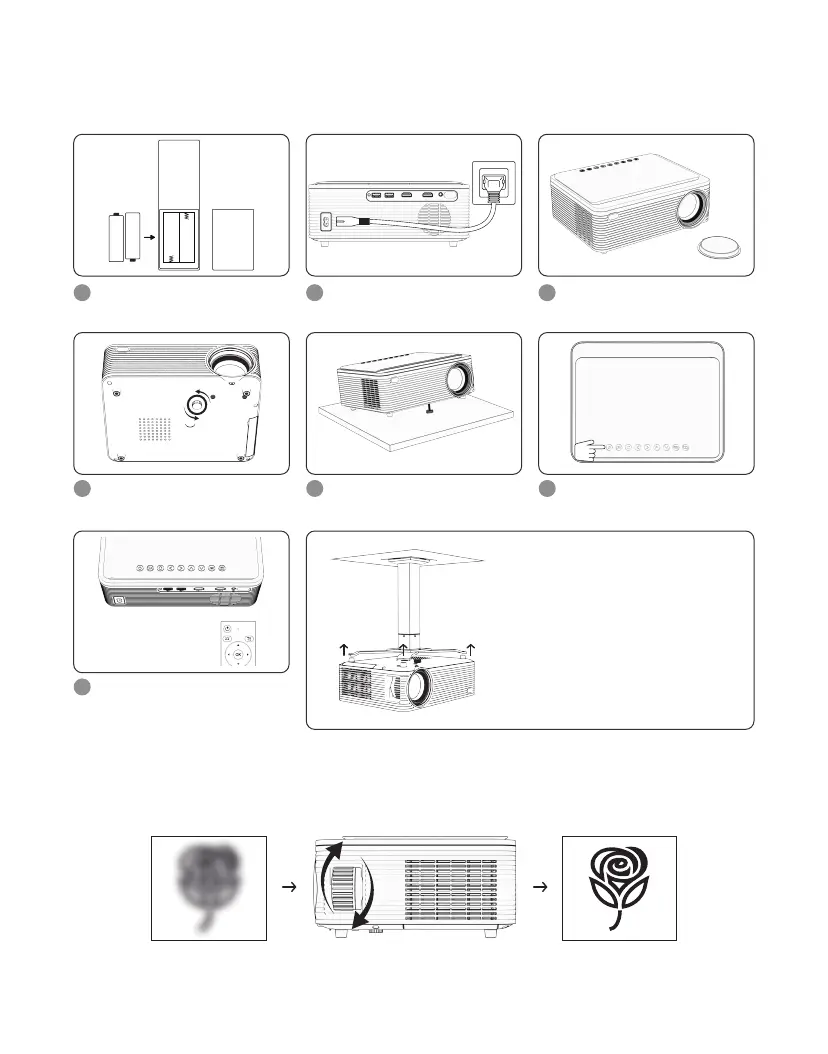
5.QUICK START
Please install the batteries
for the remote control.
1
Plug the power cord into
an outlet.
2
Take off the lens cover.
3
Press the power button on
the remote control to turn
off the projector.
7
Rotate the adjustable foot.
4
Place the projector on a
flat surface.
5
Press the power button to
turn on the projector.
•Tear off the rubber gaskets on the
four corners of the bottom of the
projector, and install the projector
on the ceiling.
•Go to Setting » Projection Image
Setting » Projection Mode to flip
the projection image.
(This product does not include the projector
ceiling mount)
6
Rotate the focus knob to focus until the picture is clear.
6.FOCUS


 To Next Page