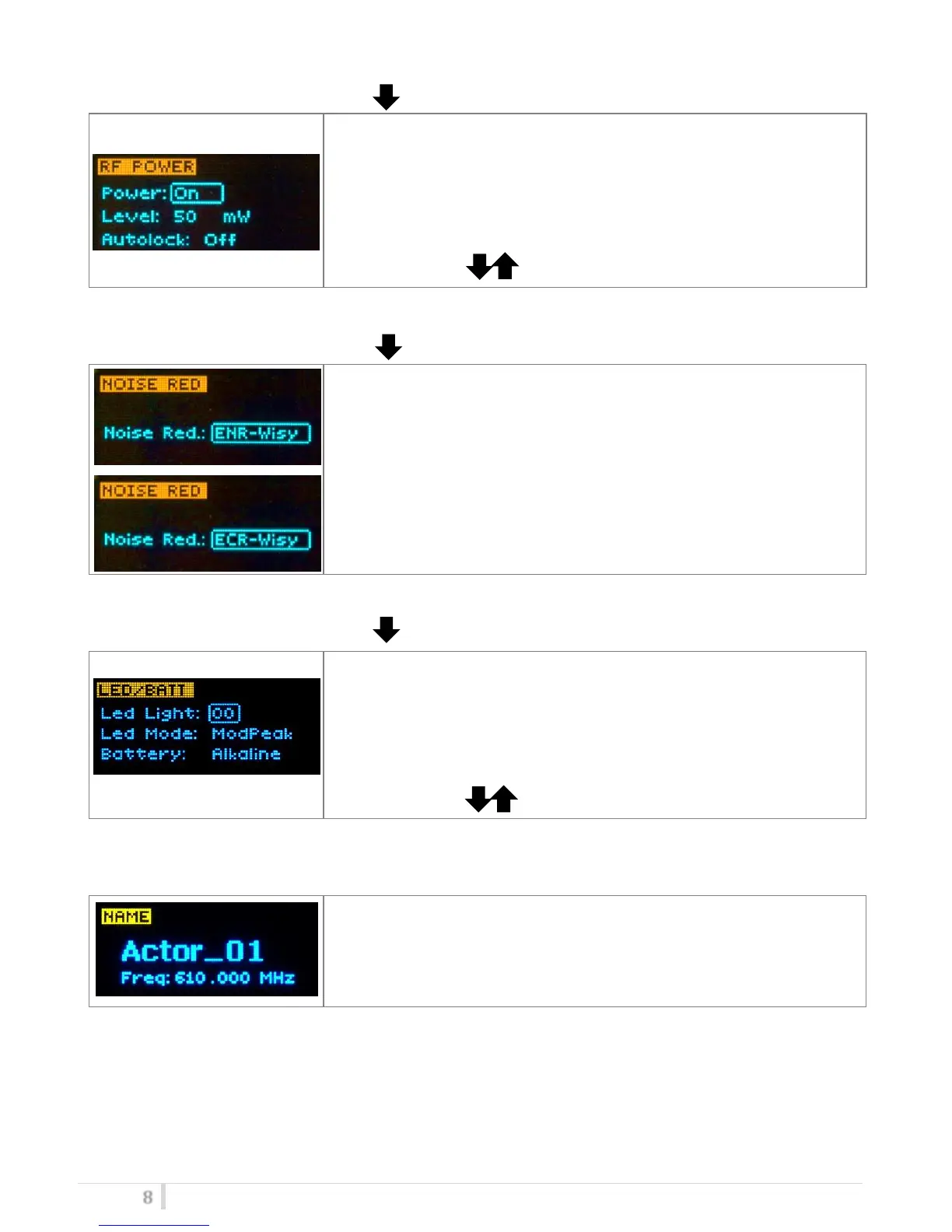
<RF POWER> menu
This menu can be entered by pushing .
RF power can be setup to ON/OFF to activate or not the radio
transmission.
Additional field to setup:
- Level: It is possible to setup the RF power at 50mW or 10mW.
- Autolock: select ON for lock the transmitter after the auto turn
off of the display
Use the selector ( ) to change values and <SEL> to confirm.
<NOISE RED> menu
This menu can be entered by pushing .
MTB40 supports 2 different type of “Companding systems”
ENR-Wisy: designed for maximum noise reduction
ENC-Wisy: designed for maximum audio fidelity (use this in case of
special vocal application or to remote instruments)
< LED BATT > menu
This menu can be entered by pushing .
In “Led Light” the brightness of the front led ❼ can be set from 0 to
16 level.
It’s also possible change the mode of function of the LED (in “LED
Mode”) selecting Modpeak (become RED when audio get close to
saturation) or None (never become RED).
Battery type can be setup in Alkaline or NiMH.
Use the selector ( ) to change values and <SEL> to confirm.
<NAME> menu
This menu can be entered by scrolling selector.
In this menu it’s possible to see the frequency set on the device and
the name of the transmitter.



 To Next Page