both R(right) and L(left) channels input
To change (increase or decrease) the input level of the left
channel on DSP
To change (increase or decrease) the input level of the right
channel on DSP
To set which AF level is shown in the two LED bars for the AF
levels (L=left & R=right levels): they can show AF input levels or
modulation levels (after the pre-emphasys and compander
phases)
Mono config
(only for mono Mode)
To set the type of mono input
If enabled and the digital signal is lost (parameter Input set to
digital), the transmitter takes the signal from the analog input.
Equalizer
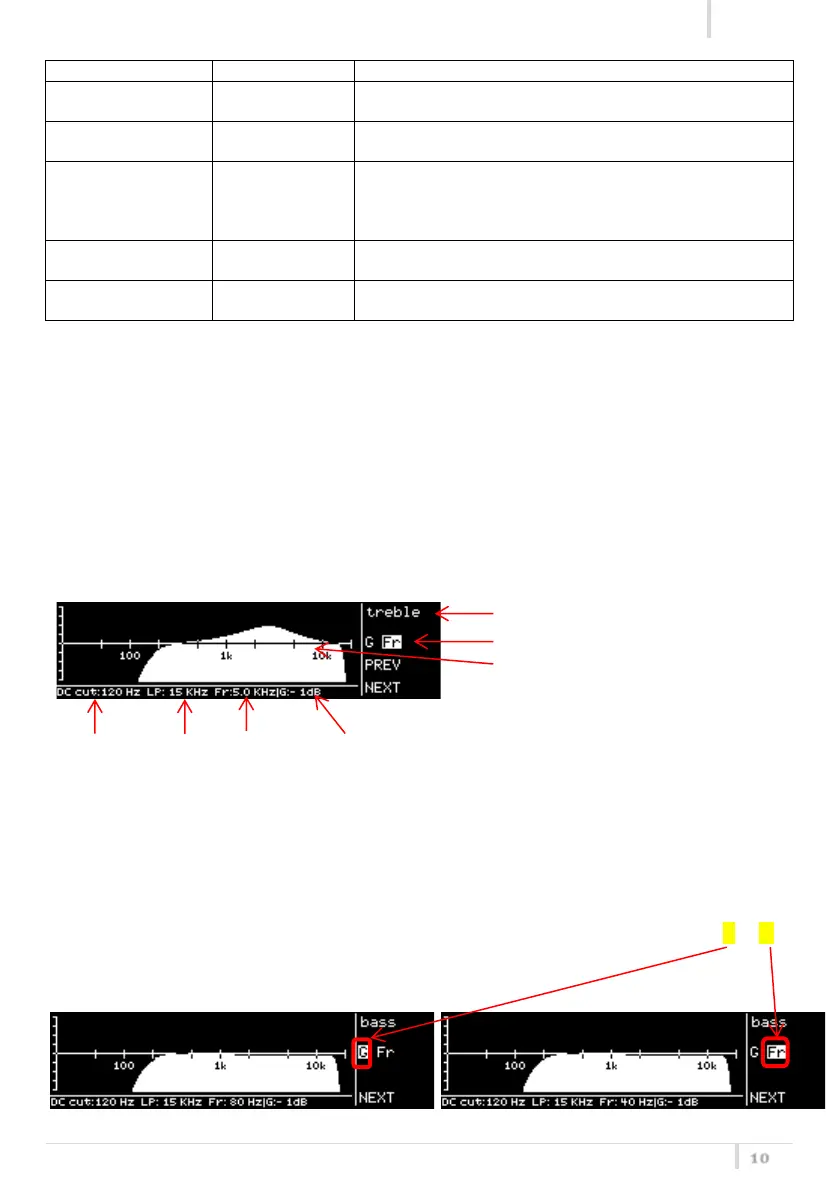
This menu allows to of adjusting the gain between frequency components (bass, mid and treble)
within the audio signal. There are 4 windows in cascade:
bass windows: allows to change gain and frequency of low frequencies
mid windows: allows to change gain and frequency of middle frequencies
treble windows: allows to change gain and frequency of high frequencies
eq windows: allows to save the equalization parameter or exit without save
Each window shows the following information:
❷parameter to set (gain or frequency)
❸ graphic equalizer: frequency on
horizontal axis, gain on the vertical axis
❼
HP filter
set in the
mode
menu
❻
LP filter
set in
the
mode
menu
For each window it is showed the graphic equalizer which help to see the set parameters. Push the
rotatory knob to change the parameter between gain and frequency (the respective letter G or Fr
is highlighted during the setting phase) and



 To Next Page