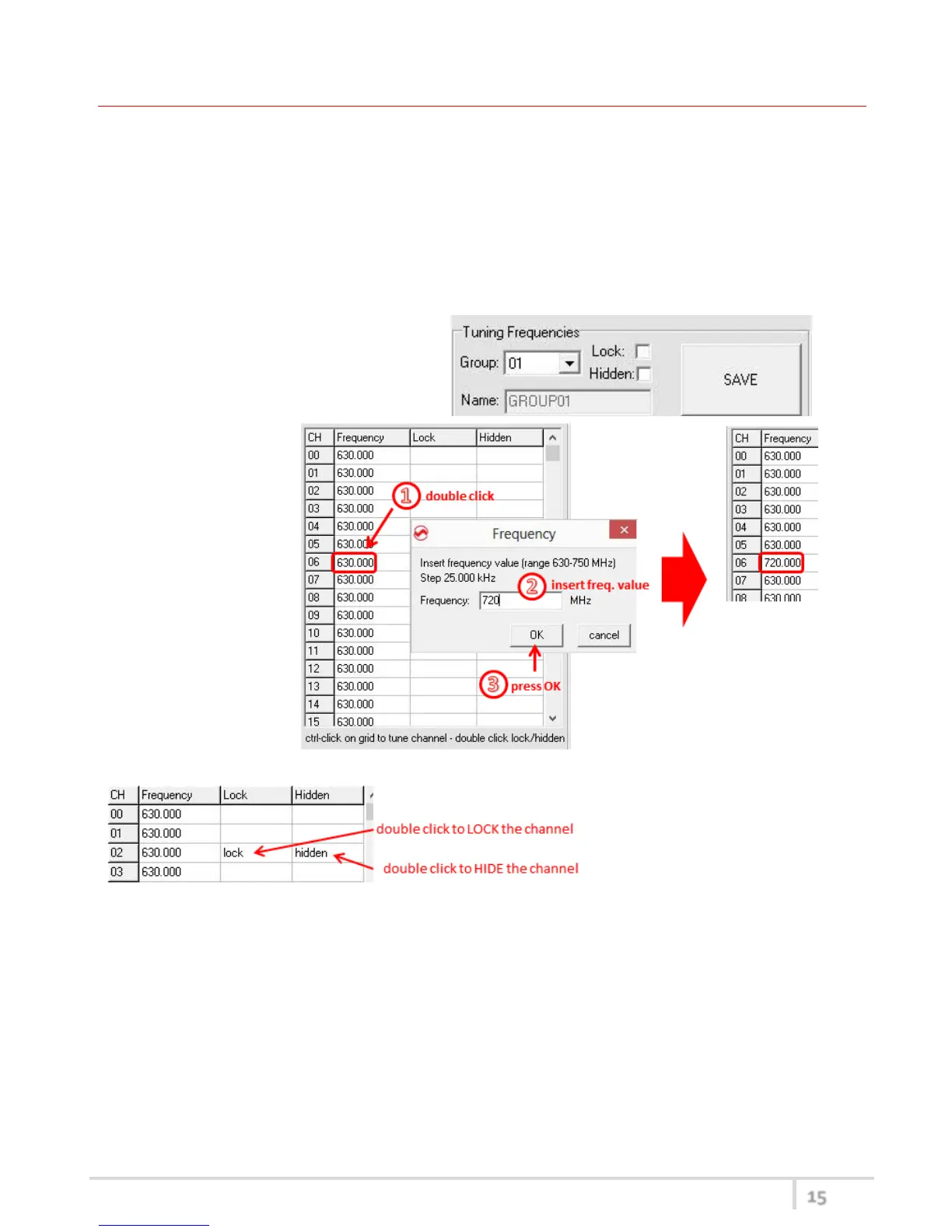
TUNING FREQUENCIES PANEL (❸)
With the Tuning Frequencies panel the user can select a frequencies group (0÷39) and for each one
execute the following operations:
- modify the Group’s Name
- lock and/or hidden the group
- for each channel (0 ÷59) of the selected group: change the frequency value and the
related status (locked/hidden) (in the center grid frequency)
The SAVE button, at the top of the panel,
save the changes of the group selected
(name group, lock/hidden group).
To change a frequency
value for a specific
channel: double click
on the grid frequency
panel (row=channel’s
number), insert the
new frequency value
and press OK button.
To lock/hide a specific channel,
double click on the grid frequency
panel.
NOTE: keeping pressed the CTRL button on the keyboard and clicking the wanted channel/group
shown on the frequencies grid, the tuning process is executed. It is equivalent to configure the
Tuning in the Current Settings panel but it is easier. The device is re-tuned immediately, so be sure
that the RF power is turned off while changing frequencies with other RF systems in use around you!



 To Next Page