18. Setup->Graph ON/OFF
Under this item you can select if a graph of the pressure porcess shall be
printed out after the pre-assessment menu, main assesment menu and after
the leakage rates and utility life measurements. Default is „on“.
19. Setup —> Logo Here you can enter the logo text for printouts. This is ex-
plained under the following Section 8.2 (default WÖHLER MGKG, DC 2000).
20. Setup —> Default This function restores the device’s setup status on
delivery. The logo text is overwritten by the original Wöhler logo. All sensor
calibration values remain unchanged. Accidental initiation is prevented by the
prompt Sure?.
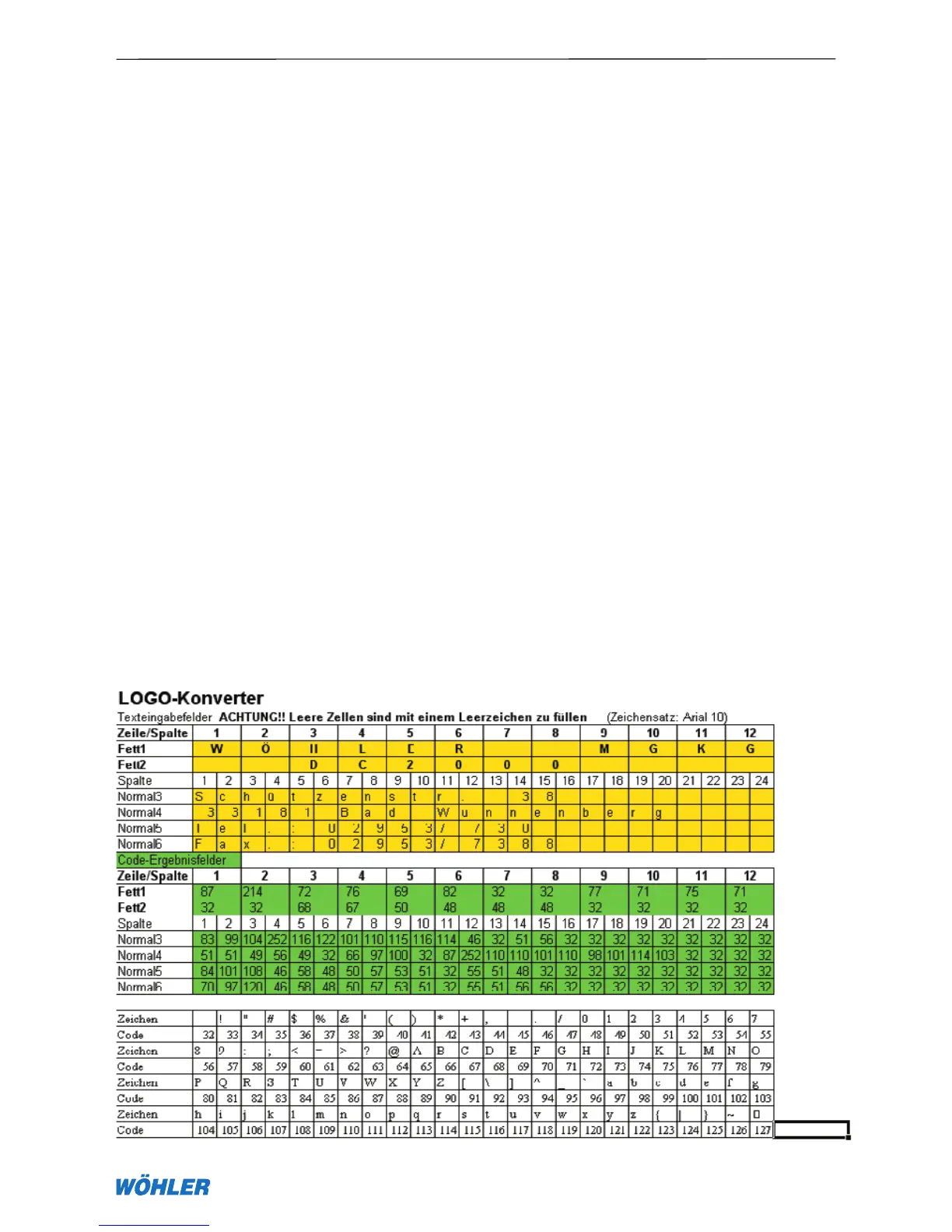
8.1 Entering a logo The following Tables 2 and 3 are to assist you in ente-
ring a logo into the DC 2000. First enter (preferably with a lead pencil) the text
you want in the upper Table 3. The first two rows take twelve characters that
are printed in bold. The following rows 4 to 6 can take max twenty-four cha-
racters that are printed normally. Finally determine for each row and column
the ASCII codes and enter these in the code fields. These values can then be
entered and stored row by row under Setup —> Logo. The LOGO converter
is also provided in the Excel software that can be downloaded as freeware
from the internet address www.woehler.de/mgkg. There the text is converted
automatically into ASCII codes.
Table 2 – Conversion example (original logo)
8. Setup Menu



 To Next Page