Play videos at PC
46
8 Play videos at PC
Viewer
• Insert CD. (The VLC Viewer is available as
freeware in the internet.)
• Click on Index.html. The menu will open.
• Click on the button “Install”.
• After the installation, the video files can be re-
played in the AFS/MPEG4 format.
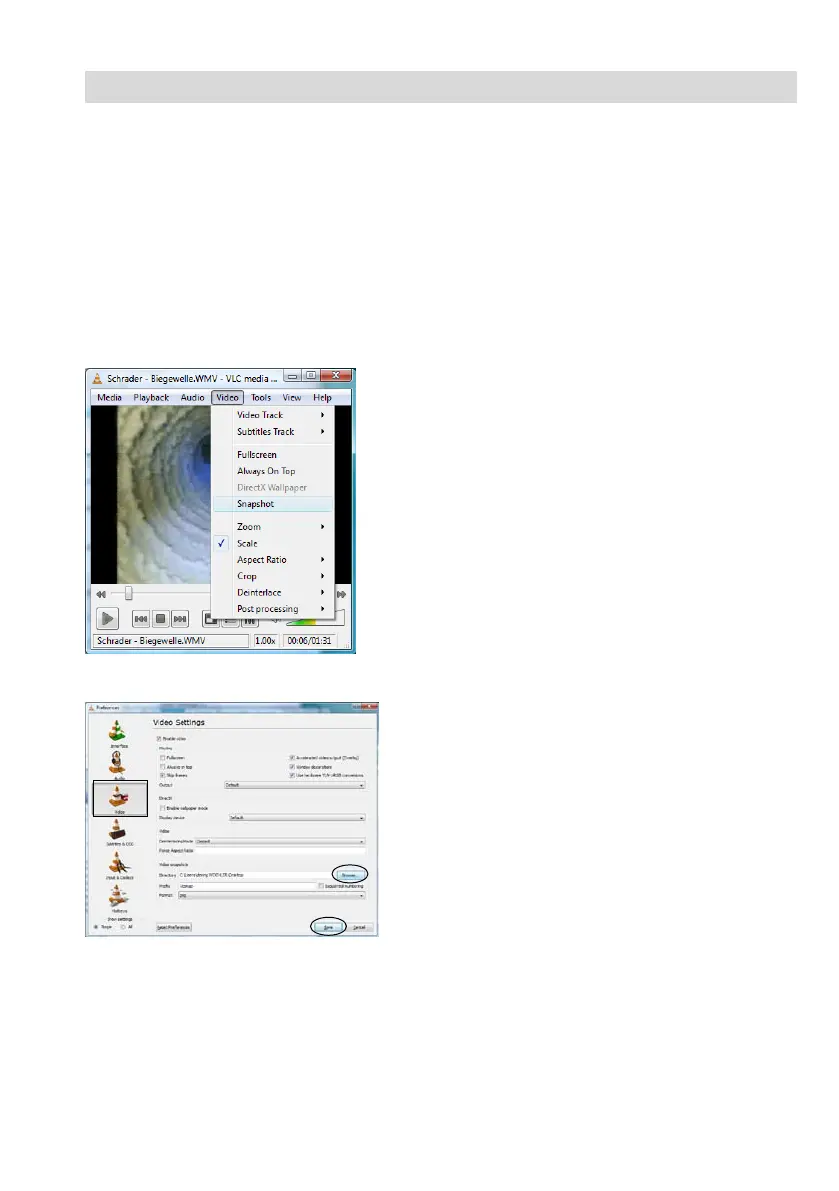
• To create a single frame of a video, click on
video > snapshot while running the video.
• Click on Tools > Preferences for storing.
• The window shown on the left will open.
• Select the Icon Video.
• Click on “Browse” and select the path where
you want to store your snapshot. You can se-
lect the file format (png or jpg) and add your
own prefix to the filename.
• Click on “Save”.
As the programm is a freeware (“Open Source”)
Wöhler cannot provide any technical support. You
will find more information as well as the current
version on the Website of the softwaremanufactor
www.videolan.org



 To Next Page