Theory of Operation
CSO24 and CSO30 (SWS #13508346)
3-11
#9001333 - Revision A - August, 2014
Special Modes
Demo Modus (Showroom Mode)
Requirements: In order to switch the Demo Modus (Showroom Mode) ON / OFF, the appliance must be ready for
operation, i.e. all displays - with the exception of the time display – should be dark/off.
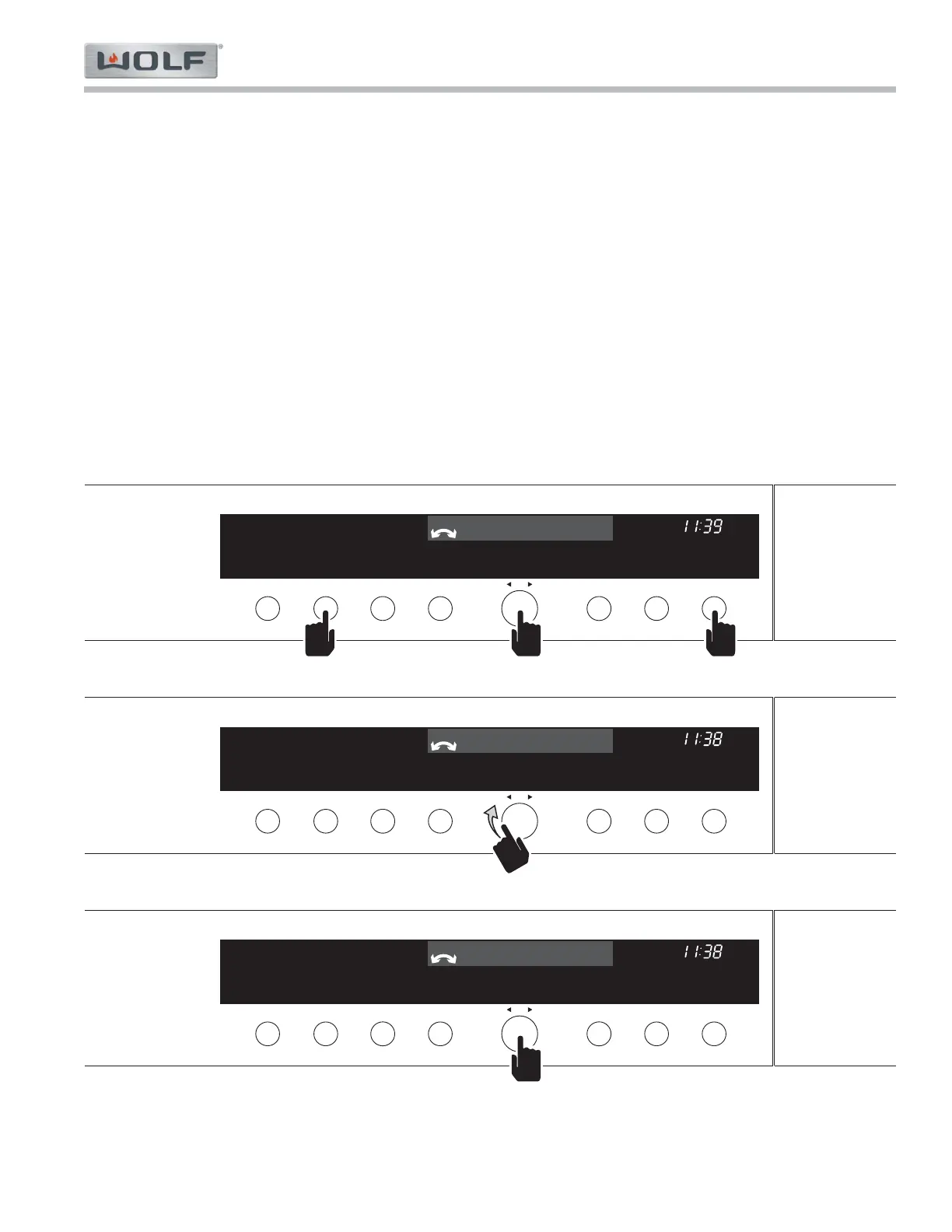
To Turn ON: 1. Press and hold the "LIGHT" + "OK" + "OFF" buttons for ten (10) seconds. NOTE: press and
hold the buttons in the order listed. (See Figure 3-2)
a «Demo-Modus» «off» appears in the display.
2. Using the adjusting “OK” knob set the display to «Demo-Modus» «on» (See Figure 3-3).
3. Press the "OK" knob to confirm the change in setting (See Figure 3-4). Press the "Off" button to
exit the configuration mode (See Figure 3-5).
To Turn OFF: 1. Press the "LIGHT" + "OK" + "OFF" buttons simultaneously. «Demo-Modus» «on» appears in the
display (See Figure 3-6).
2. Using the adjusting knob set the display to «Demo-Modus» «off» (See Figure 3-7).
3. Press the "OK" button to confirm the change in setting (See Figure 3-8). Press the "Off" button
to exit the configuration mode (See Figure 3-9).



 To Next Page