5
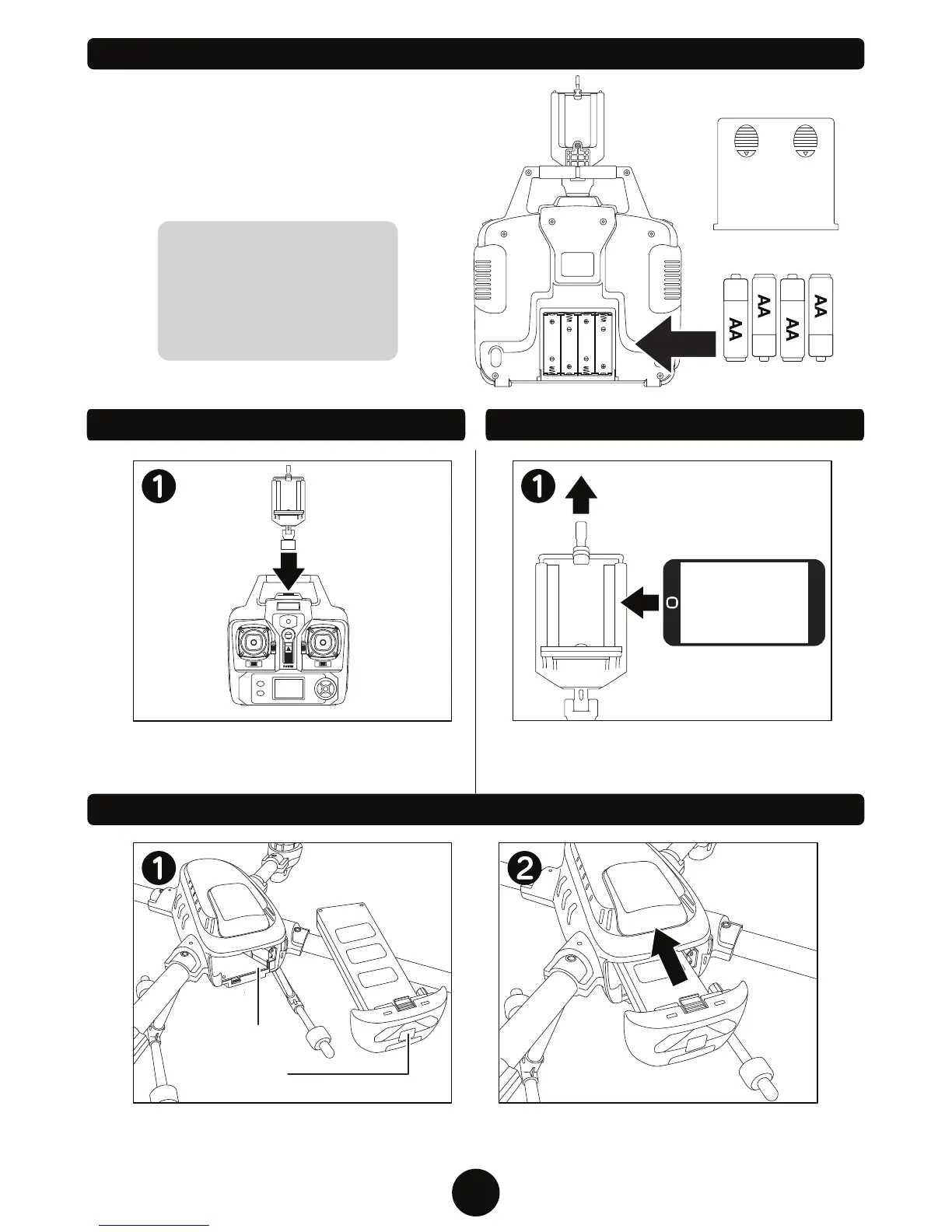
Battery Cover
4 AA Batteries
(NOT INCLUDED)
First remove the battery cover by sliding down. Next
install 4 AA batteries with the correct polarity. Finally
replace the battery cover.
Align the connectors of the battery pack to
the drone, then slide the battery pack into the
drone until a click is heard.
CAUTION:
1. Make sure the batteries are
installed with the correct polarity.
2. Do not mix old and new batteries.
3. Do not mix different types
of batteries.
INSTALLING THE TRANSMITTER BATTERY
INSTALLING THE DRONE BATTERY
Power Switch
Make sure the power switch on the battery
pack is in the OFF position and the drone is
free of debris.
ATTACHING THE SMART PHONE CRADLE
Align the Smart Phone Cradle with the
opening on top of the remote and slide in.
To attach smart device, pull up on the black
handle on top of the cradle and insert device
between foam protectors.
Battery
Compartment
ATTACHING THE SMART PHONE


 To Next Page