6
BATTERY PACK SPECIFICATIONS
CAUTION WHILE CHARGING:
Do not charge with batteries still installed. Do not charge battery unsupervised. Do not immediately charge after
use. Do not overcharge battery. Ideal charge time is 90-100 minutes. Overcharging can cause a catastrophic
failure. Always charge on dry and ventilated areas away from any heat source or flammable materials. Always
use the original charger provided. Promptly change and replace old or defective batteries.
Lithium Polymer 7.4V 2000mAh Flight Duration 5.5 - 6.5 minutes Charging Time 90 -100 minutes
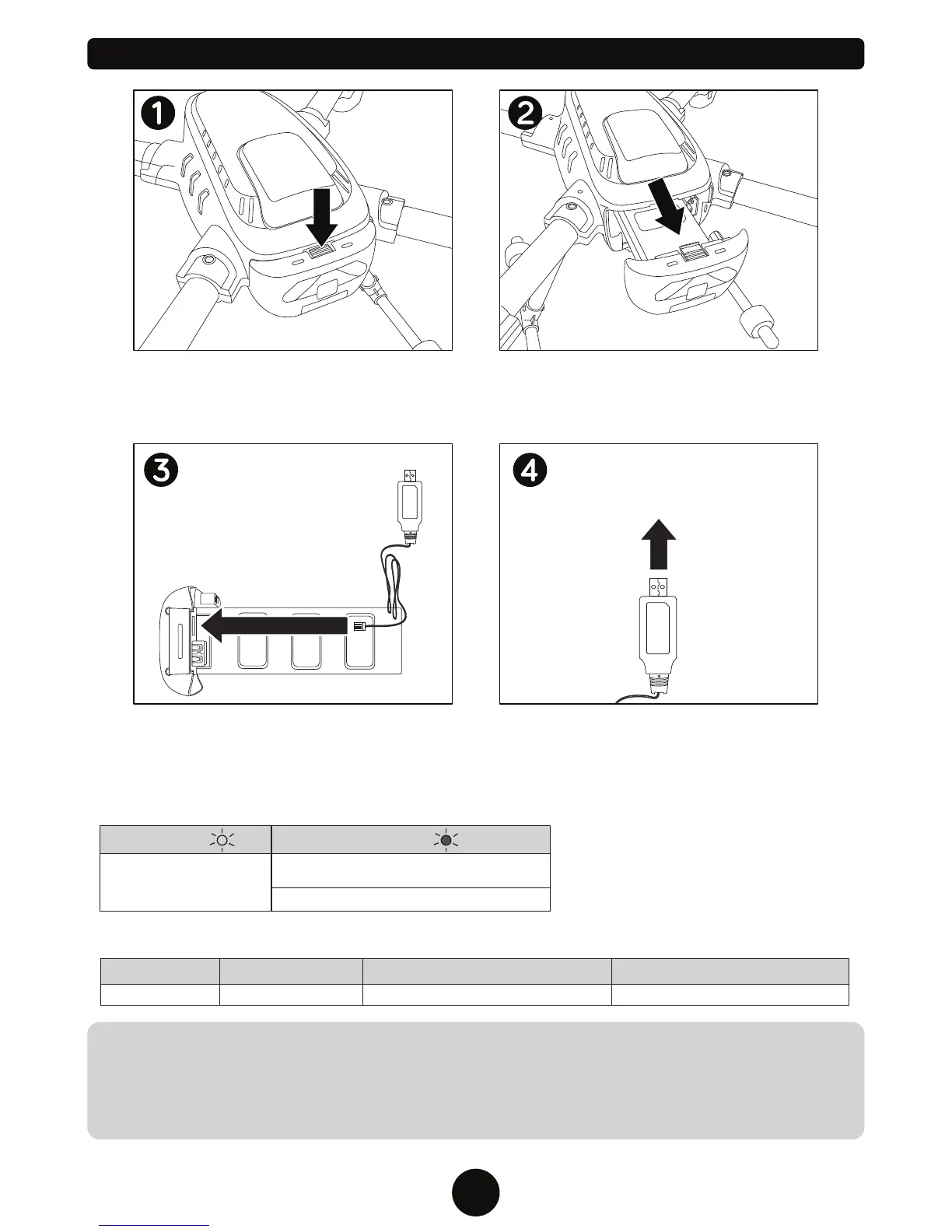
CHARGING THE DRONE BATTERY
USB CHARGER LED LIGHT INDICATOR
Please Note: The charger light will turn on
when plugged in to indicate there is power
running through the device. Once the battery
is connected the light will turn green. The
light will turn back to red when charging is
complete.
Make sure the drone power button is in the
OFF position. Push down on the button on
top of the battery pack, above the power
button.
Connect the included USB charger via the
port shown on the battery pack.
Slide the battery out of the drone.
Plug the USB charger into any standard USB
Power Adaptor or computer USB power
supply. Your battery will automatically
charge.
Green Light
Charging
Red Light
Usage DurationBattery SpecificationBattery Type Charge Time
Charger is connected to a power supply without
the battery attached.
Battery pack is fully charged.
To Computer USB
Power Supply


 To Next Page