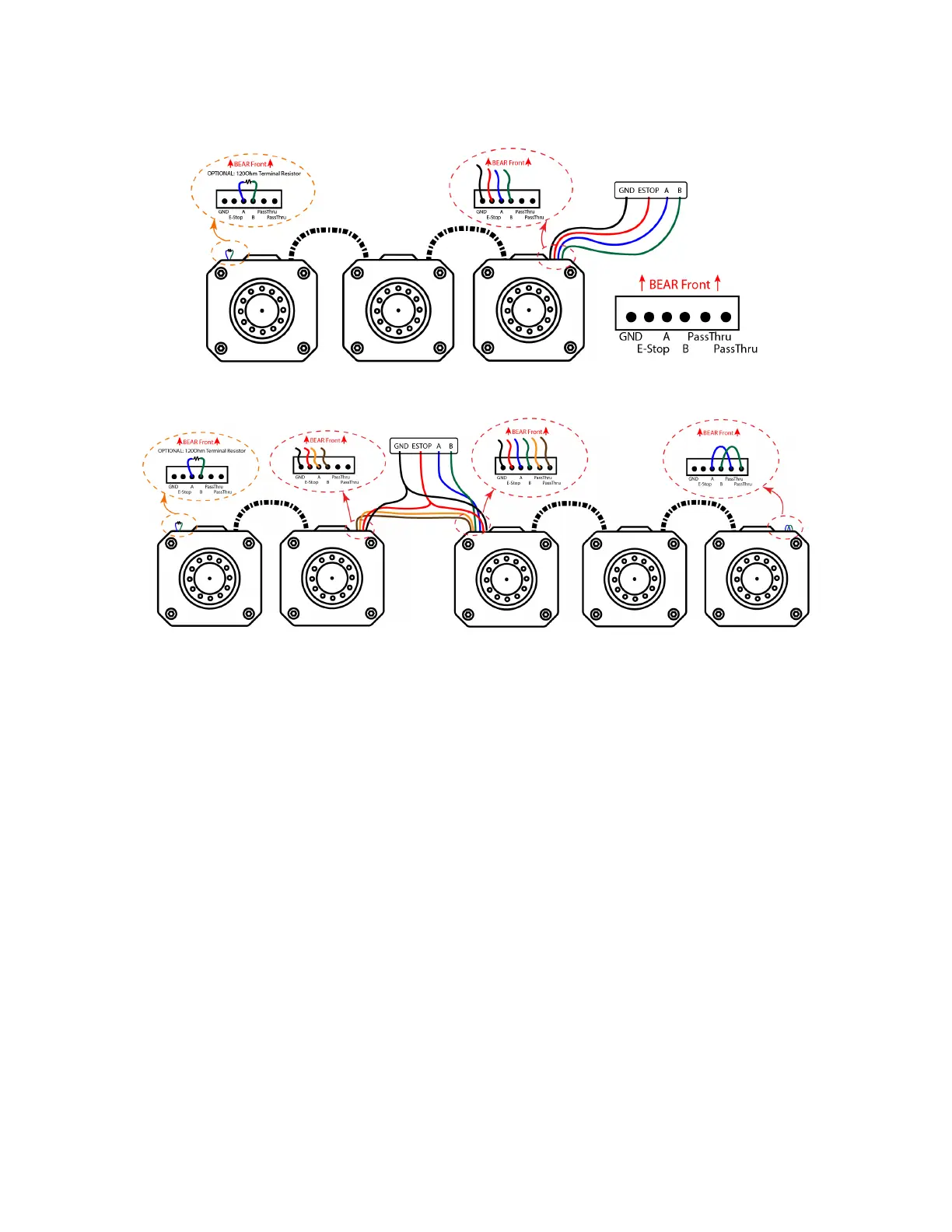
Figure 6: Daisy chain BEARs.
Figure 7: Fork chain BEARs.
It is fine to chain different type of BEARs together, but be careful to make sure that all BEARs
get the correct power supply voltage. All BEARs in the same chain should have the same
baud rate setting, and there is no ID conflict as well.
e) Connect to USB2BEAR
There are three ways of connecting the signal line from BEARs to the USB2BEAR dangle,
as shown in fig. 8. The GND, A and B terminals are always connected to corresponding
pins on the USB2BEAR dangle, and the only difference between these three configurations
is how the ESTOP signal terminal is handled. The minimum connection is to connect the E-
STOP terminal to signal GND, but doing this will eliminate the function of E-STOP protection
thus depreciated. A basic configuration which adds a E-STOP switch between the ESTOP
and the signal GND terminal is preferred over the minimum configuration. Disconnecting the
ESTOP terminal from the signal GND terminal via the E-STOP switch triggers the E-STOP
protection on all connected BEARs.
Our recommended configuration is to connect the GND and ESTOP terminal to a Westwood
Robotics Wireless ESTOP module, which enables the user to trigger the E-STOP protection
12


 To Next Page