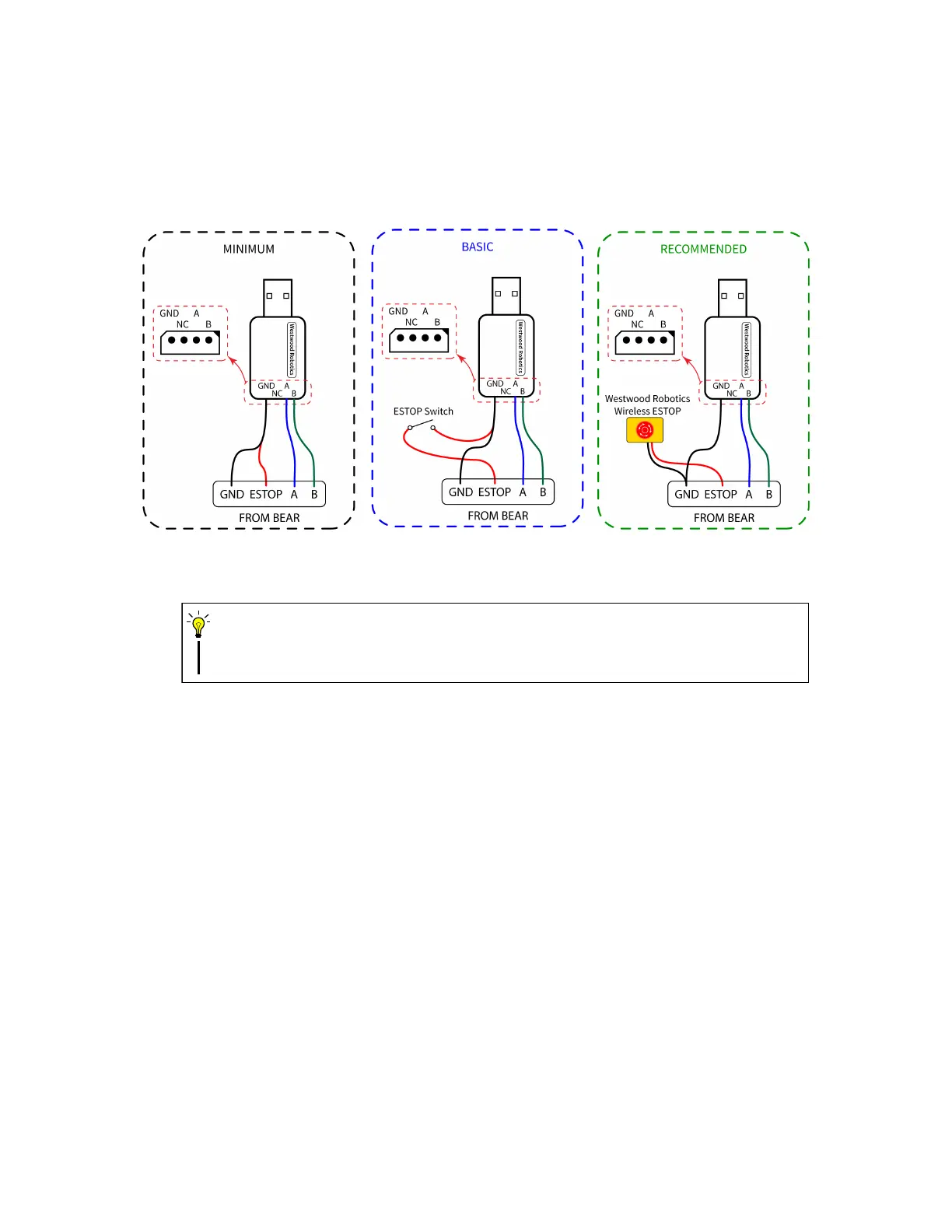
on all connected BEARs remotely, which we consider to be an extremely important safety
feature for high power or high complicity systems, or any system that works around a human.
Please refer to section. f) for detailed explanation on E-STOP protection.
Figure 8: Connecting BEARs to USB2BEAR.
Do NOT leave the ESTOP terminal floating, as this keeps BEARs in their ESTOP status
and prevents them from being enabled.
CAUTION
f) E-STOP
When the ESTOP terminal on a BEAR is not pulled low to signal GND, the BEAR module’s
E-STOP protection will be triggered. The 3rd bit of its error code will be come HIGH and
the torque enable status will become 3. If the E-STOP protection is triggered while BEAR is
enabled, such BEAR will go into hardware damping mode preventing any potential damage;
if the E-STOP protection is triggered while BEAR is disabled, such BEAR will stay disabled
and will not enter hardware damping mode.
The E-STOP protection can also be triggered by writing ”3” to the torque enable status reg-
ister and does not necessarily require the ESTOP terminal to be disconnected from signal
GND.
To release a BEAR from its E-STOP protection, first make sure that the ESTOP terminal is
pulled low to signal GND, then disable the BEAR by writing ”0” to its torque enable status
register. This will also reset the 3rd bit of its error code to LOW.
Refer to section. 2.2.2 for details on torque enable status register and section. 2.2.3 for details
on error code.
13


 To Next Page