17
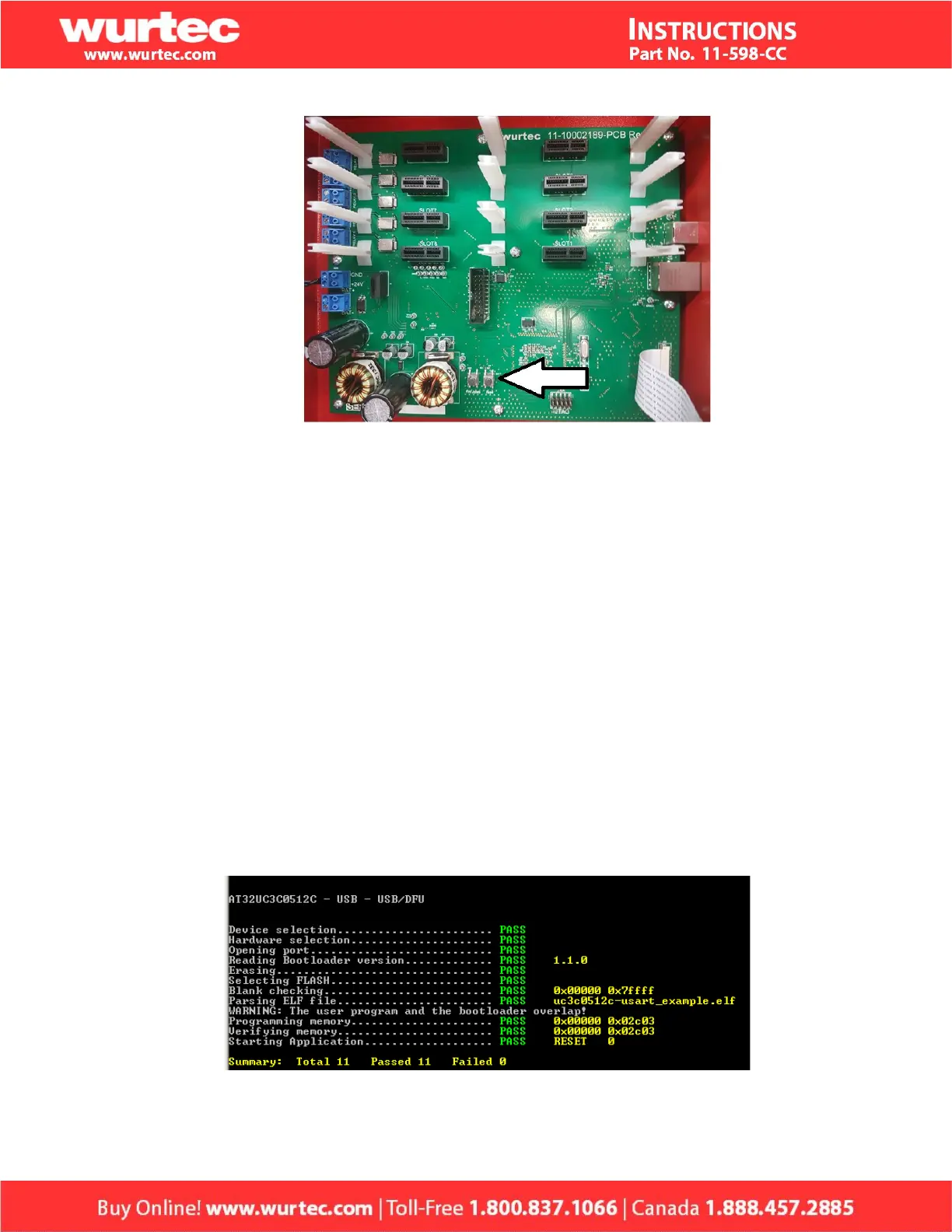
Figure 2: Command Center S3Pbx PCB F/W Update and Reset pushbuttons.
2. Press and hold both pushbuttons for at least 2 seconds.
3. Release the Reset pushbutton while still pressing the F/W Update pushbutton.
4. After at least 1 second, release the F/W Update pushbutton.
5. Connect the laptop or PC to the Command Center with a USB cable.
6. Open a CMD line window and type:
batchisp -device at32uc3a0512 -hardware usb -operation erase F blankcheck
loadbuffer "%DFUISP_PATH%" addrange 0x80002000 0x8007ffff program verify
start reset 0
Where %DFUISP_PATH% is the path and file name for the firmware obtained from
Wurtec. For example: C:\Users\user1\Desktop\S3PbxIsp.hex.
7. Type <enter> and wait until the firmware update successfully completes as shown
similarly in figure 3.
Figure 3: Typical batchisp CMD window output upon successful firmware update.


 To Next Page