12
Operation
SWITCHING ON
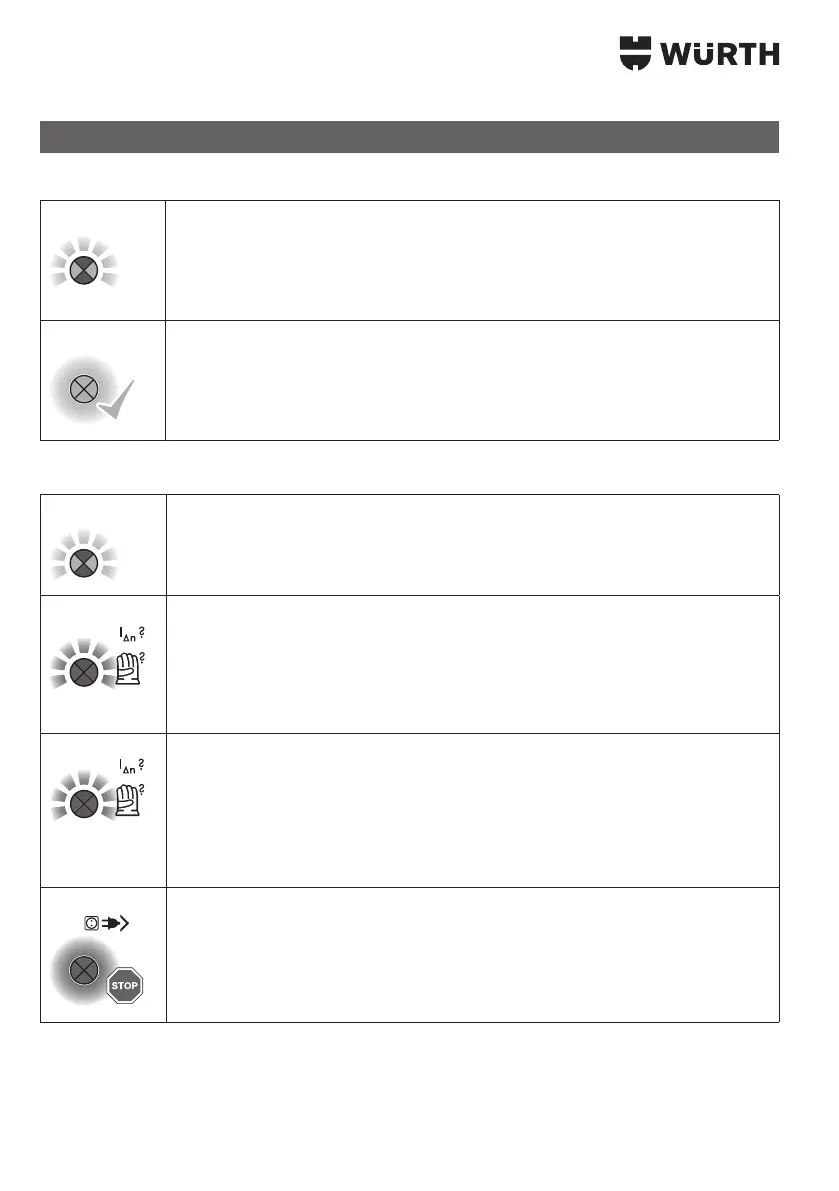
Green
> Press
Insert the mains plug of the personal protection switch into a socket.
3 If the power supply is OK, after approximately 2 seconds testing time, the signal
Green
[4] of the personal protection switch.
3 Within <2 second a routine test takes place (connection, mains supply,...).
3 The personal protection switch switches ON; the signal unit lights up GREEN
permanently.
3 The personal protection switch is now ready for operation. The button [4] can now
be released.
SWITCHING OFF
Green [4] on the personal protection switch.
3
3
Red
> Press
Dierential current fault is indicated by the signal unit ashing red.
3 In such cases, the personal protection switch outputs an optical warning and shuts
down immediately.
3 The protective earth conductor remains connected until acknowledgement.
3 The maximum possible personal protection is provided.
Red
> Press
Any measurement errors, such as wearing gloves during the activation process.
3 Red ashing of the signal unit
In such cases, the personal protection switch outputs an optical warning and does
not switch on.
3 The maximum possible personal protection is provided.
Following acknowledgement, the activation process is repeated without gloves or a
change of location.
Red
3 If the signal unit around the button lights up red or remains neutral within
about 2 seconds of switching on, a fault exists.
3 The personal protection switch does not switch ON.
3 The maximum possible personal protection is provided.
The advice of an electrical specialist must be sought.


 To Next Page