
 Need help?
Do you have a question about the X-Driven DRS1100 and is the answer not in the manual?
Records and saves images before/after accidents detected by impact sensor.
Records and saves images manually via the Emergency Button.
Stores detailed GPS data like location, time, and speed during an accident.
Records vehicle motion data like acceleration, braking, and vibrations.
Replays accident data, GPS, and vehicle operation info on PCs with software.
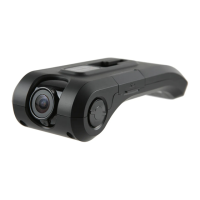
The main driving recorder device.
Includes camera rack, suction cup for windshield attachment.
Includes power cable and SD memory card.
Detailed technical specifications of the camera, resolution, storage, etc.
Identifies the camera lens and provides cleaning advice.
Shows the SD memory card slot and power terminal.
Explains the function of the red Recording LED and blue GPS LED.
Details the purpose and operation of the emergency button.
Step-by-step guide for attaching the device to the windshield.
Important notes on using the correct SD card and proper insertion/ejection.
Guidance on positioning the GPS receiver for best signal.
How to set the camera's view for optimal forward-facing recording.
Steps for connecting the power cable and what to expect on initial startup.
Instructions for installing the companion PC software from the SD card.
Information on obtaining the software from the company website.
Description of the initial screen and main layout of the software.
Steps to load data files and view recorded video clips.
Feature to view multiple selected images sequentially.
Using the map window to show vehicle location and navigate.
Interpreting graphs that visualize vehicle movements and impacts.
Details on playback buttons, speed control, and other program actions.
Understanding the timeline indicators for pre- and post-event footage.
How to find and open the settings configuration file.
Adjusting resolution, quality, speed, and duration of recordings.
Setting impact sensitivity and alarm modes.
Configuring local time zone and audio recording preferences.
Choosing between Single-Mode and Multi-Mode for event recording.
Setting disk partition for event files and general storage.
Functions for saving images, capturing screens, and printing.
Precautions against disassembly, water, chemicals, and impacts.
Warnings on secure mounting, driving distractions, and environmental factors.
Safety notes on power sources, cables, and potential GPS signal disruption.
Explains inherent limitations and factors affecting GPS accuracy.
Lists environmental and usage conditions that can impair GPS signal.
 General
| Brand | X-Driven |
|---|---|
| Model | DRS1100 |
| Category | Automobile Electronics |
| Language | English |

 To Next Page