15
Normally on: norma
lash slowly: low temperature
Flash quickly: high temperature
Double flashing: failure
3. Preparation of smart battery
The P-Series Plant Protection UAVs are designated
to be powered by B12620/B12800 Smart battery.
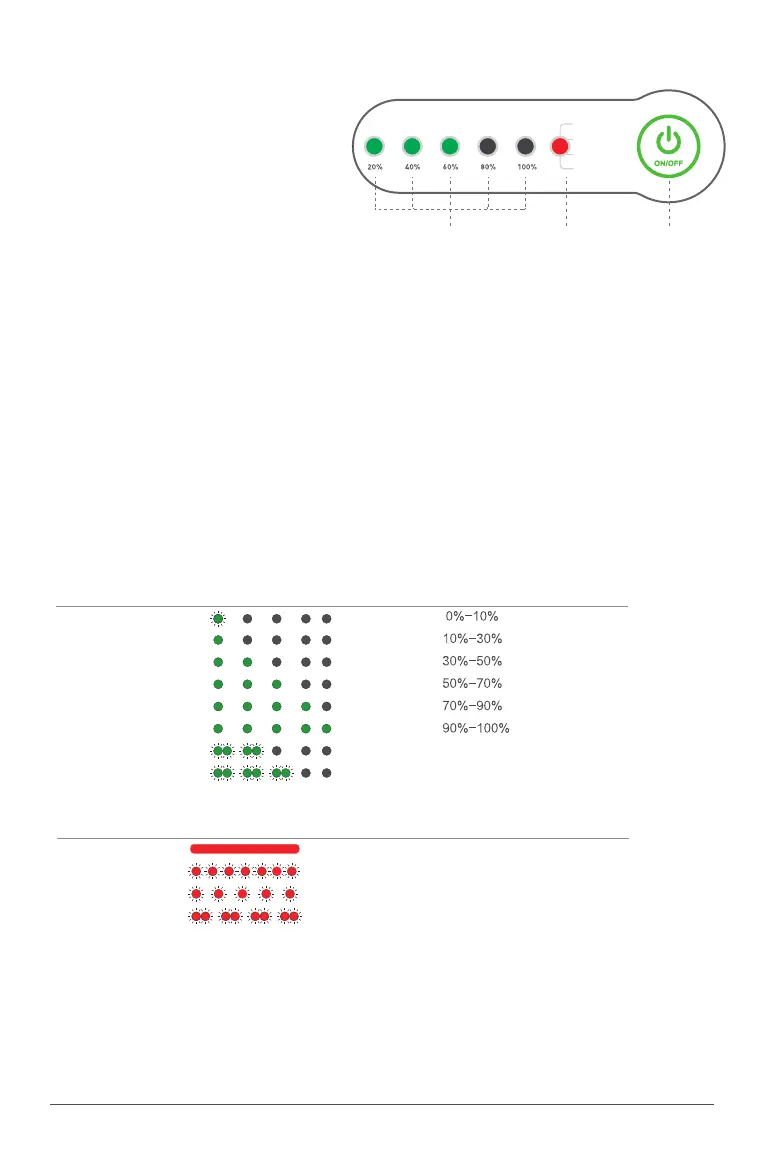
The Smart Battery contains a power button and six
indicators.
The relevant buttons/indicator are as follows:
During charging process of the battery, the battery level indicator in uncharged area will flash “in
series”, indicating that the battery is being charged, and the lights in fully-charged area will be
Solid green. After charging is completed, the buzzer will beep for 30 seconds. Meanwhile, all battery
level indicator lights will flash for 2 minutes and then the battery will turn off automatically.
•Checking battery level
•Charging of battery
•
•Battery preheating*
Battery ON/OFF
ON
:
The battery will be turned on when being pressed and held for 2 times. When the battery is OFF,
connect the load*, press and hold the power button for at least 1 second, release the button after all
battery level indicator lights flash at the same time, then press and hold the button for at least 1 second
again until a “beep” is heard from the battery and all status indicator lights turn on, which shows that
the battery is turned on successfully.
OFF
:
The battery will be turned off when being pressed and held for 2 times. When the battery is ON,
press and hold the power button for at least 1 second, release the button after all battery level indicator
lights flash at the same time, then press and hold the button for at least 1 second until a “beep” is
heard from the battery and all indicator lights turn off, which shows that the battery is turned
off successfully.
No Device* shall be connected during pre-heating*. Long Press (5 Seconds) the power button until
“beep” is heard from the battery and all state indicator lights turn on, pre-heating of the battery will
be started and the battery will turn off automatically after heating. It shall be noted that the battery
cannot be charged/discharged in preheating state.
* Device: Device as Aircraft or Charger
* Preheating: Preheating can be conducted when the battery is not connected to device
1 LIGHT FLASHING
1 SOLID LIGHT
2 SOLID LIGHT
3 SOLID LIGHT
4 SOLID LIGHT
5 SOLID LIGHT
2 LIGHT FLASHING
3 LIGHT FLASHING
Battery Level LED
Self-locked
Remotely locked
Battery level
Battery is locked due to low voltage, please contact
customer support to unlock device
Battery is locked remotely, please contact customer support
to unlock device
•Checking battery state
Battery Status LED Battery level
SOLID RED
QUICK FLASH RED
SLOW FLASH RED
2 LIGHT FLASHING (RED)
Normal
Overheated
Low Temperature
Battery Malfunction
Normal
Temporary Locked. Prohibited from charging and usage
Battery requires Pre-heating
Stop using immediately
Battery level indicator State indicator Power button
Smart battery control panel
Status
Status



 To Next Page
 Loading...










