14
•Precautions
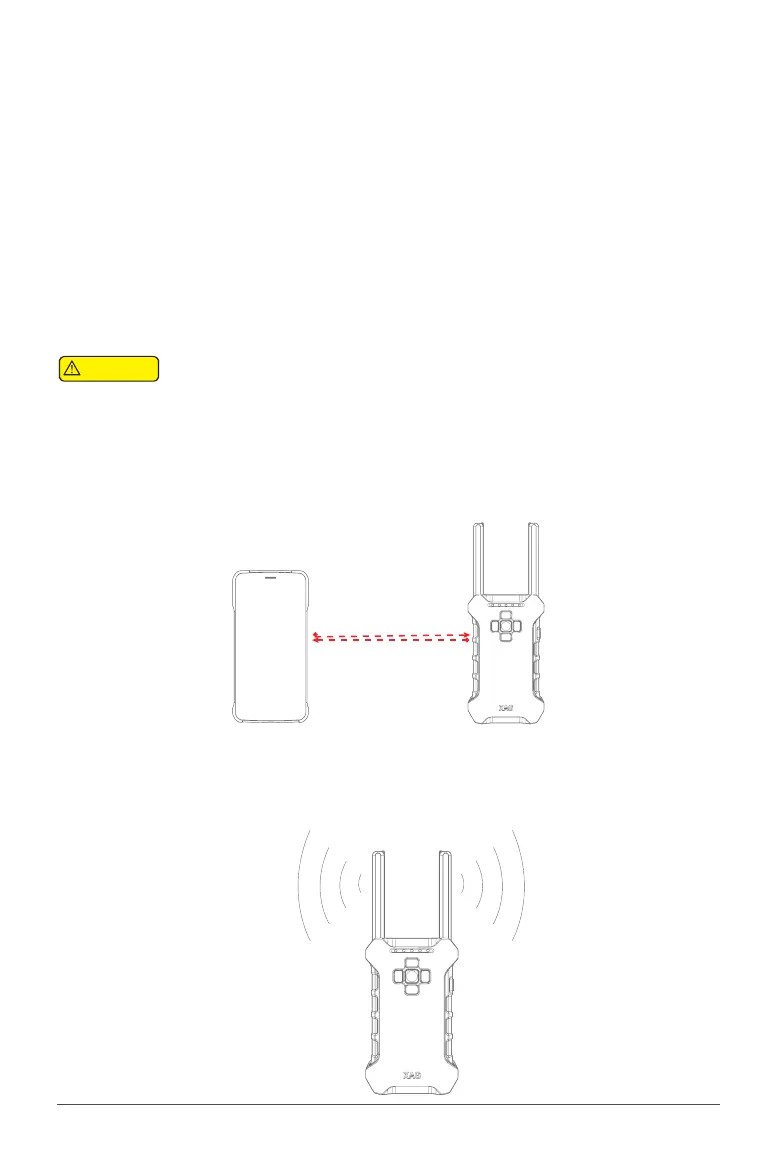
1. The distance between your phone and the CommBack shall be maintained at 20cm-10m, and it
shall be noted that your phone shall not be too close to the CommBack to avoid interference from
your phone with the signal of CommBack.
moer than: 20cm
2. The CommBack antenna radiates "apple-like" signals. In order to ensure that the UAV
receives remote control signals to the best extent, the CommBack antenna shall be expanded
and kept in a vertical state. The CommBack shall be held as shown in the figure below.
Only on the XAG member platform can a UAS with the right to use be successfully
paired.
•Pairing the Aircraft
STEP 1 – When your Smart phone is wirelessly connected via Hotspot, access XPLANET or
STEP 4 – XGEOMATICS App .
STEP 2 – Select Device, and click on “Pair”.
STEP 3 – Follow the on-screen instruction and Power on the UAV, and select the corresponding device
STEP 4 – to be paired.
STEP 4 – If the pairing process is successful, a notification will appear “Pairing successful”, and the
STEP 4 – device will be displayed on the device interface.
STEP 4 – Repeat this process if the firmware update are unsuccessful
STEP 5 – Confirm the UAV is functioning normally by selecting the UAV and Select "USE" in deployment
STEP 4 – of UAS, if it is displaying “IN USE”, the UAV is functioning normally.
STEP 4 – Note: Please be noted that pairing the aircraft requires sufficient Operator Level
STEP 6 – Follow the on-screen instruction and Power on the UAV, and select the corresponding device
STEP 4 – to be paired.
Attention



 To Next Page