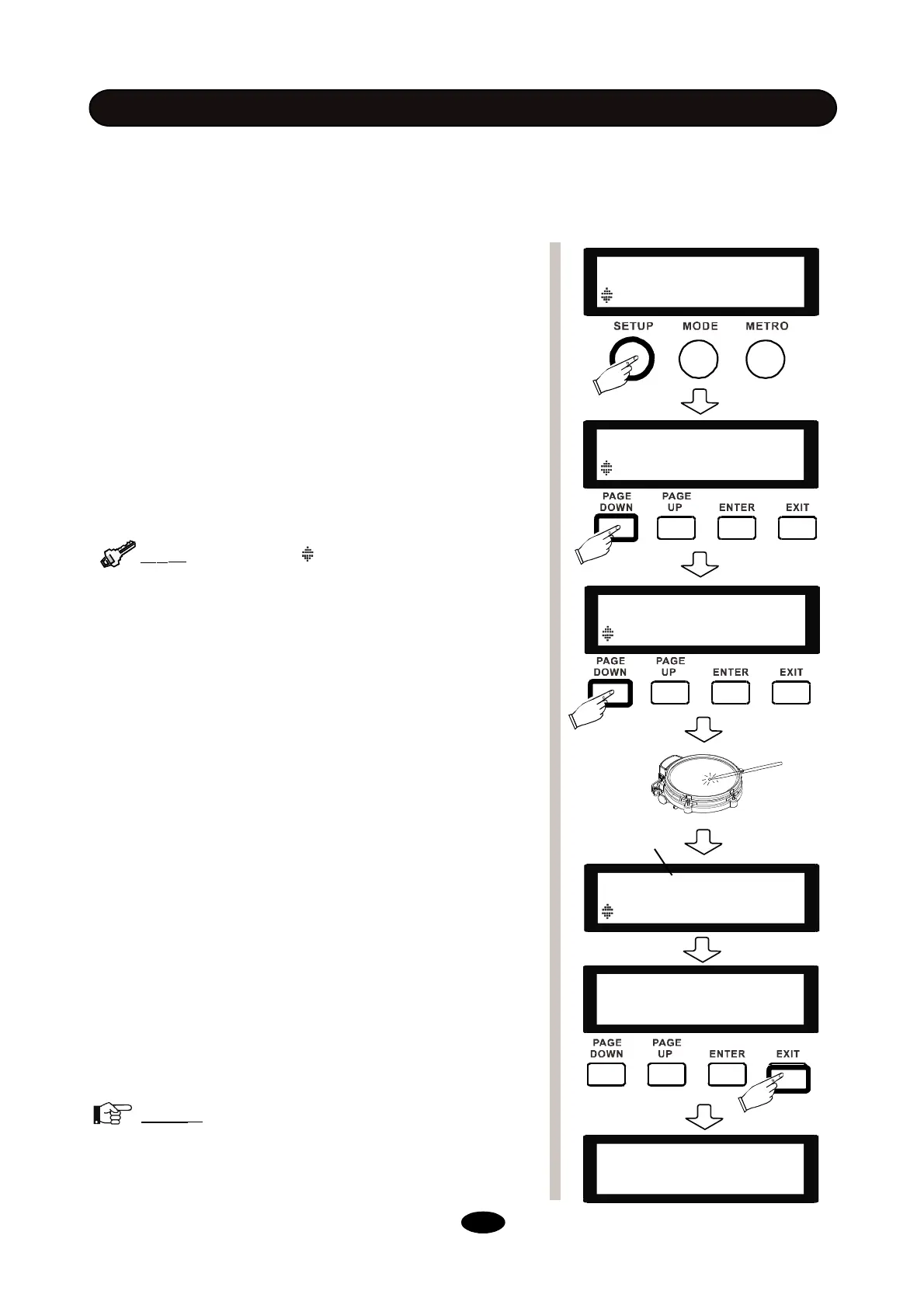
- Press SETUP button.
- Press the PAGE DOWN/UP button until the sub menu
ADVANCE appears.
- Press ENTER button to confirm, then press the PAGE
DOWN/UP button to select item of Xtalk.
- Strike a pad you desire with maximum strength repeatedly
until “OK” is shown on the screen.
- Then change to another pad and repeat the third procedure
(Not including Hihat Pedal).
- Also, you can set the HEADROOM (aka Velocity Dynamic
range) of each pad. To reach a loud sound easier, simply
lower the HEADROOM value.
- Press EXIT to quit, when “Save Setups” appears, press
ENTER to confirm or select No to cancel saving . The dis-
play will show “Save OK” after saving.
Note
:
All the system settings in SETUP is global
parameter, they will affect all the kits and can be saved even
when rebooted.If the adjustment result is not good, do a
crosstalk reset according to next pages.
- Make sure the drum kit is stable and all the parts are well locked.
- Connect all the cables to the drum module according to their tags.
- Connect the multi-trigger connector to its socket at the bottom of the sound module and lock it.
- Power the sound module up.
BEFORE START PERFORMANCE
TOM1 ADV
Xtalk Auto
Save Setups
NO YES
SETUP
BACK VOLUME 50
SETUP
ADVANCE [ENTER]
Due to the difference of installation and environment, if
cross talk problem occurs, please follow the following
procedures.
----Save OK ----
--------------------
Part to setup
12
Tip
:
When you see on screen, you can use
PAGE DOWN/UP buttons to move to another option.
SNARE-Head ADV
Xtalk
OK


 To Next Page