Portable LED HeadLight System (L2S15) www.xenosys.co.kr
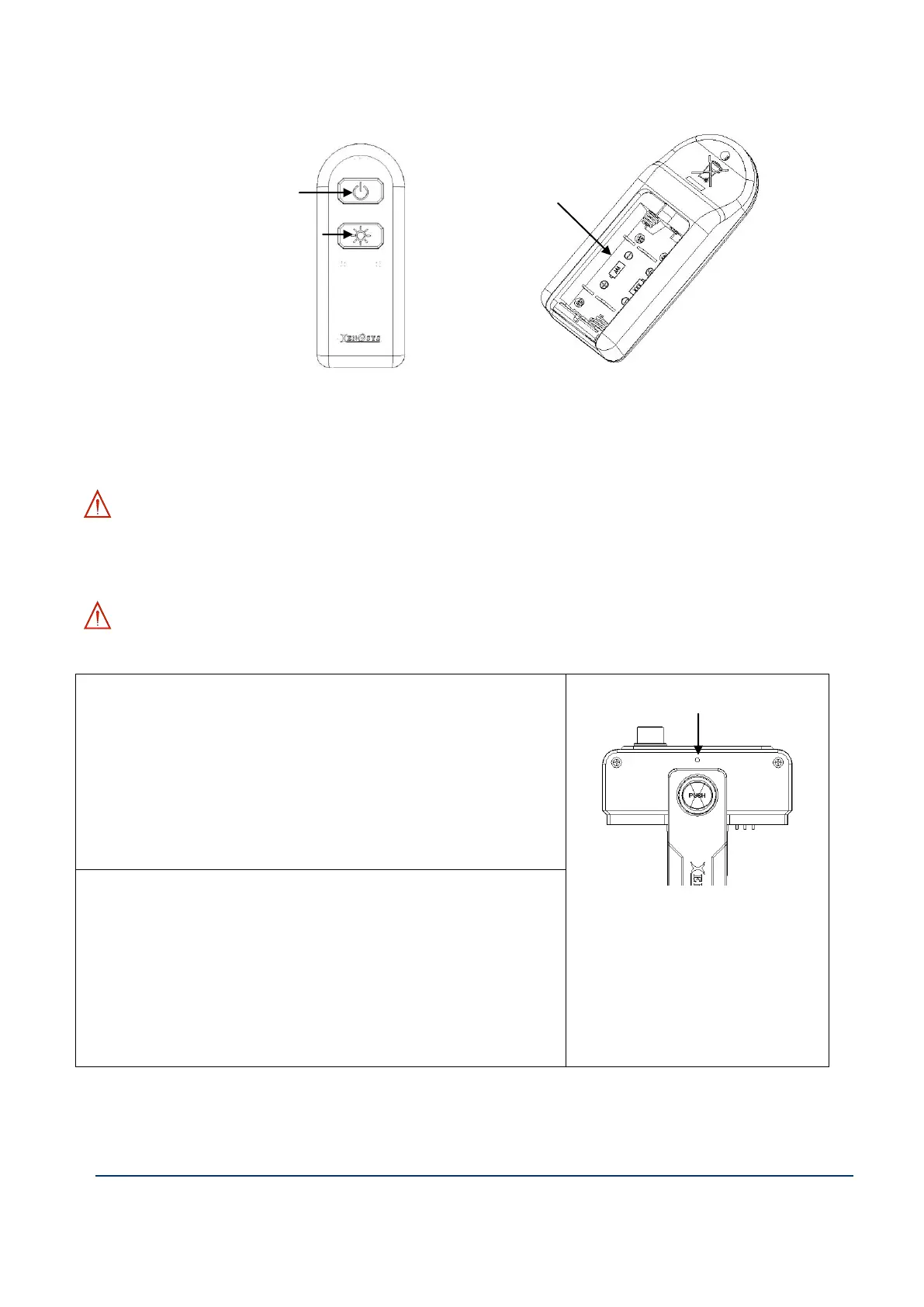
3. Remote Controller (RC15)
1) ①Power On/Off button: Press the button to turn ON/OFF of LED lens.
2) ②Battery entrance: 1.5V (2 EA), AAA size.
3) ③Intensity change button: Possible to change LED intensity from 1 to 4.
WARNING: To prevent the loss of battery power, the stand-by power of remote controller will be shut
down after turn-off by the remote controller (RC15). If you want to use remote controller again, turn on the
button of the control unit (main body).
WARNING: Control unit and remote controller will be provided with pairing. To set up & release
the pairing is as follows.
How to set up the pairing
1. Turn on the control unit (LCU15)
2. Push the pairing switch for one second and release -> Blue
light blinking
3. Push & release On/Off button of remote controller -> Blue
light will linger and off
4. Pairing complete.
A. If the pairing is released, it
can be controlled by other
remote controllers.
How to release the pairing
1. Turn on the control unit (LCU15)
2. Push & hold the pairing switch more than 5 seconds -> Blue
light blinking
3. Push & release On/Off button of remote controller -> Blue
light will linger and off
4. Release pairing complete.
③ Intensity Change Button



 To Next Page