EasyManua.ls Logo

Xhorse KEY TOOL PLUS - User Manual

Xhorse KEY TOOL PLUS
24 pages
Print Icon
To Next Page IconTo Next Page
Loading...
User Manual
Xhorse APP
*Read this user manual carefully before using the device.
www.vvdishop.com
Question and Answer IconNeed help?

Do you have a question about the Xhorse KEY TOOL PLUS and is the answer not in the manual?

Summary

Disclaimer, Safety, and Product Information

Disclaimer

Legal notices and disclaimers concerning the use and limitations of the KEY TOOL PLUS device.

Safety Precautions

Essential safety instructions for proper operation and user protection when using the device.

Product List

Details the standard package contents and accessories included with the KEY TOOL PLUS.

KEY TOOL PLUS Overview

Main interface and icons

Explains the device's main screen layout, key icons, and their functions.

Core functions

Outlines the primary functions available, such as Immo Programming, Transponder Clone, and PROG.

Shortcut features

Describes useful shortcut functions like Al query, My favorite, and My account for efficient operation.

Ports and accessories

Details the physical ports and accessories of the device for connectivity and operation.

Technical specifications

Lists the technical specifications of the KEY TOOL PLUS, including hardware and software details.

OBD IMMO Programming

Overview and model support

Introduces OBD IMMO programming and lists the extensive range of car brands and models supported.

Programming procedures

Covers key programming steps like adding keys, clearing DTCs, and using authorization codes.

Honda Accord example

Illustrates IMMO programming for Honda Accord, detailing system selection based on model year.

Remote and Transponder Functions

Remote generation and cloning

Explains how to generate and clone vehicle remotes, including frequency detection.

Transponder operations

Details transponder reading, generation, and cloning for various transponder types.

Special functions

Covers advanced functions like remote renew, ignition coil detection, and smart key customization.

PROG Module Operations

Overview of PROG functions

Introduces the PROG module for reading/writing common automotive modules and chips.

EEPROM and module programming

Details EEPROM reading/writing and solder-free programming for BMW, Land Rover, and Porsche modules.

Immo Data Tool Features

File Make Key overview

Introduces File Make Key for generating keys when OBD port access is limited, listing supported models.

File management and data handling

Covers managing local and cloud files for the File Make Key process, including uploading data.

Extended Function: Key Cutting

Connecting to cutting machines

Instructions for connecting KEY TOOL PLUS to Xhorse key cutting machines like DOLPHIN.

Key cutting methods

Covers various key cutting techniques including Cut by Bitting, Universal Duplication, Find Bitting, All Key Lost, and customization.

Machine parameter settings

Details how to set and adjust parameters for the key cutting machine.

Settings

Machine connection and network

Connects to cutting machines via Bluetooth and configures Wi-Fi connections for the device.

Device settings and customization

Manages language, APP prompts, system volume, brightness, and other device configurations.

Policy and user information

Provides access to service/privacy policy and manufacturer/app version information.

Warranty and After-sales Service

Summary

Disclaimer, Safety, and Product Information

Disclaimer

Legal notices and disclaimers concerning the use and limitations of the KEY TOOL PLUS device.

Safety Precautions

Essential safety instructions for proper operation and user protection when using the device.

Product List

Details the standard package contents and accessories included with the KEY TOOL PLUS.

KEY TOOL PLUS Overview

Main interface and icons

Explains the device's main screen layout, key icons, and their functions.

Core functions

Outlines the primary functions available, such as Immo Programming, Transponder Clone, and PROG.

Shortcut features

Describes useful shortcut functions like Al query, My favorite, and My account for efficient operation.

Ports and accessories

Details the physical ports and accessories of the device for connectivity and operation.

Technical specifications

Lists the technical specifications of the KEY TOOL PLUS, including hardware and software details.

OBD IMMO Programming

Overview and model support

Introduces OBD IMMO programming and lists the extensive range of car brands and models supported.

Programming procedures

Covers key programming steps like adding keys, clearing DTCs, and using authorization codes.

Honda Accord example

Illustrates IMMO programming for Honda Accord, detailing system selection based on model year.

Remote and Transponder Functions

Remote generation and cloning

Explains how to generate and clone vehicle remotes, including frequency detection.

Transponder operations

Details transponder reading, generation, and cloning for various transponder types.

Special functions

Covers advanced functions like remote renew, ignition coil detection, and smart key customization.

PROG Module Operations

Overview of PROG functions

Introduces the PROG module for reading/writing common automotive modules and chips.

EEPROM and module programming

Details EEPROM reading/writing and solder-free programming for BMW, Land Rover, and Porsche modules.

Immo Data Tool Features

File Make Key overview

Introduces File Make Key for generating keys when OBD port access is limited, listing supported models.

File management and data handling

Covers managing local and cloud files for the File Make Key process, including uploading data.

Extended Function: Key Cutting

Connecting to cutting machines

Instructions for connecting KEY TOOL PLUS to Xhorse key cutting machines like DOLPHIN.

Key cutting methods

Covers various key cutting techniques including Cut by Bitting, Universal Duplication, Find Bitting, All Key Lost, and customization.

Machine parameter settings

Details how to set and adjust parameters for the key cutting machine.

Settings

Machine connection and network

Connects to cutting machines via Bluetooth and configures Wi-Fi connections for the device.

Device settings and customization

Manages language, APP prompts, system volume, brightness, and other device configurations.

Policy and user information

Provides access to service/privacy policy and manufacturer/app version information.

Warranty and After-sales Service

Overview

The Xhorse KEY TOOL PLUS is an all-in-one automotive security solution designed for locksmiths, combining various functions for immobilizer matching, remote generation, transponder cloning, file make key, and reading/writing vehicle module data. It also serves as a control unit for Xhorse key cutting machines.

Function Description:

The device offers a comprehensive suite of functions accessible through its main interface:
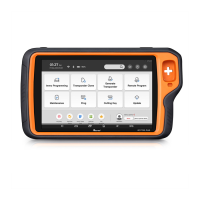
  • Immo Programming: Facilitates vehicle OBD immo programming for a wide range of car models. Users can select car brands and models based on brand area, with support for over 20,000 car models worldwide. Functions include adding keys, all keys lost, and remote clearing. For some models, an authorization code may be required, which the device can read or users may need to obtain.
  • Transponder Clone: Allows reading and cloning of vehicle transponders, supporting common types like 11, 12, 13, 33, 42, 46, 4D, 48, 8A, 8C, and Xhorse super transponders. It can precisely read remote transponder data, reading status, frequency, and synchronized mileage. Some transponders, like ID48, can be directly cloned online without needing car matching.
  • Generate Transponder: Enables the generation of vehicle remote transponders.
  • Remote Program: Supports remote generation for ordinary cars and smart keys, frequency detection, and remote cloning for various car models. Users can bookmark favorite remotes and key blanks for quick access.
  • Immo Data Tool: For cars where key programming via OBD is not possible due to immobilizer system design, this function allows generating or adding keys by reading transponder data directly from the car's immo module. It supports file make key for common cars and motorcycles. File management is integrated, allowing users to choose data from local files or cloud storage.
  • PROG (Programming): Supports reading and writing common modules and chips, including EEPROM and FLASH, IMMO, Instrument, Airbag, and ECU. Users can operate according to specific car model modules or chip manufacturers. It supports reading and writing EEPROM chips of ordinary cars, and specific module programming like BMW FRM, LANDROVER RFA, and PORSCHE BCM (solder-free).
  • Cutting Key: Integrates with Xhorse key cutting machines (CONDOR, DOLPHIN, PANDA) to complete key cutting tasks. It displays all supported key blanks, allows cutting by bitting (categorized by general key blanks), universal key duplication for common car key bittings, and "All Key Lost" functionality to acquire bitting information from partial key data. The "Find Bitting" function helps get ignition lock bitting from car door lock bitting. Users can also customize key data or download shared bitting data.
  • Update: Provides a system update center for keeping the device software, firmware, and databases current.
  • Help Center: Offers technical guidance, tutorial videos, and FAQs. Users can also provide feedback or apply for remote development.
  • Al Query: Allows scanning the VIN code of a vehicle to automatically display operation options like detailed information, key cutting, remote programming, immo programming, and immo data tool.
  • Remote Renew: Unlocks programmed car keys of multiple brands and models that are no longer usable after programming.
  • Ignition Coil Signal Detection: Detects the transponder type of a car's ignition coil and checks its functionality, useful for "all keys lost" scenarios.
  • Smart Key Customization: Supports customizing Xhorse universal smart key button settings and frequency adjustments to suit different scenarios and car models.

Important Technical Specifications:

  • Operating System: Android 9.0
  • Processor: 8-Core (4xCortex-A53 up to 2.3Ghz + 4xCortex-A53 up to 1.8Ghz)
  • Screen: 10.1 inch, 1920*1200 resolution
  • Memory: 4GB LPDDR4X SDRAM + 128GB EMMC
  • Camera: 13.0MP
  • Input Voltage (USB): 5V/9V
  • Input Voltage (OBD): 12V/24V
  • Charging Current: 9V/3A
  • Standby Time: >7*24h
  • Battery: 10000mAh
  • Working Temperature: -20~55 °C
  • Storage Temperature: -30~65 °C
  • Wireless Port: WIFI/Bluetooth
  • Sensor: Light sensor
  • Dimension: 320*181*34mm

Usage Features:

  • Main Interface: Intuitive layout with icons for Immo programming, Transponder Clone, Generate Transponder, Remote Program, Immo data tool, Prog, Cutting key, and Update.
  • Ports and Accessories:
    • On/Off / Screen Lock: Power control.
    • USB Charging Port: Standard fast charge adapter and Type-C port DC-5V input.
    • PS2 Port: For remote generation.
    • DB15 Port: Supports standard & optional programming adapters.
    • DB25 Port: For OBD immo programming.
    • Benz Infrared (IR) Port: Supports IR read for Benz FBS3 & FBS4 smart keys and Benz IR reader.
    • Detection Coil: Integrated for 125K low, 13.56M medium, and 300-900M high frequency, supporting reading, writing, and cloning common immo transponders, ID/IC transponders, and frequency detection of vehicle remotes.
    • Immo Transponder Placement Hole: For vehicle immo transponders.
    • Screw Hole: For optional tablet support.
    • Hand Strap Holder: For secure handling.
    • Speaker & Microphone: For audio feedback and input.
    • Camera & Flashlight: For various utility functions.
    • Accessories: Includes charger, USB cable, OBD_DB25 cable, OBD connectors (KIA 10/20 pin, HONDA 3 pin), Remote_PS2 programming cable, Transponder box, Prog_DB15_15 cable, Prog_EEPROM adapter, Benz_IR reader, Benz_NEC adapters (1, 2, 3), BENZ_power adapter, 9s12xE cable, and MCU cable.
  • Synchronization: Users can synchronize tokens and collect bonus points.
  • Settings: Allows configuration of system settings such as WLAN connection, language, APP settings, system volume, brightness, sleep time, cache clearing, and system restore.
  • Key Cutting Machine Connection: Connects to Xhorse key cutting machines via Bluetooth, allowing the KEY TOOL PLUS to serve as its screen and control unit.

Maintenance Features:

  • Update Notification Bar: Displays update information for the device.
  • System Update Center: Provides one-click updates for system, APP, firmware, and database.
  • Warranty and After-sales Service: Xhorse offers a one-year guarantee from the purchase date. The warranty does not cover damages caused by:
    • Operations not observing the user manual.
    • Self-repair or modification.
    • Dropping, collision, or improper voltage.
    • Force Majeure.
    • Long-term use in severe environments (vehicle or boat).
    • Shell stains, scratches, and abrasion from daily use.
  • Technical Support: Users can contact their local dealer or Xhorse online customer service for after-sale service and technical support.

Xhorse KEY TOOL PLUS Specifications

General IconGeneral
BrandXhorse
ModelKEY TOOL PLUS
CategoryTablet
LanguageEnglish

Related product manuals