9 Extended Function: Cutting Key
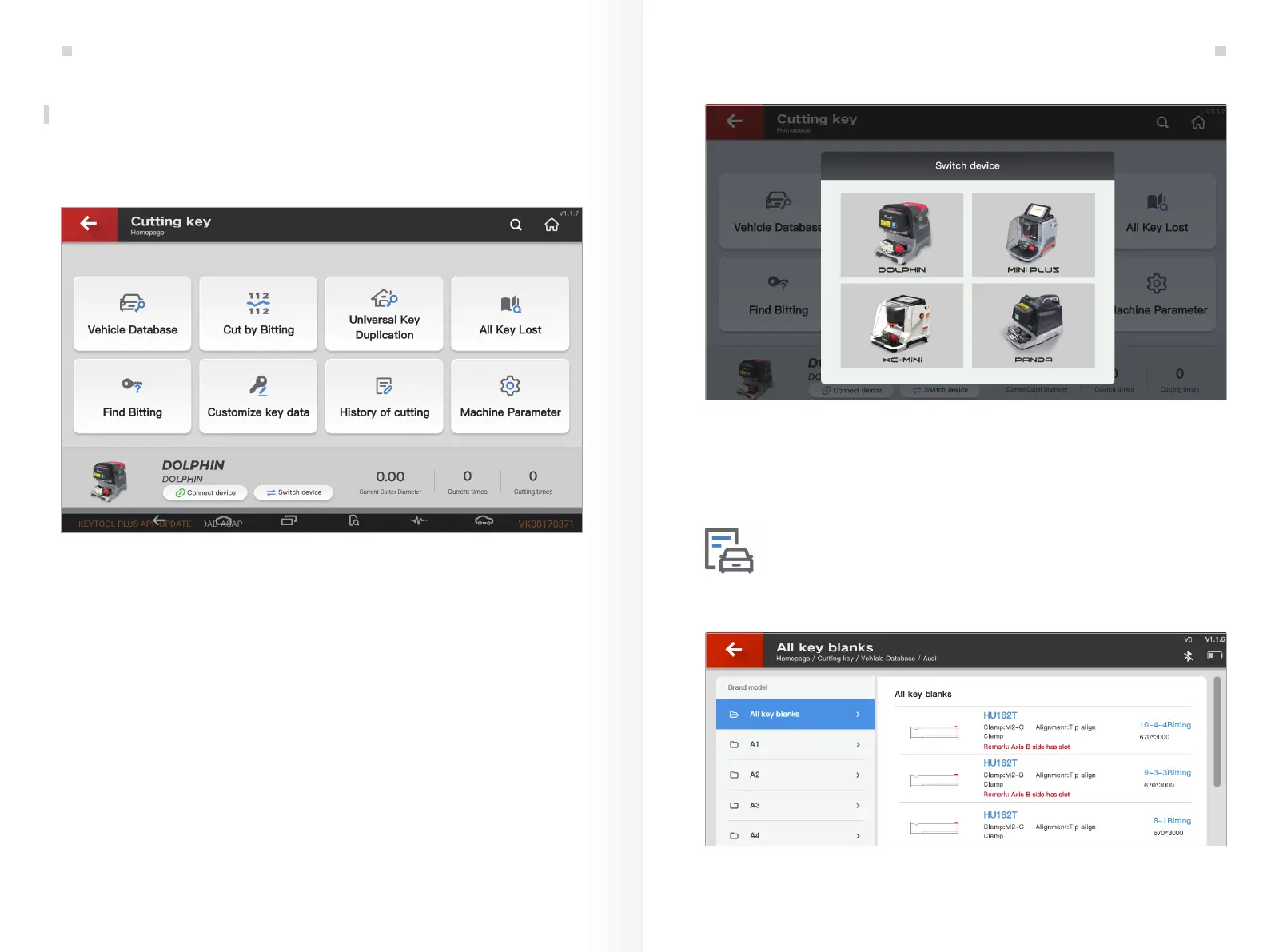
KEY TOOL PLUS can be extended to control Xhorse key cutting machines (CONDOR,
DOLPHIN and Panda) and work as its screen. See the interface as shown in Fig. 9.1
Fig.9.1
9.1 How to switch and connect the key cutting machine
Steps:
① Click 'Switch device', select the machine you need as shown in Fig. 9.1.1.
Machines that are compatible with KEY TOOL PLUS include DOLPHIN, MiNi PLUS,
XC Mini and PANDA.
9.2 Introduction to key cutting machine functions
Vehicle Database shows all the key blanks supported by the currently connected device.
You can choose the brand, model, year and key blank you need. See Fig. 9.2.1.
Fig.9.1.1
Fig.9.2.1
② Click 'Search new device' and click on the serial number.
Vehicle Database
Extended Function: Cutting Key
33 34
Extended Function: Cutting Key


 To Next Page