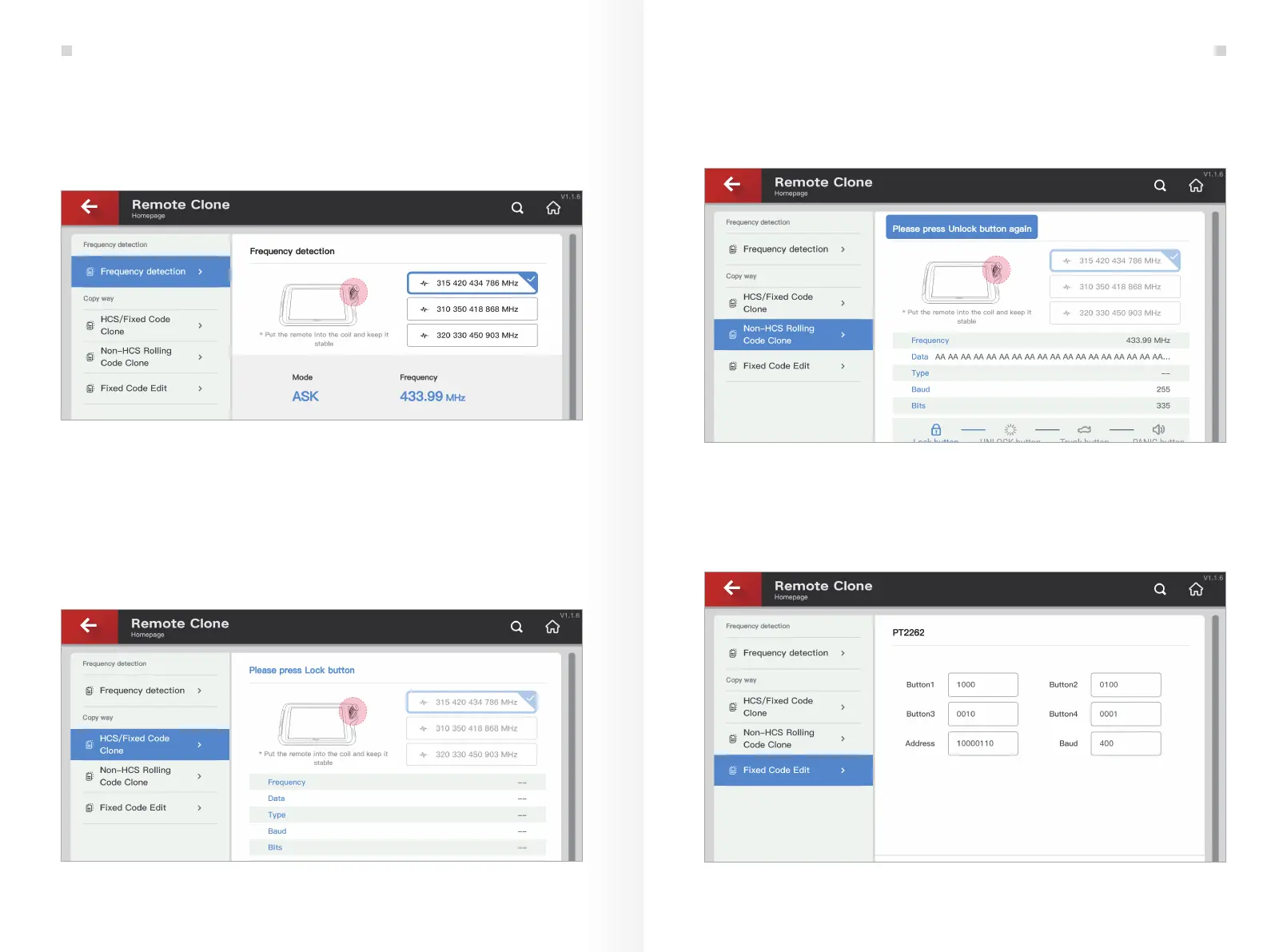
Remote clone can be completed in this interface. To better detect the remote
frequency, the device needs to set the appropriate frequency range. The default
frequency range is 315 MHz to 433 MHz. If you need to detect other frequency, you
can switch the frequency range manually. See Fig. 6.1.2
The special clone function is for remotes with non-fix format. Because the special
clone function is compulsive, there is no guarantee that this function will work normal-
ly after copying. The clone interface is shown in Fig. 6.1.4.
Some new remotes can be directly cloned with the original remotes. KEY TOOL PLUS
supports two common types of remote clone function and fix code editing function.
HCS/fix code clone is used to complete remote clone for HCS3XX rolling code, PT2262, LX918,
HT6P20 and so on. Other types of remotes that are not fix code format will not show the clone
data. See Fig. 6.1.3, the HCS301 remote data clone of BYD F3. Please see the example below.
Fig.6.1.2
Fig.6.1.4
Fix code editing serves as a fix tool for some fix code remotes. When the remote function
is partially damaged, users can generate a fully functional remote by using the editing
function as shown in Fig. 6.1.5.
Fig.6.1.5
Fig.6.1.3
Remote and Transponder
19 20
Remote and Transponder


 To Next Page