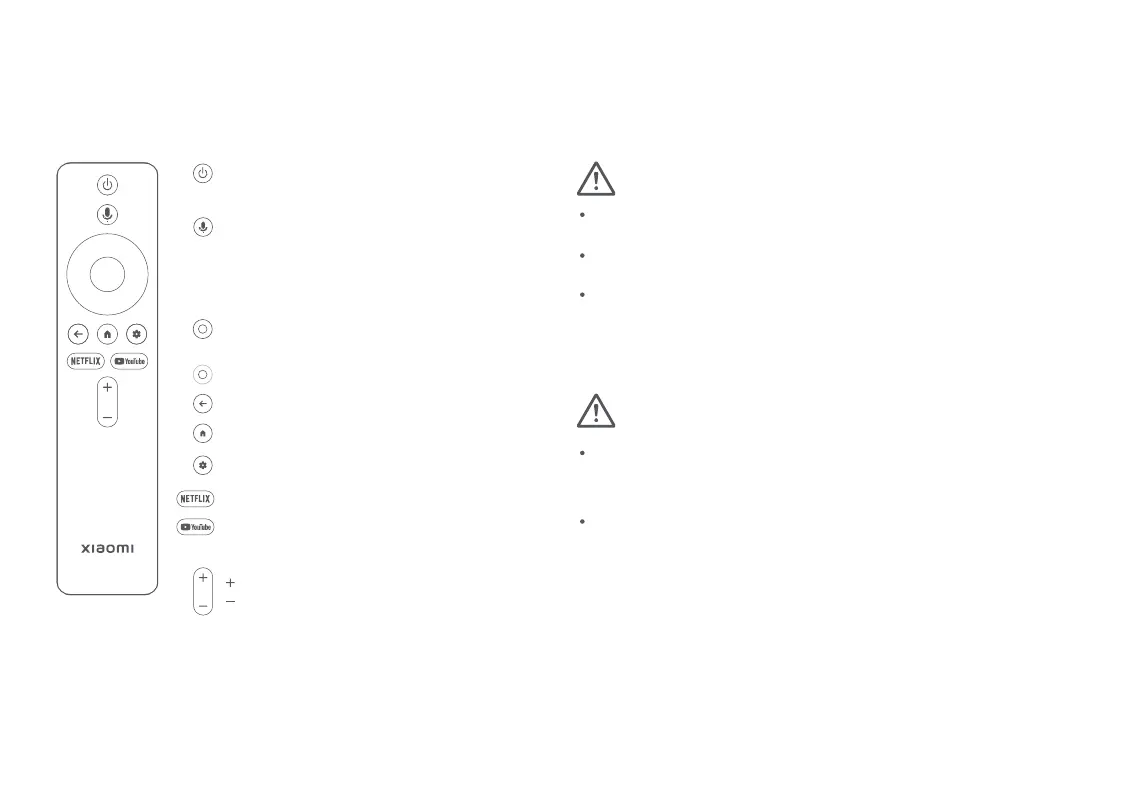
Settings Button: Open the control panel
Netflix Button: Access the Netflix app
YouTube Button: Access the YouTube app
Volume Button:
Volume up
Volume down
Note:
Caution:
Power Button:
Navigation Button:
Move up, down, left, or right
Back Button: Return to the previous screen
Confirm Button: Press to confirm
Home Button: Return to the home screen
Remote control
Note: Illustrations of product, accessories, and user interface in
the user manual are for reference purposes only. Actual
product and functions may vary due to product enhancements.
The appearance or screen printing characters on the projector
may vary for different sales regions. Please refer to the actual
projector.
It is recommended to use the remote control within a
distance of 5 meters from the projector.
Make sure the positive and negative poles are installed
correctly when placing the batteries into the remote control.
Dispose of used batteries in accordance with local waste
disposal regulations and guidelines of the country or region
you live in.
Turn on or turn off the projector
04
Google Assistant:
Ask Google Assistant to find movies,
stream apps, play music, and control
the projector - all with your voice.



 To Next Page