13
Instructions
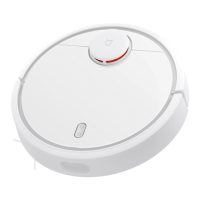
Press and hold the buon to turn on the unit. The indicator
light will go on, and the unit will enter standby mode. When
the unit is stationary, press and hold the buon to turn it
off, and the cleaning will be finished.
Turning on/off
Cleaning Methods
Press the buon to start cleaning
Press any buon to pause the unit when it is cleaning
Note:
The unit cannot start cleaning without sufficient power. Recharge
the device before cleaning.
The Unit will automatically return to the Charging Dock to charge
when it runs low on power over the course of cleaning. It will
automatically return and continue cleaning where it le off aer
charging
Please tidy up any cables lying on the ground before cleaning
(including the Charging Dock power cable itself) to prevent the unit
from catching on any cables in the course of cleaning which
might shut down any electrical appliances or cause damage to the
objects or cables
The device will clean the area twice by default if it completes the
cleaning process in less than 10 minutes
Cleaning
Note: You cannot turn the Unit off when it is charging
Auto Mode: The Unit will automatically return to the Charging
Dock to recharge aer it finishes cleaning Manual Mode: Press
the buon to start charging when the unit is in Paused Mode.
The indicator light will gently pulse while the unit is charging
Charging
Note: The unit will automatically return to its original location if it cannot
locate the charging dock. You will then need to place the main unit on
the charging dock manually to recharge it.
The Unit will intelligently scan and map out its area being activated. It
will clean along edges and walls first and then figure out a cleaning route
that covers the entire area in Z-shaped paerns. It will methodically clean
each zone it maps in a very comprehensive, methodical and highly efficient
manner. The Unit will automatically return to the charging dock to recharge
aer cleaning is finished






 To Next Page