8
CONTROL PANEL AND
OPERATION
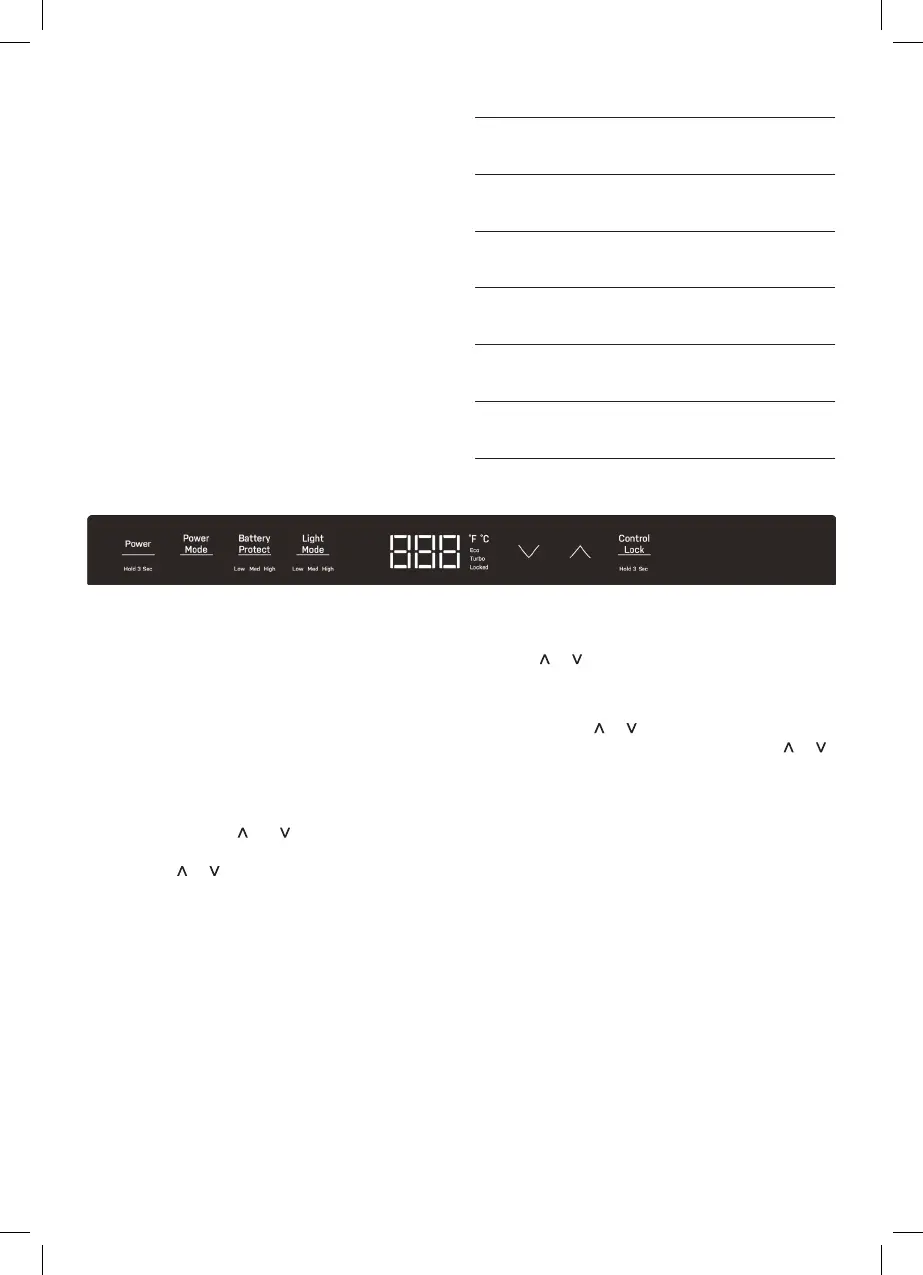
(1) (2) (3) (4) (5) (6)
POWER MODE
+ Press Power Mode button to switch between
Quick mode and Eco mode; the corresponding icon
will be lit.
+ Default setting is Eco mode.
CHANGING TEMPERATURE
SCALE
+ Press and hold the and keys for 10 seconds,
the current temperature display unit will flash,
and press
or key briefly to switch between
“°C” and “°F” When the power to the cooler is
turned on.
+ Default setting is “°C”.
BATTERY PROTECTION
+ When the power to the cooler is turned on, press
the Battery Protect button to enter battery
protect mode. The panel will display the current
setting.
+ In selection mode, press the Battery Protect
button to cycle to the next setting option.
The panel will display LOW > MED > HIGH.
+ The default setting is MED.
When your fridge is first connected to a power source
the appliance will automatically switch on and the
LCD control panel will display the current cabinet
temperature, Battery Protection and Cooling Power
Mode setting as well as the Light Mode setting.
+ The Temperature Controller provides the ability
to set the desired temperature level and display
the current cabinet temperature. The electronic
controller has been programmed to maintain an
average of the set temperature.
+ The compressor will start up when the internal
cabinet temperature increases 0.5 to 1.5 degrees
above the set temperature and will run until the
temperature is 0.5 to 1.5 degrees below the set
temperature.
1 POWER
Press and hold the Power button for 3
seconds to Power unit on or off.
2
POWER
MODE
Press Power Mode button to switch
between Quick mode and Eco mode
3
BATTERY
PROTECT
Press Battery Protect button to select
Low, Middle or High level.
4
LIGHT
MODE
Press the Light Mode button to adjust
the light’s setting to low, middle, or high.
5
TEMP.
ADJUST
Press up/down arrows to adjust the
desired temperature.
6
CONTROL
LOCK
Press Control Lock button for 3 seconds,
to lock and unlock the control.
TEMPERATURE SETTING
+ Press or button to increase or decrease the
temperature setting.
+ The default temperature setting is 5°C.
+ Each time the
or is short pressed, the
temperature setting will change 1°C, while or
is long pressed, the temperature setting will
change 4°C.
+ The Temperature range setting from
-18°C to +10°C.
DISPLAY LIGHTING
+ Press Light Mode button to activate and enter
light setting mode.
+ In selection mode, press the Light Mode button to
cycle to the next setting option.
The panel will display LOW > MED > HIGH.
+ The default is HIGH.


 To Next Page