Operation Manual
56
Operation
Operation Manual
56
Stopping Travel
1. Stop the forklift by applying the service brake pedal.
2. Slow the forklift until it comes to a complete stop.
3. Move the travel select lever to NEUTRAL (N).
4. Set the parking brake to ON (engaged).
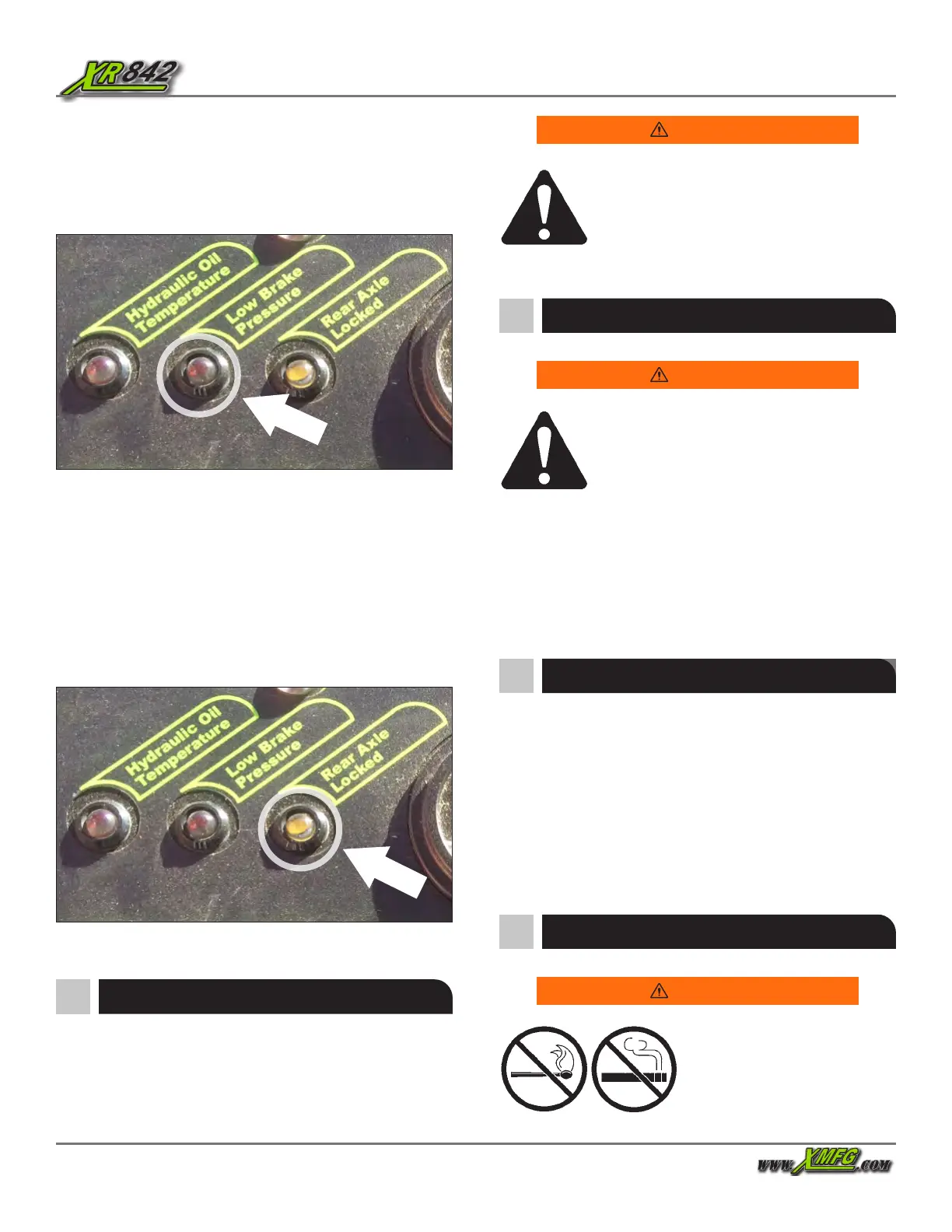
Figure 66. Low Brake Pressure Indicator
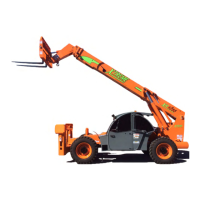
Figure 67. Rear Axle Lock Indicator
The rear axle lock indicator illuminates when the forklift is
in the axle lock mode. The rear axle locks when the parking
brake is set to ON (engaged), the transmission is in NEUTRAL
or the service brake applied, and when the boom is above 40
degrees. If the rear axle lock indicator does not illuminate,
stop the forklift, follow proper shut down procedures, tag
the forklift with “Do Not Operate” tags, and have a qualied
mechanic service or repair the forklift before placing it into
service again.
The low brake pressure indicator illuminates if the hydraulic
brake oil pressure gets low. If the low brake pressure indicator
is illuminated, stop the forklift, follow proper shut down
procedures, tag the forklift with “Do Not Operate” tags, and
have a qualied mechanic service or repair the forklift BEFORE
placing it into service again.
Warning
To prevent death, serious injury, or property
damage, apply service brakes until the forklift
comes to a complete stop, move travel select
lever to NEUTRAL (N), set the Parking Brake
switch to ON (engaged), lower and retract the
boom, and shut o the engine before exiting the forklift.
Warning
Make sure the forklift comes to a complete
stop before moving the travel select lever. A
sudden change in direction of travel, while
carrying a load, can reduce stability and/
or cause the load to shift or fall, which could
result in death, serious injury, or property damage.
Changing Travel Direction
1. Stop the forklift by applying the service brake pedal.
2. Move the travel select lever to FORWARD (F) or REVERSE
(R).
3. Release the service brake pedal.
4. Slowly press the accelerator pedal to start travel.
Engine fuel is ammable and
can cause a re or explosion
resulting in death or serious
injury. DO NOT smoke while
refueling and keep sparks and
open ames away from the forklift.
Warning
Refueling
Shut Down Procedure
1. Park forklift on level ground, if possible.
2. Stop the forklift by applying the service brake pedal.
3. Place the travel select lever in NEUTRAL (N) and set the
parking brake to ON (engaged).
4. Lower the boom and rest carriage on ground.
5. Turn the ignition key to OFF and remove the key.
6. If the forklift is parked on an incline, block the wheels.


 To Next Page