EasyManua.ls Logo

XTZ CLASS-A100D3 - Remote Control Operations; Remote Control Functions

XTZ CLASS-A100D3
14 pages
Print Icon
To Next Page IconTo Next Page
To Previous Page IconTo Previous Page
Loading...
Page: 11 / 14
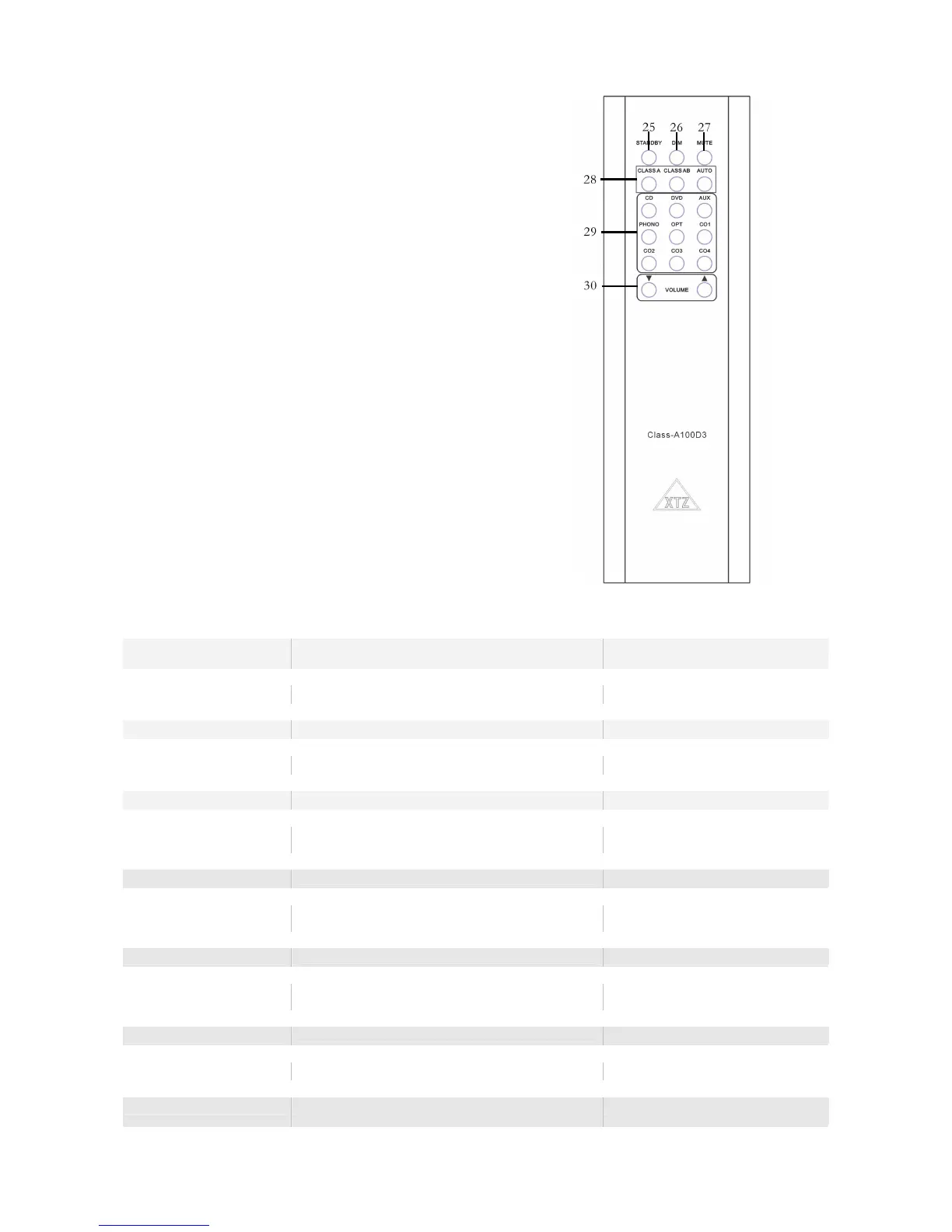
Remote control
25. STANDYBY
26. DIM
27. MUTE
28. OPERATION MODE
29. INPUTS
30. VOLUME
1 STANDBY
To set the product in standby mode, without
turning it off
2 CD
CD as source
3 DVD
DVD as source
4 AUX
Aux as source
Normally used to connect a TV or decoder
5 PHONO
Phono as source
For connecting your LP player
6 DIGITAL
Choosing the digital inputs
Push it once to change
to next digital
input
7 VOLUME
Adjusting the volume on the amplifier
8 IR
Infra red eye
Do not put anything in the way of the IR
-
eye
9 DISPLAY
All information is shown here
10 ON/OFF
The main power on/off
Should be set to OFF
when going away for
a longer time
11 AC INPUT
For connection the power cord
12 VOLTAGE
The input voltage that is used
EU ~220-240V & USA ~110-130V
13 DIGITALINGÅNG
Digital input, change input by pushing the button

one more time.
Push it once to change
to next digital
input

Related product manuals