5
Introduction
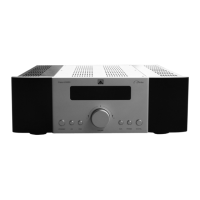
We would like to thank you for buying a product of the XTZ EDGE series. The electrical design of the EDGE
series oers the ultimate sound reproduction. In order to utilize your new device in the best possible way,
please read this manual carefully before using it for the rst time. It often takes some eort and patience to
make a HiFi system sound its best. If you don´t have any previous experience from this kind of installations,
please feel free to contact our free of charge support and we will help you. (See Support on the last page
of this manual)
- Series name - Power Amplier - Power level
-Two channels
Safety instructions
Switch o your amplier before connecting the speakers. Make sure that the speaker cables are tightened
and have a strong connection to the speaker terminal and amplier terminal.
Make sure that the electronics are not exposed to direct sunlight or strong articial light. Listening
to high sound pressure levels over a longer period of time may harm your hearing. To avoid hearing
damage do not listen to high sound levels over a longer period of time.
Quick Setup
The initial set-up of a XTZ product is relatively easy. Please take your time reading the guidelines and more
detailed instructions on the following pages of this manual after completing the rst four steps as listed
below.
1 Connect your speakers to the SPEAKER-OUTPUT terminals of the EDGE A2-300.
2 Connect your Preamplier’s PRE OUT to the EDGE A2-300 rear panel’s INPUT port.
3 Make sure to set your Pre-amplier’s volume level to minimum.
4 Connect the AC cord to the EDGE A2-300 AC Power input and then plug into an AC outlet.
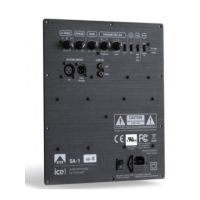
5 Set the switches in the CONTROL section on the backside of the EDGE A2-300 as you wish. If the device
is used in „AUTO ON“ Mode, it will detect any incoming signal and automatically switch from STANDBY to
ON. If used in „ALWAYS ON“ Mode, the device will always be in ON Mode.
6 Switch the POWER switch on the rear panel to the “ON” setting in order to turn the EDGE A2-300 to stand-
by mode. The Standby LED indicator embedded around the bezel of the STANDBY button will illuminate
red in case you use the device in „AUTO ON“ Mode and green in case you use it in „ALWAYS ON“ Mode
Placing the unit
Allow adequate ventilation. Do not place the unit on a soft surface like a carpet. Do not place it in an enclosed
position such a bookcase or cabinet that may impede the air-ow through the ventilation slots.
AC Power
(220V / 110V)
To power the unit, connect the supplied power cord to the unit and a standard AC power outlet. The unit itself
recognizes the prevailing voltage so you don‘t need to adjust it to your local voltage level. In standby mode
the EDGE A2-300 consumes less than 0,3W.
Connections
(Noise issues)
To ensure a safe management of the amplier and speakers, always only connect and disconnect
signal cables and speaker cables when the amplier is shut o with the main switch on the back side.
Always use signal and speaker cables as short as possible and of good quality. Long
signal cables of poor quality works as antennas, and might in some cases create noise.
Always connect using the correct phase, from the plus (+) pole on the amplier to the plus (+) pole on the
loudspeaker and respectively for the minus (-) pole.
Earth ground is often used to reduce noise from electrical interference from outside the casing, however in
some cases several electrical devices which are connected to the same grounding grid can create loops that
pick up interference i.e. ground loops. There are a couple of ways to x this problem:
• Use the same power strip / power outlet for the interfering equipment.
• Use short as possible signal cables of high quality to minimize resistance and impedance.
Trademarks
ICEpower is a registered trademark of ICEpower a/s
XTZ is a trademark of XTZ Group AB
Cleaning the
product
Switch o all components of your system when cleaning any of the components. Clean surfaces with a soft
dry cloth only.


 To Next Page
 Loading...