76
Quick Setup
The initial setup of a XTZ product is relatively easy. Please take your time reading the guidelines and more
detailed instructions on the following pages of this manual after completing the rst four steps as listed
below.
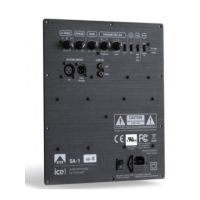
1. Connect your speakers to the SPEAKER-OUTPUT terminals of the EDGE A2-400.
2. Connect your pre-amplier’s PRE OUT to the EDGE A2-400 rear panel’s INPUT port.
3. Make sure to set your pre-amplier’s volume level to minimum.
4. Connect the AC cord to the EDGE A2-400 AC power input and then plug into an AC outlet.
5. Set the switches in the on the back of the EDGE A2-400 as you wish. If the device is used in “AUTO ON“
mode, it will detect incoming signals and automatically switch from STANDBY to ON. If used in “ALWAYS
ON“ mode, the device will always be in ON mode. There is also the option of using “TRIGGER” if your
pre-amplier has 12V trigger output.
6. Set the POWER switch on the rear panel to “ON” in order to turn the EDGE A2-400 to standby mode. The
standby LED indicator on the front panel will illuminate red in case you use the device in “AUTO ON“ mode
and green in case you use it in “ALWAYS ON“ mode.



 To Next Page