EN 22 EN 23
Signal Lines Connection
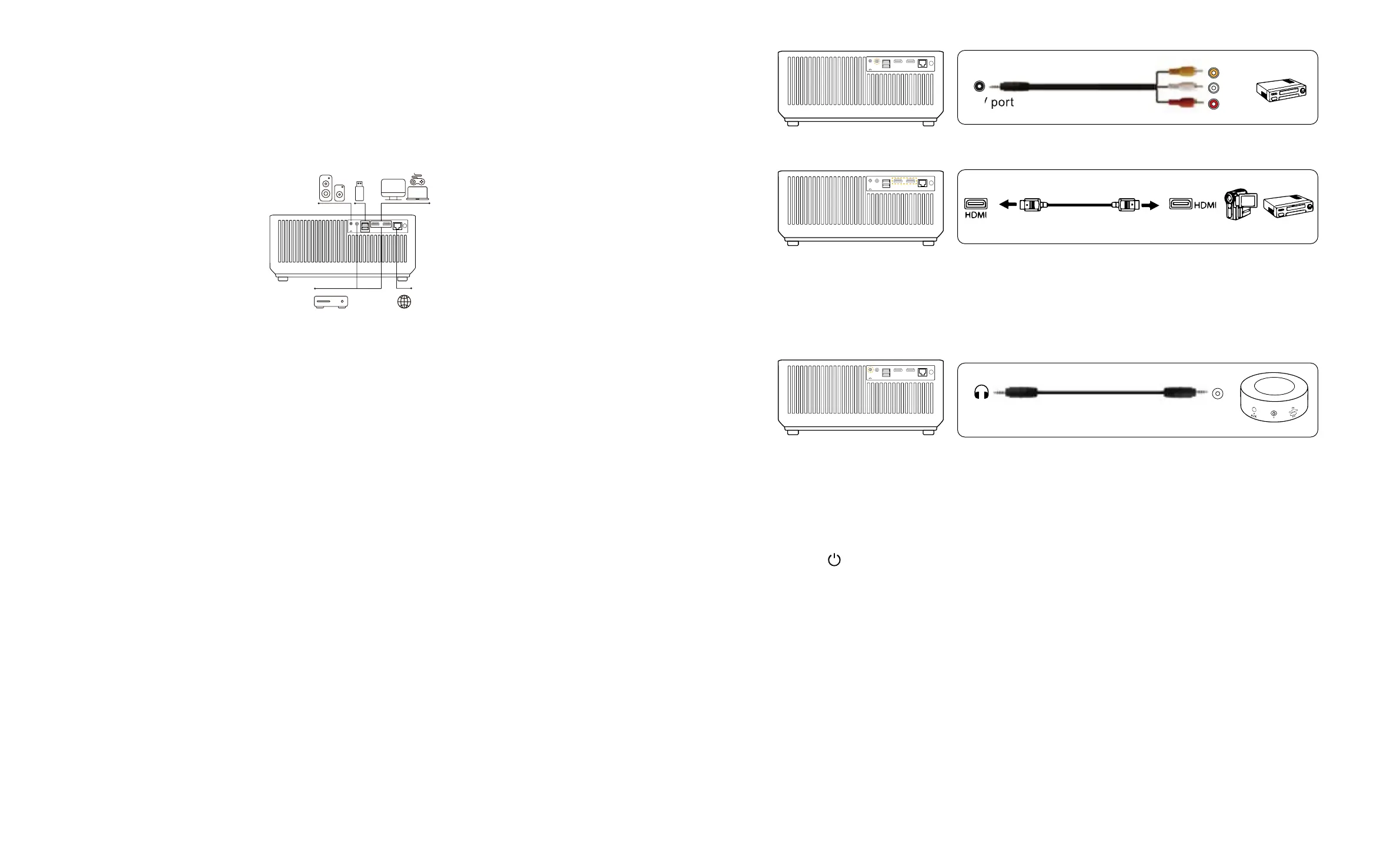
YABER K1 projector has 7 interfaces, HDMI ports*2/ USB ports*2/ 3.5mm headphone output/
AV in /RJ45 (Ethernet port) .Please select the correct connecting port to connect your device
(PC, Phone, DVD Player, Sound bar, USB, PS4 etc.)
1. Insert the U disk into either of the two usb input ports.
2. You can directly enter the start-up screen on the home page, select the option [ Video/
Music/Photo/Office Suite].
3. Select the desired file (or enter the subfolder) in the USB disk, then press the [ OK ] button
to play it.
1. Connect your TV stick or laptop to any HDMI port of the projector.
2. Enter the home page to select the corresponding HDMI1 or HDMI2 as the signal source.
Or connect to the DVD Player with the HDMI cable in the package.
Use the 3-in -1 AV cable in the package
1. Connect your TV stick or laptop to any HDMI port of the projector.
2. Connect the colorful female connectors to your DVD player's RCA cable with the 3-in-1 AV
cable in the package.
3. Connect the black connector to the AV port of the projector, enter the home page to
select [ AV ] as the signal source.
If your speaker has AUX port, please use your 3.5mm audio cable connect the projector and
your speaker as the picture shows, enter the home page to select [ AV ] as the signal source.
1. Press the button on the projector or remote controller,then press OK key to power off
the projector.
2. Unplug the power cord of the projector.
3. Cover the lens and store the projector in a cool and dry place.
Thank you so much for your purchase and support! We provide 3-year warranty for K1
projector. If you have any questions, please feel free to contact us via:
purchased from Amazon: support@yabertech.com
purchased from others: aftersales@yabertch.com
1. Connect USB Disk
2. Connect the Devices via the HDMI ports
3. Connect to the DVD Player
4. Connect to the Sound bar/Speaker
Audio
out
AUX
port
Safe Shutdown
Warranty
Video
Left
AV port
Right
DVD
AV USB HDMI 1 HDMI 2 IR
AV USB HDMI 1 HDMI 2I
AV USB HDMI 1 HDMI 2I
AV USB HDMI 1 HDMI 2I
RJ45
RJ45 IR
RJ45
RJ45
IR
IR



 To Next Page