5
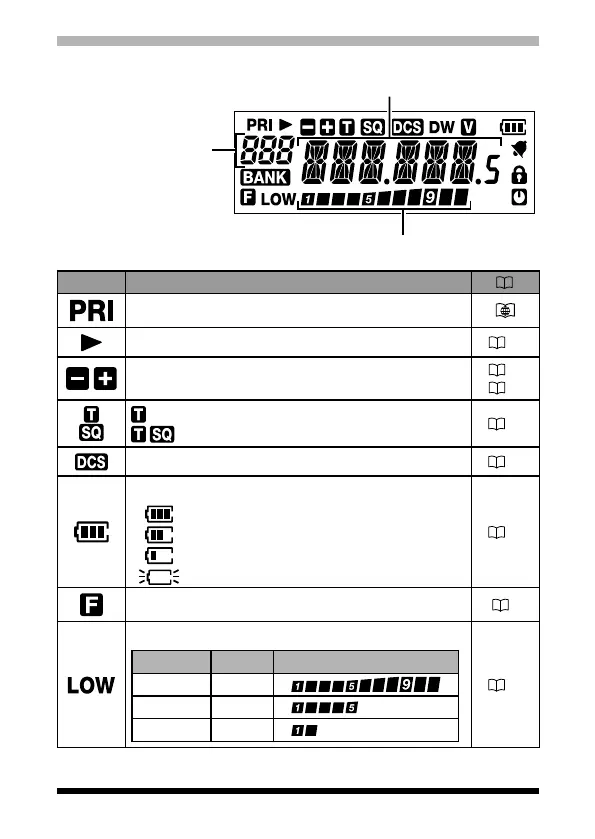
Display
S Meter
:
Displays the received signal strength
PO Meter
:
Displays the transmit power level
Frequency / Memory Tag / PAGER
Set Mode Item
VFO-A/B
Memory Channel Number
Home Channel Display
Memory Bank
Icon Description
Priority Memory Channel
Memory channel registered as a skip memory.
24
Repeater Shift Direction
Split Memory (two different frequencies)
17
22
:
Appears when the tone encoder function.
: Appears when the tone squelch function.
28
Appears when the DCS is in use.
27
The battery condition is displayed in 4 steps.
: Full battery charge
: Enough battery charge
: Battery is depleted. Charge battery.
:
(When blinking) Charge battery immediately.
13
Appears when a function key is pressed.
7
TX Power Level Indicator (LOW/MID TX Power Selected)
Tx Power Icon TX Power Meter during transmission
HIGH
(
5 W
)
(
No display
)
MID
(
2.5 W
)
LOW
LOW
(
0.5 W
)
LOW
15


 To Next Page