40 CP4 STAGE/CP40 STAGE Reference Manual
Design of the CP4 STAGE & CP40 STAGE
Reference
Performances
Editing Performances
Common Edit Area
01: Chorus Effect
02: Reverb Effect
03: General
04: Name
Part Edit Area
01: Play Mode
02: Filter/EG
03: Effect-A
04: Effect-B
05: Controller
06: Receive Switch
Master Keyboard Area
Job Area
01: Recall
02: Copy
03: Bulk
Store Performance Function
Compare Performance Function
File Area
01: Save
02: Load
03: Rename
04: Delete
05: Format
06: Memory Info
Utility Area
01: General
02: MIDI
03: Controller
04: MasterComp
05: Master EQ
06: Panel Lock
Utility Job Area
01: Factory Set
02: Version
Appendix
01: General
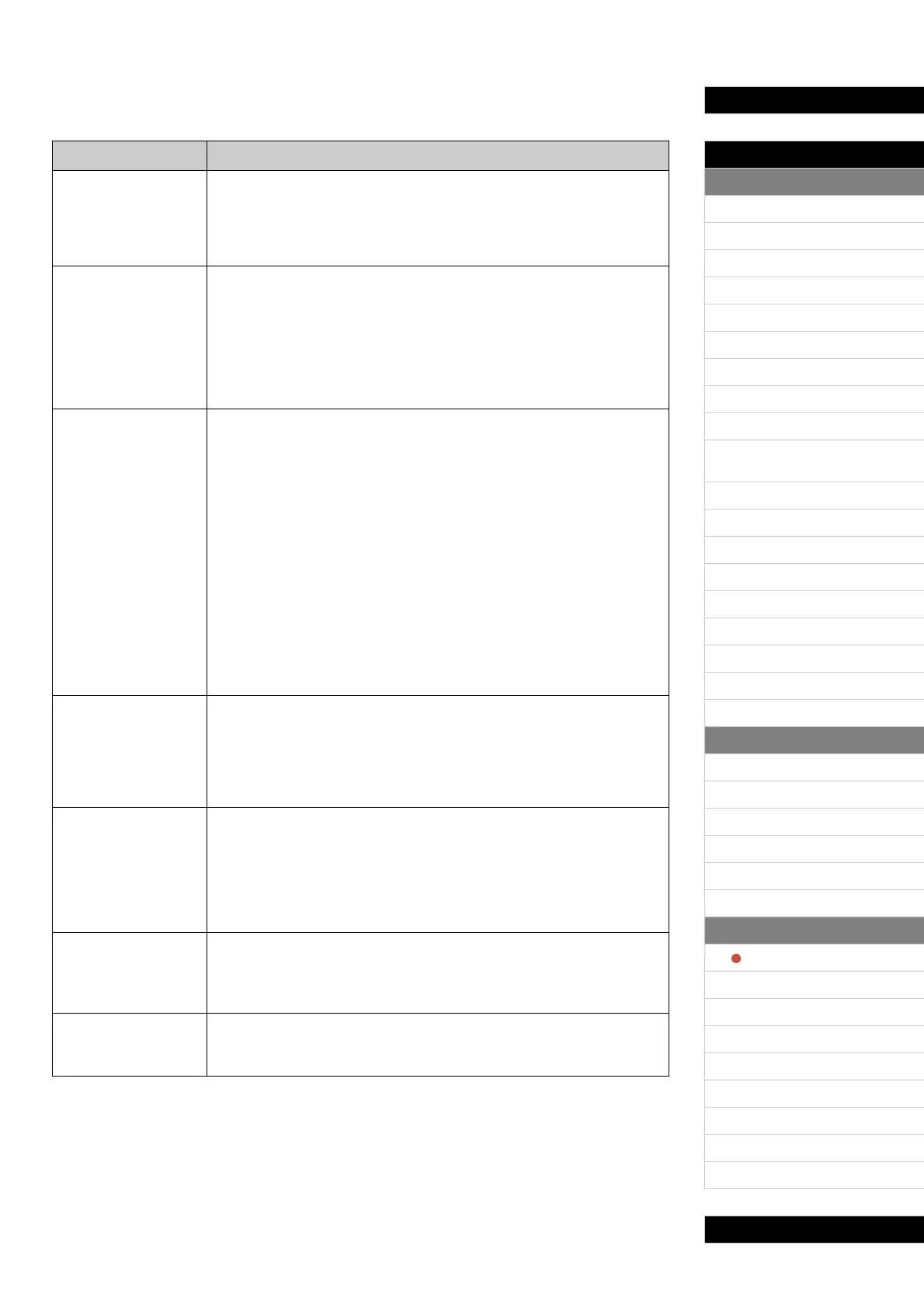
The General screen is primarily used to configure the instrument’s tone generator.
Parameter name Description
MasterTune
(Master Tuning)
This parameter can be used to adjust the tuning of all sounds produced by
the tone generator in units of one cent.
Settings: -102.4 (414.7Hz) to +0.0 (440.0Hz) to +102.3 (466.8Hz)
NOTE The stage piano’s default tuning is 440 Hz (for A3), and 3 to 4 cents is roughly
equivalent to 1 Hz.
Trnsps
(Master Transpose)
This parameter can be used to adjust the pitch of the keyboard in steps of
one semitone.
Settings: -12 to +0 to +12
NOTE If the current settings require the instrument to play a note outside the range
of frequencies it can reproduce, a note one octave higher or lower will be
played instead.
NOTE The Tr nsps setting can also be adjusted using the [-] and [+] TRANSPOSE
buttons from the control panel.
VelCurve
(Velocity Curve)
This parameter can be used to select a curve for determining how the actual
velocities will be generated according to the strength with which you play
notes on the keyboard.
Settings: normal, narrow, wide1, wide2, and fixed
normal: The Normal curve produces velocities in direct proportion to the strength of
your keyboard playing.
narrow: The Soft curve makes it easier to produce high velocities across the entire
keyboard.
wide1: The Hard curve makes it more difficult to produce high velocities across the
entire keyboard.
wide2: The Wide curve accentuates your playing strength by producing lower
velocities in response to softer playing and louder velocities in response to harder
playing. As such, you can use this setting to expand the dynamic range of your
performances.
fixed: The Fixed curve can be used to send a fixed velocity to the tone generator
regardless of how hard or soft you play the keyboard. The actual velocity to be sent
can be set using the following FixedVel parameter.
FixedVel
(Fixed Velocity)
The Fixed curve can be used to send this fixed velocity to the tone
generator regardless of how hard or soft you play the keyboard. (This
parameter can be set only when VelCurve has been set to “fixed”.)
Settings: 1 to 127
NOTE When VelCurve is not set to “fixed”, this parameter’s setting is displayed as
“---”.
AudioPlay
Volume
This parameter can be used to adjust the volume at which the instrument will
play audio files from a USB flash-memory device.
Settings: 0 to 127
NOTE Normally, when this parameter is set to “127” for audio files recorded using
the stage piano, they will be played back at the actual recording volume. This
does not apply, however, to audio files that have been normalized or
processed in another similar way.
AudioRec
PreCount
(Audio Recording
Precount)
This parameter can be used to set the number of precount beats played
before recording starts.
Settings: off and 1meas to 8meas
AutoClk
(Audio Recording
Auto Click)
This parameter can be used to specify whether the metronome should
automatically start to play at the beginning of recording.
Settings: off and on



 To Next Page