Instruction #6100002960-Rev4 - Page 3 of 8
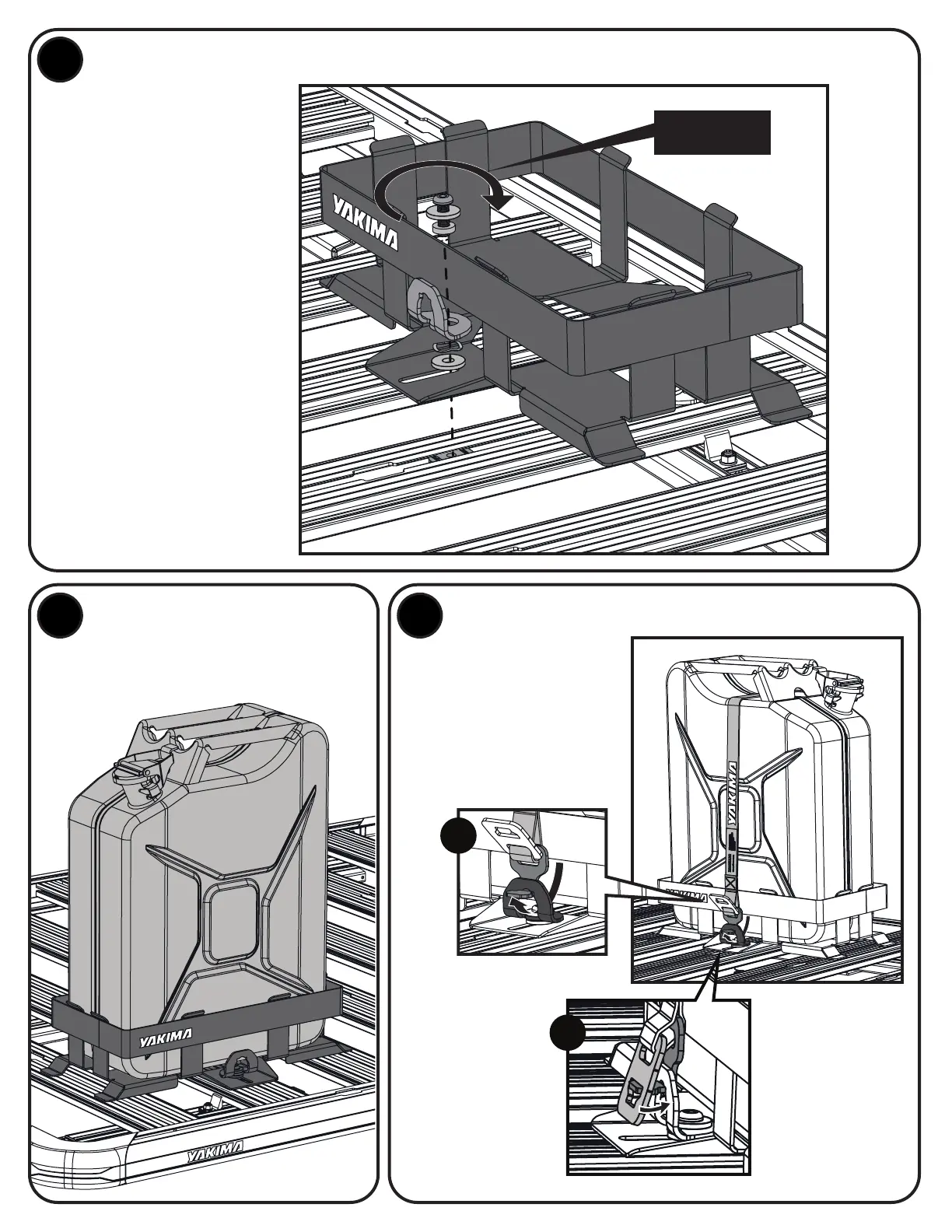
INSTALL JERRY CAN ASSEMBLY
2X
3
4 5
Align slots on Jerry Can
Holder with the spring nuts
in Platform slat channel.
Secure the swivel anchor
to Platform using the
following components
in the order shown:
• buttonhead capscrew
• thrust washer
• swivel spacer
• swivel anchor
• wave washer
• thrust washer
Tighten capscrews to 7 Nm
using the provided hex key.
NOTE: Ensure wave washer
is not pinched by the swivel
spacer. A screwdriver can be
used to adjust if necessary.
INSTALL JERRY CAN. SECURE LATCH.
Install jerry can into the secured Jerry
Can Holder with the spout upright.
a
b
A. Hook the
latch end
through
the swivel
anchor from
behind.
7 Nm
B. Flip the
outer clasp
over the
latch to lock
it in place.
Feed the loose
strap through the
jerry can handle.








 To Next Page