Using 01V96 Editor
Windows
Getting Started
Keyboard Shortcuts
Index
24
01V96 Editor—Owner’s Manual
Windows
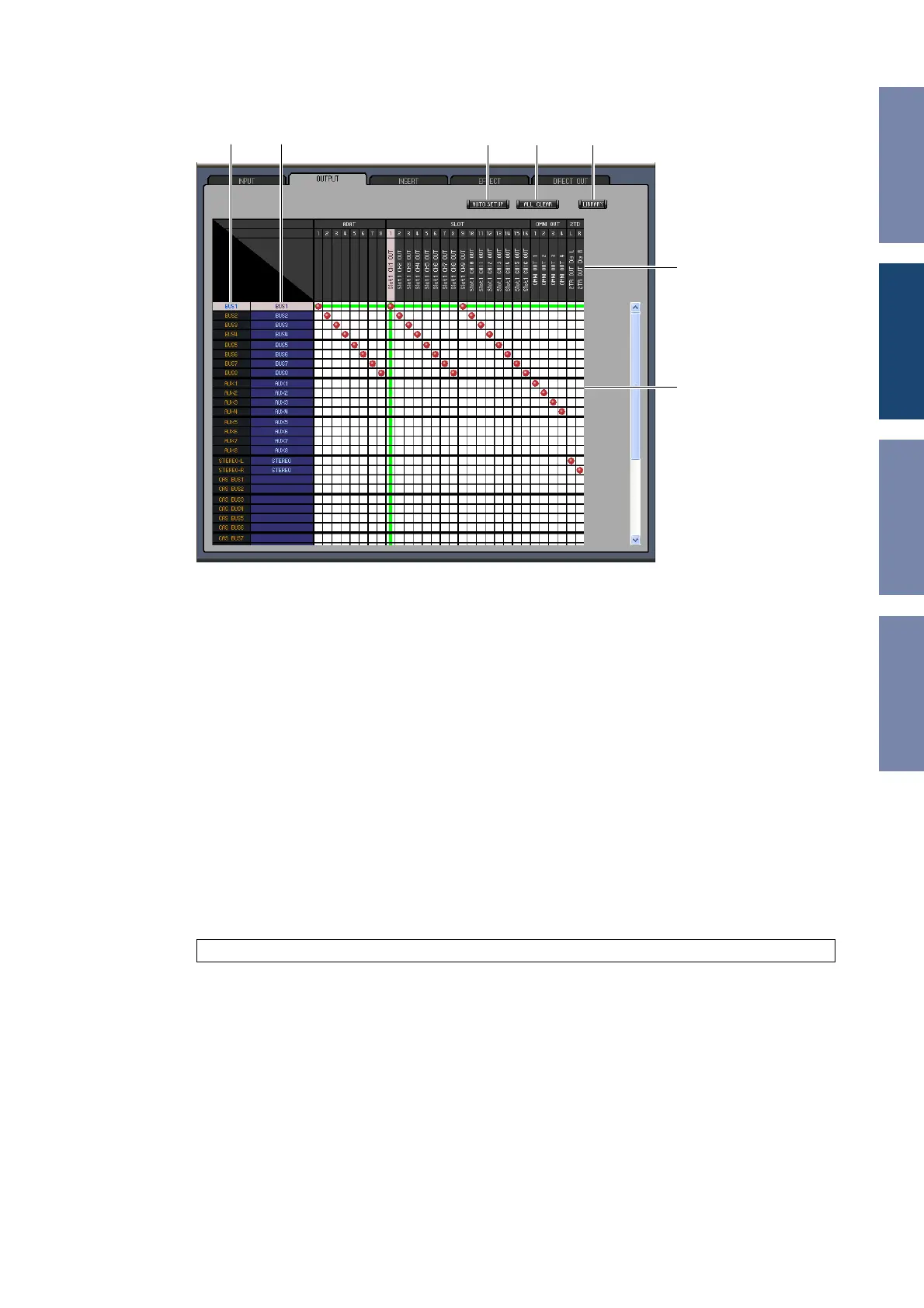
❏ OUTPUT PATCH Page
A Channel IDs
These are the Channel IDs.
B Long channel names
These are the Channel long names. To edit a name, click it and type.
C [AUTO SETUP] button
Clicking this button sets the patches on this page to their initial values.
D [ALL CLEAR] button
This button clears all patches on this page.
E [LIBRARY] button
This button opens the Output Patch Library window.
F Port names
These are the Port names.
G Patchbay
The patchbay enables you to patch output ports to Output Channels. Active patches are indicated by
a red dot. To make a patch, click a square. To unpatch, click a red dot.
Note: Yo u can also use the cursor keys and the <ENTER> key on the computer keyboard to make a patch.
BA
C D E
G
F













 To Next Page