Using 01V96 Editor
Windows
Getting Started
Keyboard Shortcuts
Index
8
01V96 Editor—Owner’s Manual
Windows
Layer Windows
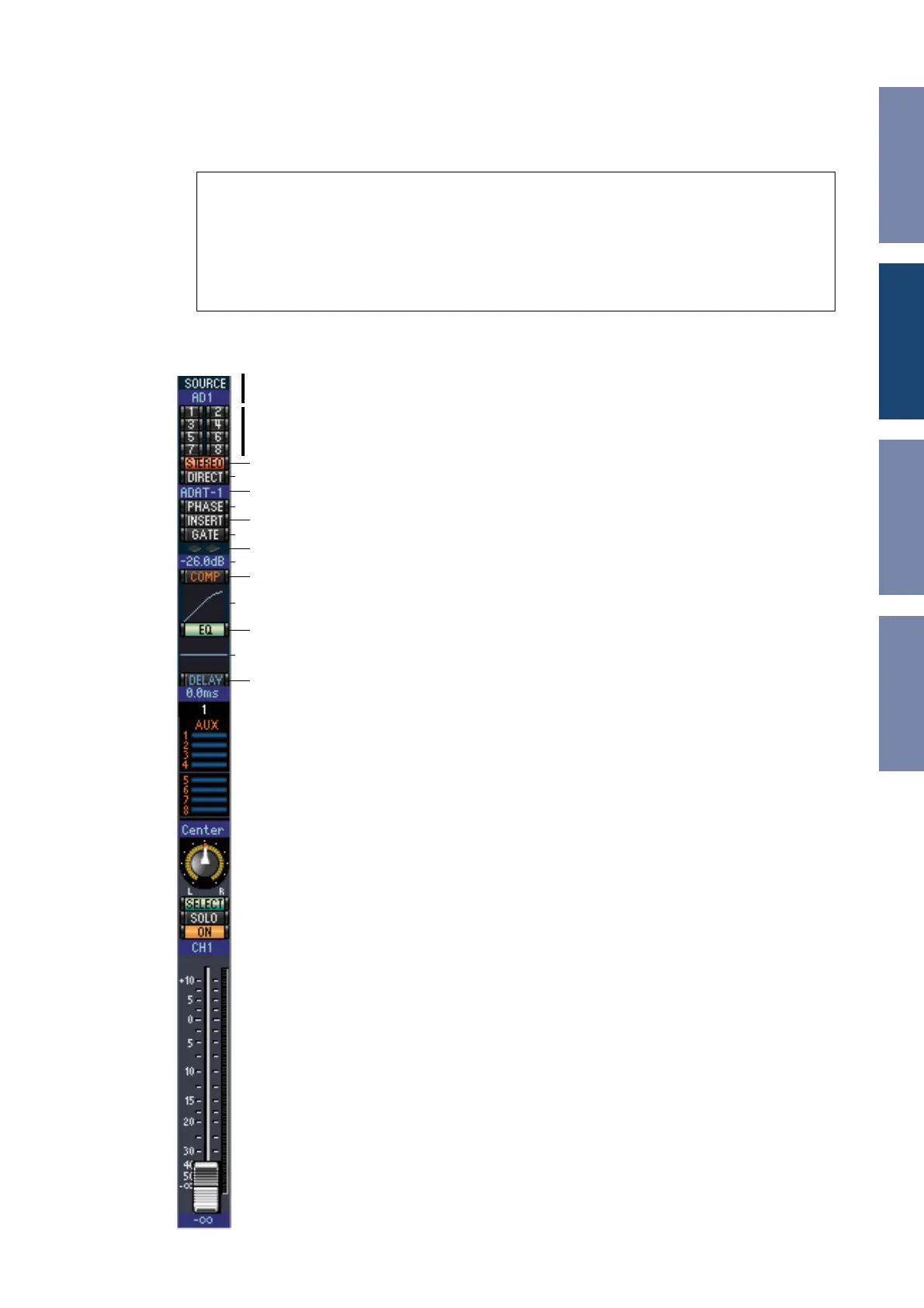
The Layer window displays 16 channel strips. You can select a layer using the LAYER buttons in the
Master window. To open the Layer window, choose [Layer] from the [Windows] menu.
❏
Input Channels
Selecting the 1-16 or 17-32 button in the Master window displays the corresponding
Input Channel strips.
A
SOURCE parameter
This parameter is used to select an Input source. To select an Input source, click the
parameter and choose from the list that appears.
B
Routing buttons
These buttons are used to route the Input Channel to the Bus Outs.
C
[STEREO] button
This button is used to route the Input Channel’s signal to the Stereo Out.
D
[DIRECT] button
This button turns on and off the Input Channel’s routing to its Direct Out.
E
Direct Out parameter
This parameter is used to select the Direct Out destination. To select a destination,
click the parameter and choose from the list that appears.
F
[PHASE] button
This button is used to reverse the signal phase of the channel.
G
[INSERT] button
This button is used to turn on and off the Input Channel’s Insert.
H
[GATE] button
This button is used to turn on and off the Input Channel’s Gate.
I
Gate open/close indicators
These indicators display whether the Gate is open (green) or closed (red).
J
Gate threshold
This displays the Gate Threshold, which can be set by dragging.
K
[COMP] button
This button is used to turn on and off the Input Channel’s Compressor.
L
Compressor curve
This display shows the Compressor’s curve.
M
[EQ] button
This button is used to turn on and off the Input Channel’s EQ.
N
EQ curve
This display shows the Equalizer’s curve, which can be set by dragging.
O
[DELAY] button
This button is used to turn on and off the Input Channel’s Delay function.
Note:
•You can selectively turn on or off some of channel strips by using the [View] menu.
•You can open multiple Layer windows by choosing [Windows] menu -> [Layer] -> [Additional View].
The titles of these windows will indicate [Locked]. Windows that are indicated as [Locked] will not
reflect layer changes made on the console or in the Master window. If you want the Layer windows to
reflect the changes, right-click each window (Macintosh: <control> + click), then select the desired layer
using the LAYER buttons.
A
B
C
D
E
F
G
H
I
J
K
L
M
N
O













 To Next Page