Using 01V96 Editor
Windows
Getting Started
Keyboard Shortcuts
Index
32
01V96 Editor—Owner’s Manual
Windows
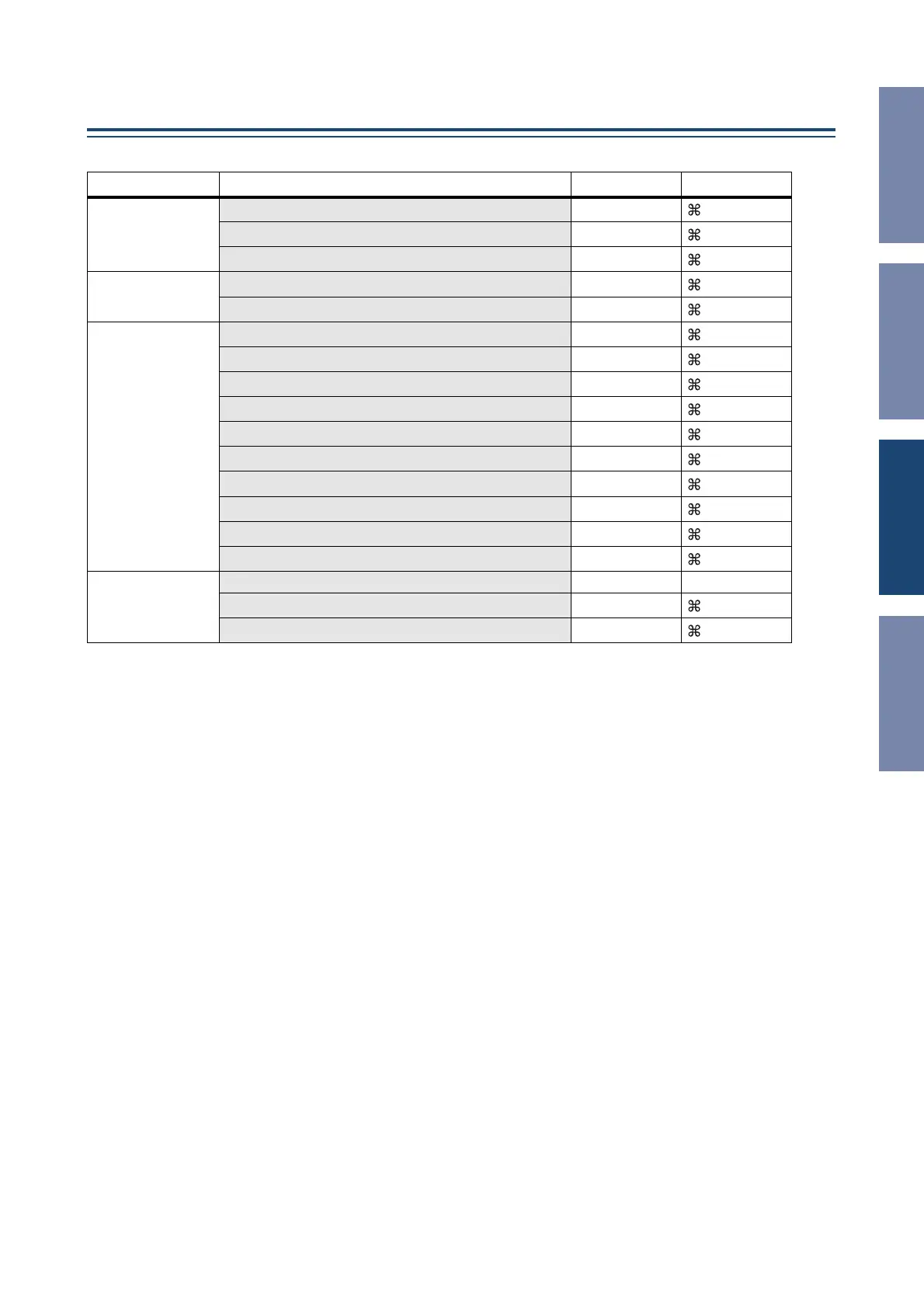
Keyboard Shortcuts
Menu Action Windows Macintosh
File menu
Creates a new Session Ctrl+N
+N
Opens a previously saved Session Ctrl+O
+O
Saves the current Session Ctrl+S
+S
Edit menu
Undo Ctrl+Z
+Z
Redo Ctrl+Y
+Y
Windows menu
Closes the active window Ctrl+W
+W
Closes all windows Ctrl+Alt+W
+Option+W
Opens the Master window Ctrl+1
+1
Opens the Layer window Ctrl+2
+2
Opens the Selected Channel window Ctrl+3
+3
Opens the Library window Ctrl+4
+4
Opens the Patch Editor window Ctrl+5
+5
Opens the Surround Editor window Ctrl+6
+6
Opens the Effect Editor window Ctrl+8
+8
Opens the Meter window Ctrl+9
+9
Library window
Selects consecutive multiple items (memories) Shift+click shift+click
Selects non-consecutive multiple items (memories) Ctrl+click
+click
Selects all memories in a section Ctrl+A
+A













 To Next Page