Using Studio Manager
Windows
Getting Started
Keyboard Shortcuts
Index
23
Studio Manager for V2 02R96 Editor—Owner’s Manual
Using SM Windows
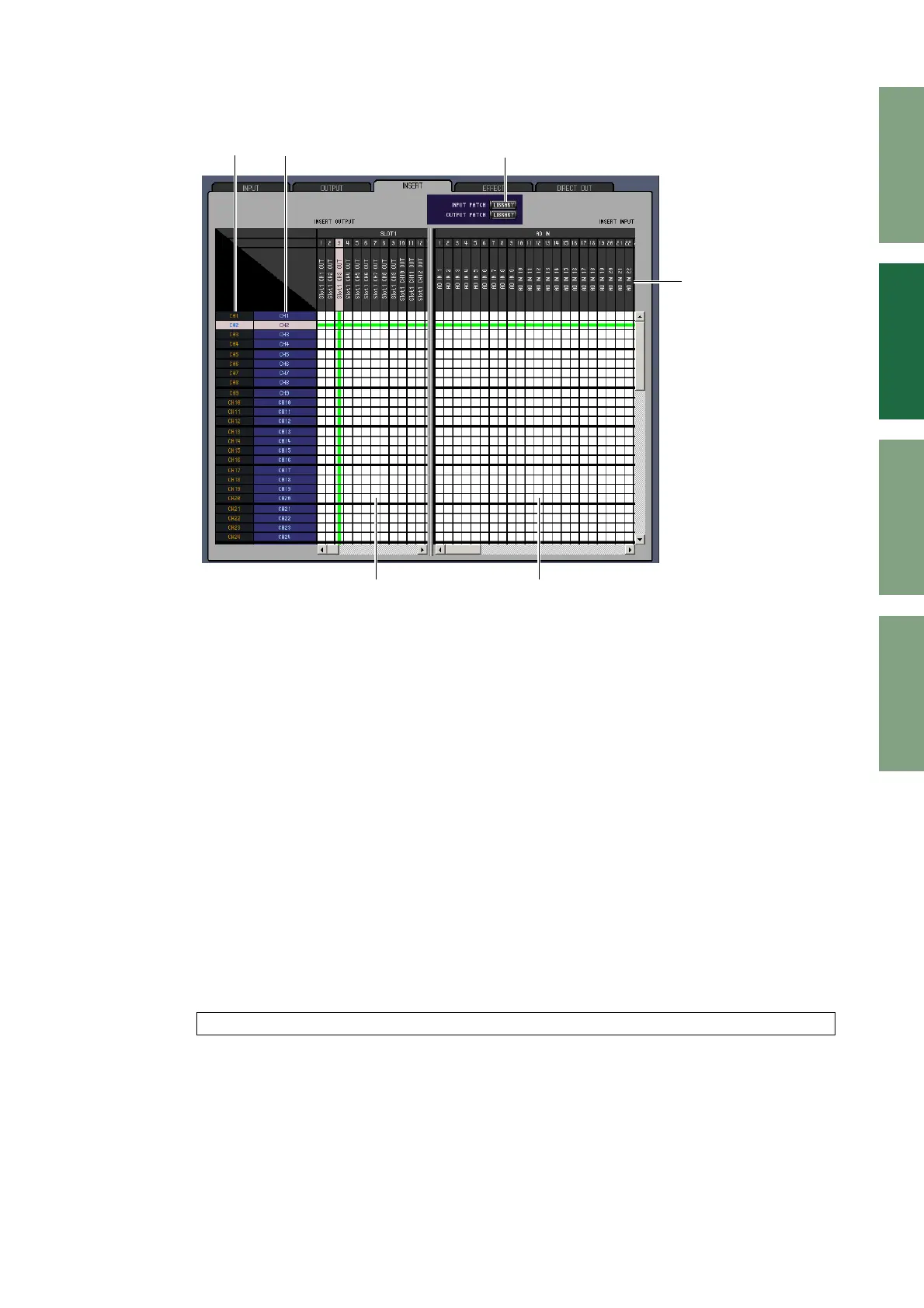
INSERT PATCH Page
A Channel IDs
These are the Channel IDs.
B Long channel names
These are the Channel long names. To edit a name, click it and type.
C [LIBRARY] buttons
These buttons open the Input and Output Patch Library windows.
D Port names
These are the Port names. To edit a name, click it and type.
E Insert Out Patchbay
This patchbay is used to patch output ports to the Insert Outs of Input Channels, Bus Outs, Aux Sends,
and the Stereo Out. Active patches are indicated by a red dot. To make a patch, click a square. To
unpatch, click a red dot.
F Insert In Patchbay
This patchbay is used to patch input ports to the Insert Ins of Input Channels, Bus Outs, Aux Sends,
and the Stereo Out. Active patches are indicated by a blue dot. To make a patch, click a square. To
unpatch, click a blue dot.
Note: You can also use the cursor keys and the <ENTER> key on the computer keyboard to make a patch.
B
C
E F
D
A



 To Next Page