Selecting & Playing Voices
18
YDP-161/141 Owner’s Manual
ENGLISH
Adding Variations to the Sound – Reverb
This control enables you to select various digital reverb effects that add extra depth and expression to the sound to create
a realistic acoustic ambience.
Selecting a reverb type
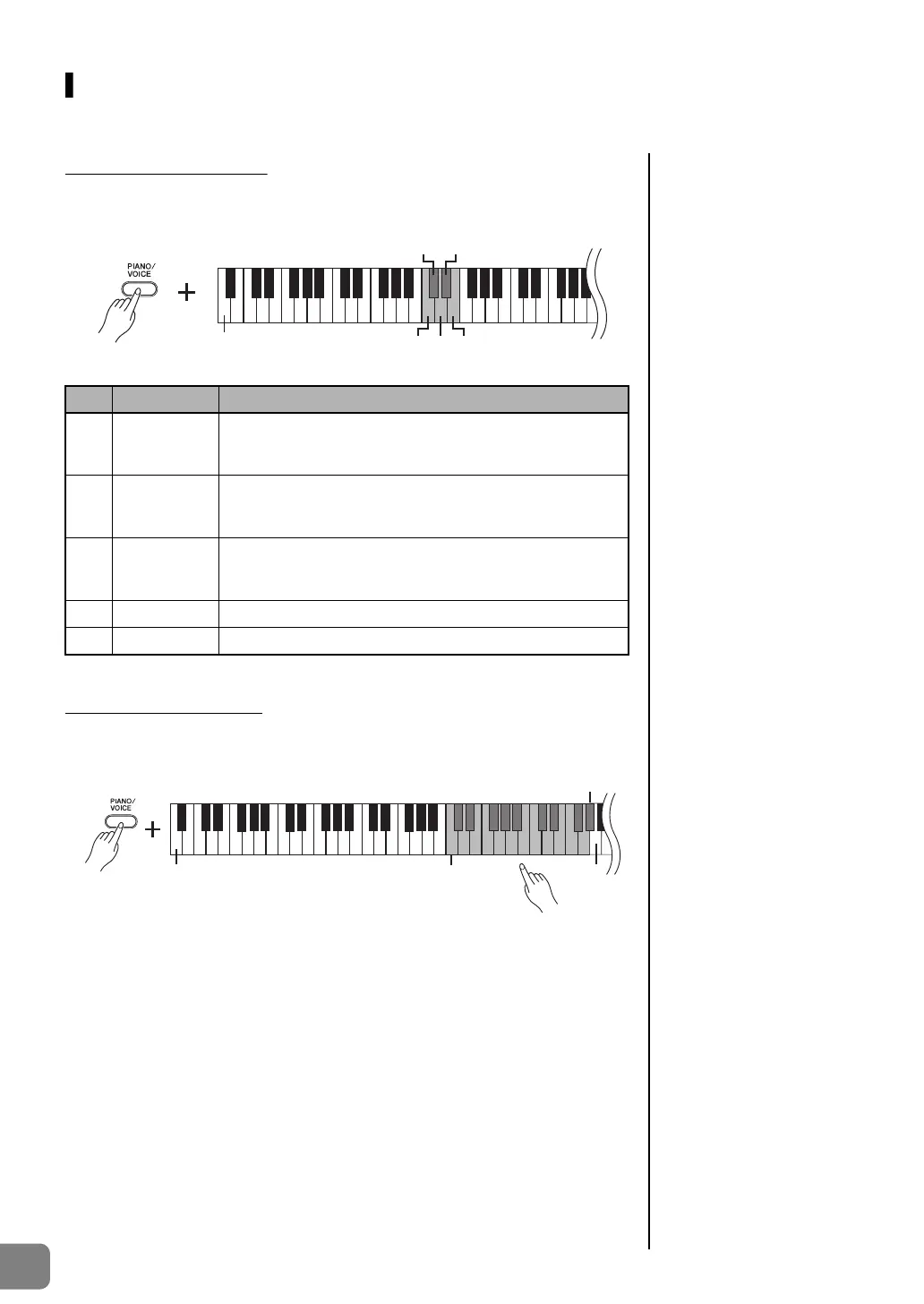
While holding down the [PIANO/VOICE] button, press one of the C2–E2 keys to select a
reverb type.
Adjusting reverb depth
The default reverb type
(including OFF) and depth
settings are different for each
voice.
Reverb depth range:
0 (no effect)-20 (maximum
depth)
Adjust the reverb depth for the selected voice by pressing one of the C3–G
4 keys while
holding down the [PIANO/VOICE] button. The depth range is from 0 through 20.
While holding down the [PIANO/VOICE] button, press the A4 key to set the reverb to the
depth most suitable for the selected voice.
Key Reverb Type Description
C2 Room
This setting adds a continuous reverb effect to the sound,
similar to the acoustic reverberation you would hear in a
room.
C
2Hall1
For a “bigger” reverb sound, use the HALL 1 setting. This
effect simulates the natural reverberation of a small-size
concert hall.
D2 Hall2
For a truly spacious reverb sound, use the HALL 2 setting.
This effect simulates the natural reverberation of a large
concert hall.
D
2 Stage Simulates the reverb of a stage environment.
E2 Off No effect is applied.
C
2D
2
C2 D2 E2
The lowest key
The lowest key
C3: depth 0
G
4: depth 20
A4
The depth value increases as you
press higher keys.


 To Next Page