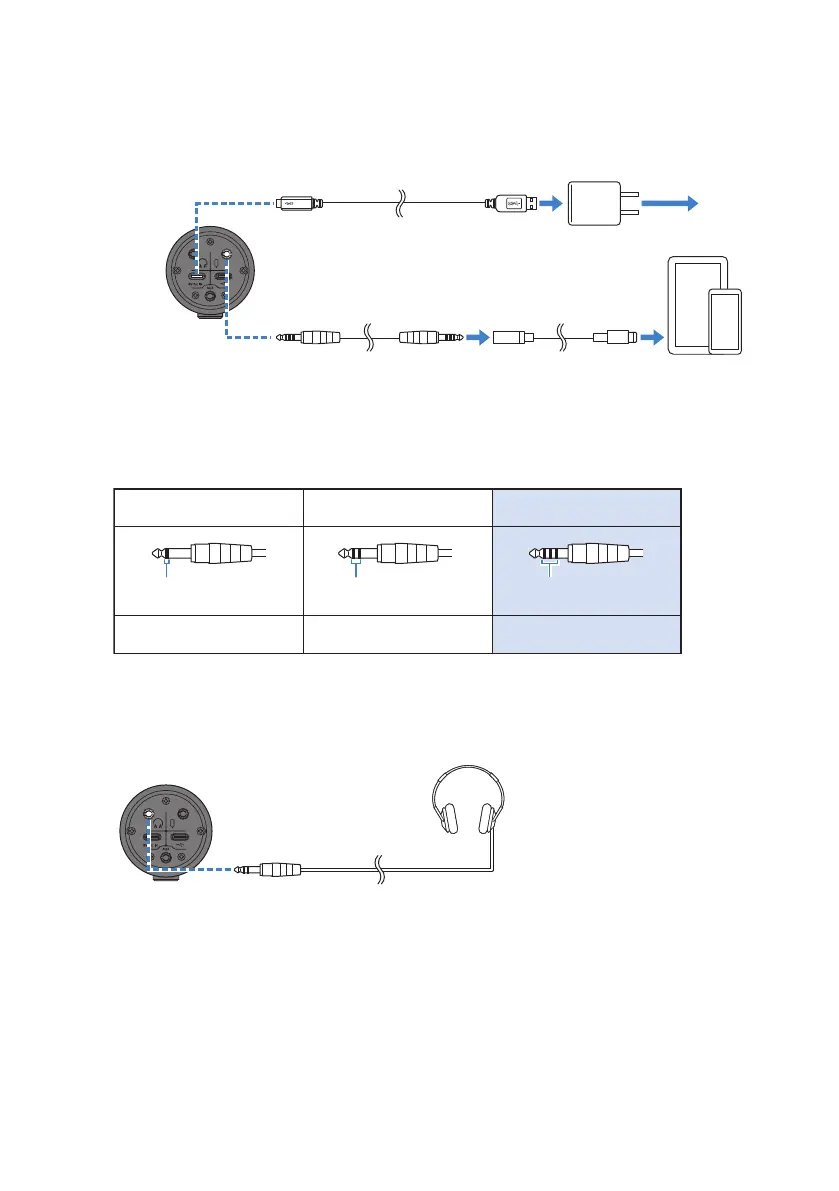
4 Connect the Lightning or USB-C 3.5 mm headphone jack adapter to the smartphone [P]
input/output jack of this product with a 3.5 mm 4-conductor (TRRS) stereo mini cable.
3.5 mm
4-conductor (TRRS) stereo mini
cable
Lightning/USB-C
3.5 mm headphone
jack adapter
34
Bottom
iPhone/iPad
4
USB cable (commercially available)
USB
power adapter
2
To a
power supply
NOTE
Use a four-conductor (TRRS) stereo mini cable, not a two- or three-conductor (TS/TRS) cable.
2-conductor (TS) 3-conductor (TRS) 4-conductor (TRRS)
No No Yes
One insulator band Two insulator bands Three insulator bands
2 Connect headphones or earphones
Connect your headphones or earphones to the headphones output jack.
47
Using this product in a Web meeting > Using with an iPhone/iPad



 To Next Page