3 Configure the settings for this product
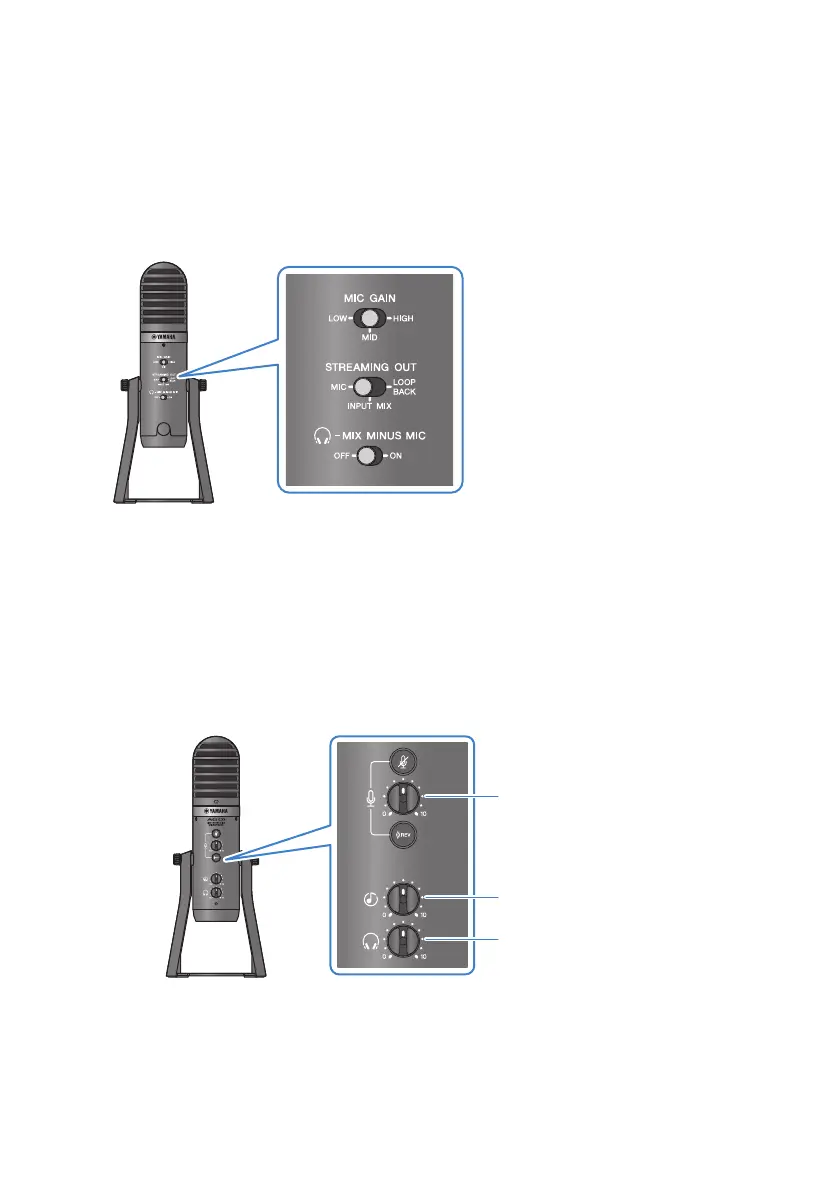
Make the settings for each switch on the rear as follows.
[MIC GAIN]: [MID]
[STREAMING OUT]: [MIC]
[H-MIX MINUS MIC]: [OFF]; set this to [ON] if you don’t want to hear your own voice.
4 Start the Web meeting.
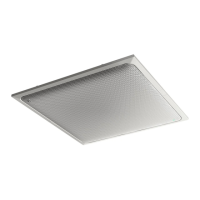
1 Set the USB/smartphone [n] input volume knob to the 3-o’clock position.
2 Launch the Web meeting app you will use.
3 Use the USB/smartphone [n] input volume knob to adjust the volume of the conversation.
4 Adjust the volume for the headphones or earphones using the headphone [H] volume knob.
5 Use the mic [M] volume knob to adjust the volume of your own voice.
Volume adjustment for
your own voice
Volume adjustment for
conversation
Volume adjustment for
headphones/earphones
5
1, 3
4
Operations during the conversation
(
Muting your own voice
If you want to interrupt the conversation, turn the mic mute [m] button on (the LED lights up).
48
Using this product in a Web meeting > Using with an iPhone/iPad



 To Next Page