EasyManua.ls Logo

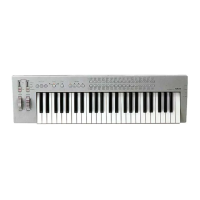
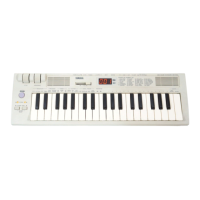
Yamaha CBX-K1XG - User Manual

Yamaha CBX-K1XG
71 pages
Print Icon
To Next Page IconTo Next Page
Loading...
M.D.G., EMI Division © Yamaha Corporation 1995
VU14800 509POCP2.3-01A0 Printed in Japan
MIDI SOUND KEYBOARD CBX-K1XG
1 MODULATION
5 PORTA TIME
6 DATA ENTRY
7 VOLUME
10 PANPOT
11 EXPRESSION
65 PORTAMENTO
71 HARMONIC
72 RELEASE
73 ATTACK
74 BRIGHT
84 PORTA CTRL
91 REVERB
93 CHORUS
94 VARIATION
120 PB SENS
121 FINE TUNE
122 COARSE TUNE
123 VIBRT RATE
124 VIBRT DEPTH
125 VIBRT DELAY
126 FLT CUT FRQ
127 FLT RESO
128 EQ ATTACK
129 EG DECAY
130 EG RELEASE
142 CH PRESSURE
143 KEY PRESSURE
144 M
STR VOLUME
146 MSTR TUNE
147 VELOCITY
148 TEMPO
CONTROLLER NUMBER LIST
1
DRUM
NUMBER
MAX
MIN
NRPN
CONTROLLER
RPN
FIXED
VELOCITY
MIDI
CH
MERGE
ON/OFF
XG
ON
SOUND
OFF
GM
ON
R
AM
AN
GE
2
3
4
5
6
7
8
9
A
B
C
D
E
F
0
HEXA
DECIMAL
DECIMAL
ENTER
INPUT
SUSTAIN
TO HOST
IN
MIDI
OUT
Mac
MIDI
PC-2
PC-1
L-OUTPUT-R
PHONES
DC IN
ON
OFF
POWER
VOLUME
TRANSPOSE
WHEEL ASSIGN
SYSTEM
PRESET

Other manuals for Yamaha CBX-K1XG

Question and Answer IconNeed help?

Do you have a question about the Yamaha CBX-K1XG and is the answer not in the manual?

Summary

SPECIAL MESSAGE SECTION (U.S.A.)

FCC INFORMATION (U.S.A.)

Precautions

Common Operational Issues

A compilation of likely problems and their corrective actions for smooth operation.

Welcome to the CBX-K1 XG

The CBX-K1 XG-What It Is and What It Can Do

What It Is

Detailed description of the CBX-K1XG's core features and technical specifications.

How to Use This Manual

Explanation of the conventions and symbols used throughout the owner's manual for clarity.

Panel Controls and Terminals

Front Panel

Detailed explanation of the controls and indicators located on the front surface of the keyboard.

Rear Panel

Detailed explanation of the input/output terminals and switches on the rear of the keyboard.

Default Settings of the CBX-K1 XG

Guided Tour

Power Supply

Instructions on connecting the power adapter or using batteries for the instrument.

Connections

Computers

Instructions for connecting the CBX-K1XG to computers via serial or MIDI interfaces.

Mac - Macintosh

Specific connection procedures for linking the CBX-K1XG with Apple Macintosh computers.

PC-1 PC98

Specific connection procedures for linking the CBX-K1XG with NEC PC98 computers.

PC-2 IBM PC;AT

Specific connection procedures for linking the CBX-K1XG with IBM PC/AT compatible computers.

MIDI - Via MIDI connection

Instructions for establishing MIDI communication using standard MIDI ports.

MIDI Devices

Procedures for connecting the CBX-K1XG to external MIDI sound modules or sequencers.

Audio Equipment

Instructions for connecting the CBX-K1XG's audio output to external speakers or amplifiers.

Playing and Using Your CBX-K1 XG

Playing the Demo Song

Instructions on how to activate and listen to the pre-programmed demonstration song.

Selecting and Playing Voices

Guide to choosing and playing the different sound voices available on the instrument.

Using the PITCH and ASSIGNABLE Wheels

Explanation of how to use the pitch bend and assignable wheels for expressive control.

Changing the Touch Sensitivity of the Keyboard

Instructions on adjusting how the keyboard responds to playing dynamics (velocity).

Reference

About the Tone Generator of the CBX-K1 XG

Technical details on the internal sound engine, including GM and XG compatibility.

Effect Types

Overview of the types of digital effects (Reverb, Chorus, Variation) available on the instrument.

About MIDI & The CBX-K1 XG

What is MIDI?

A fundamental explanation of the Musical Instrument Digital Interface standard.

Merge-related Notes

Important considerations and behaviors related to the MIDI Merge function.

Using the SHIFT-Related Functions

Group A Functions - List

A detailed list and explanation of the primary SHIFT-activated functions.

Group B Functions - List

A detailed list and explanation of the secondary SHIFT-activated functions.

Troubleshooting

Common Operational Issues

A compilation of likely problems and their corrective actions for smooth operation.

About RPN and NRPN

Specifications

Keyboard and Core Features

Details on the keyboard, tone generator, polyphony, voices, effects, and performance modes.

Controls and Connectivity

Information on the instrument's controllers, buttons, and input/output terminals.

Power and Physical Details

Specifications related to power supply, consumption, dimensions, weight, and accessories.

MIDI Data Format

MIDI Transmission

Explanation of the MIDI messages the CBX-K1XG sends to external devices.

MIDI Receive

Explanation of the MIDI messages the CBX-K1XG can receive and process.

SYSTEM EXCLUSIVE MESSAGES

Details on System Exclusive messages used for advanced control and configuration.

Parameter Change

Information on how to change specific parameters using MIDI messages.

SYSTEM COMMON MESSAGES

Explanation of MIDI messages for common system-level functions like song selection.

SYSTEM REALTIME MESSAGES

Explanation of MIDI messages used for real-time system operations like timing clocks.

SINGLE-BYTE DATA TRANSMISSION

Information on transmitting single-byte MIDI data for non-standard messages.

XG Normal Voice List

TG300 B Normal Voice List

C;M Normal Voice List

DOC Normal Voice List

XG Drum Voice List

TG300 B Drum Voice List

Effect Type List

Effect Parameter List

Summary

SPECIAL MESSAGE SECTION (U.S.A.)

FCC INFORMATION (U.S.A.)

Precautions

Common Operational Issues

A compilation of likely problems and their corrective actions for smooth operation.

Welcome to the CBX-K1 XG

The CBX-K1 XG-What It Is and What It Can Do

What It Is

Detailed description of the CBX-K1XG's core features and technical specifications.

How to Use This Manual

Explanation of the conventions and symbols used throughout the owner's manual for clarity.

Panel Controls and Terminals

Front Panel

Detailed explanation of the controls and indicators located on the front surface of the keyboard.

Rear Panel

Detailed explanation of the input/output terminals and switches on the rear of the keyboard.

Default Settings of the CBX-K1 XG

Guided Tour

Power Supply

Instructions on connecting the power adapter or using batteries for the instrument.

Connections

Computers

Instructions for connecting the CBX-K1XG to computers via serial or MIDI interfaces.

Mac - Macintosh

Specific connection procedures for linking the CBX-K1XG with Apple Macintosh computers.

PC-1 PC98

Specific connection procedures for linking the CBX-K1XG with NEC PC98 computers.

PC-2 IBM PC;AT

Specific connection procedures for linking the CBX-K1XG with IBM PC/AT compatible computers.

MIDI - Via MIDI connection

Instructions for establishing MIDI communication using standard MIDI ports.

MIDI Devices

Procedures for connecting the CBX-K1XG to external MIDI sound modules or sequencers.

Audio Equipment

Instructions for connecting the CBX-K1XG's audio output to external speakers or amplifiers.

Playing and Using Your CBX-K1 XG

Playing the Demo Song

Instructions on how to activate and listen to the pre-programmed demonstration song.

Selecting and Playing Voices

Guide to choosing and playing the different sound voices available on the instrument.

Using the PITCH and ASSIGNABLE Wheels

Explanation of how to use the pitch bend and assignable wheels for expressive control.

Changing the Touch Sensitivity of the Keyboard

Instructions on adjusting how the keyboard responds to playing dynamics (velocity).

Reference

About the Tone Generator of the CBX-K1 XG

Technical details on the internal sound engine, including GM and XG compatibility.

Effect Types

Overview of the types of digital effects (Reverb, Chorus, Variation) available on the instrument.

About MIDI & The CBX-K1 XG

What is MIDI?

A fundamental explanation of the Musical Instrument Digital Interface standard.

Merge-related Notes

Important considerations and behaviors related to the MIDI Merge function.

Using the SHIFT-Related Functions

Group A Functions - List

A detailed list and explanation of the primary SHIFT-activated functions.

Group B Functions - List

A detailed list and explanation of the secondary SHIFT-activated functions.

Troubleshooting

Common Operational Issues

A compilation of likely problems and their corrective actions for smooth operation.

About RPN and NRPN

Specifications

Keyboard and Core Features

Details on the keyboard, tone generator, polyphony, voices, effects, and performance modes.

Controls and Connectivity

Information on the instrument's controllers, buttons, and input/output terminals.

Power and Physical Details

Specifications related to power supply, consumption, dimensions, weight, and accessories.

MIDI Data Format

MIDI Transmission

Explanation of the MIDI messages the CBX-K1XG sends to external devices.

MIDI Receive

Explanation of the MIDI messages the CBX-K1XG can receive and process.

SYSTEM EXCLUSIVE MESSAGES

Details on System Exclusive messages used for advanced control and configuration.

Parameter Change

Information on how to change specific parameters using MIDI messages.

SYSTEM COMMON MESSAGES

Explanation of MIDI messages for common system-level functions like song selection.

SYSTEM REALTIME MESSAGES

Explanation of MIDI messages used for real-time system operations like timing clocks.

SINGLE-BYTE DATA TRANSMISSION

Information on transmitting single-byte MIDI data for non-standard messages.

XG Normal Voice List

TG300 B Normal Voice List

C;M Normal Voice List

DOC Normal Voice List

XG Drum Voice List

TG300 B Drum Voice List

Effect Type List

Effect Parameter List

Yamaha CBX-K1XG Specifications

General IconGeneral
BrandYamaha
ModelCBX-K1XG
CategoryElectronic Keyboard
LanguageEnglish

Related product manuals